

If you run a garment or apparel store, you already know the biggest headache in inventory management: variants.
One shirt in 5 sizes, 4 colours and a few patterns quickly becomes hundreds of product records. Add manual coding for article numbers and lot tracking, and every receipt and sale becomes a chance for human error.
That's why we built Garment Shop Management for Odoo 19 — a module designed for apparel retailers that streamlines brands, styles, lots, stock, sales and purchases, all inside the Odoo 19 ecosystem.
The Core Challenge in Apparel Retail
Traditional ERP setups force apparel retailers into one of two bad options:
Variant explosion — create a separate product for every size, colour and pattern combination.
Lost detail — keep the catalogue lean, but lose Brand, Style and Article Number at the point of sale.
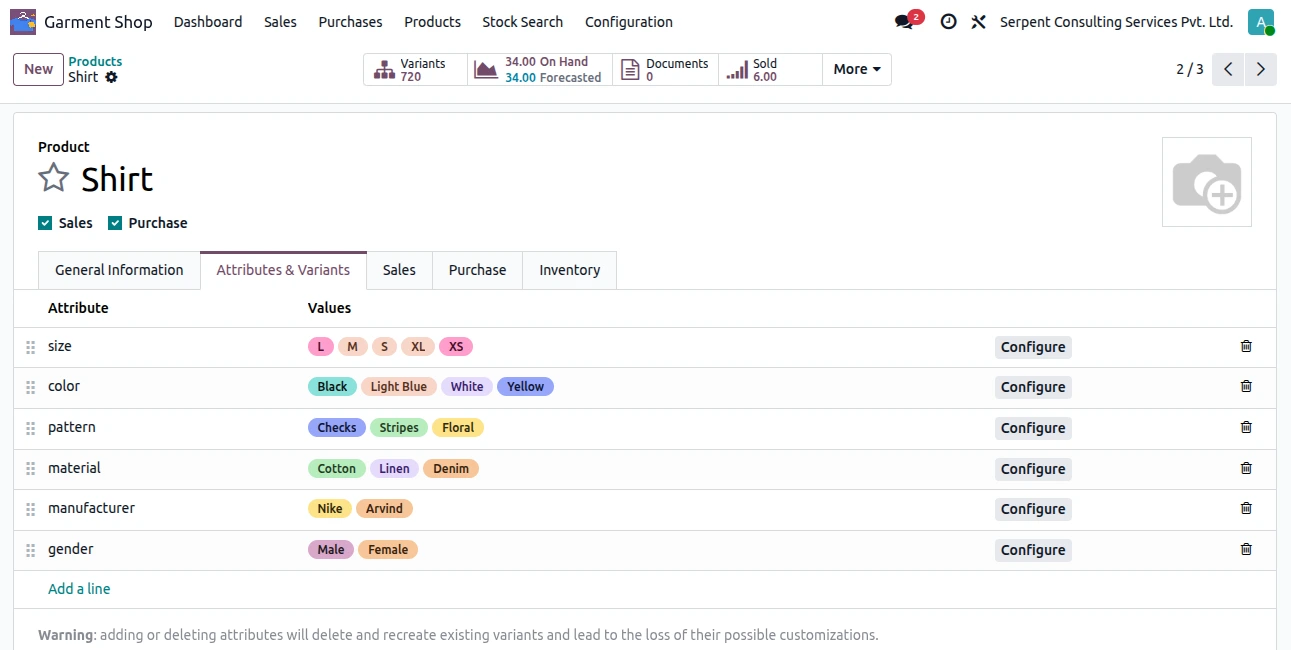
Garment Shop Management removes that compromise. The Brand, Type, Style, Article No, Sale Price and MRP fields are included on each line of transaction. This means your product master is kept to a minimum but all orders, receipts and deliveries contain full garment details.
Key Features That Change the Game
1. Size-by-Colour Matrix Grid
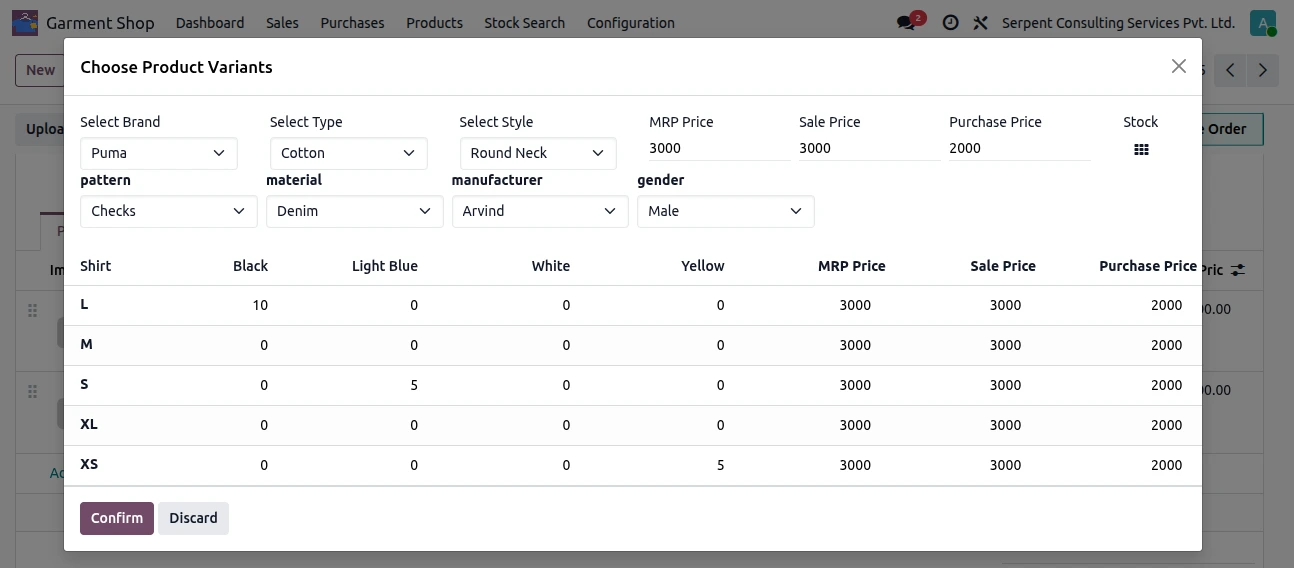
Stop adding items line by line. When you add a product to a purchase or sales order, a matrix opens: pick the Brand, Type and Style, set MRP, sale and purchase prices, then type quantities straight into the Size × Colour cells — for example 10 in L/Black, 5 in S/Light Blue and 5 in XS/Yellow. Click Confirm and the exact order lines are created for you.
2. Smart Auto-Coding for Articles and Lots
No more manual coding. Article and lot numbers are built automatically from your master data:
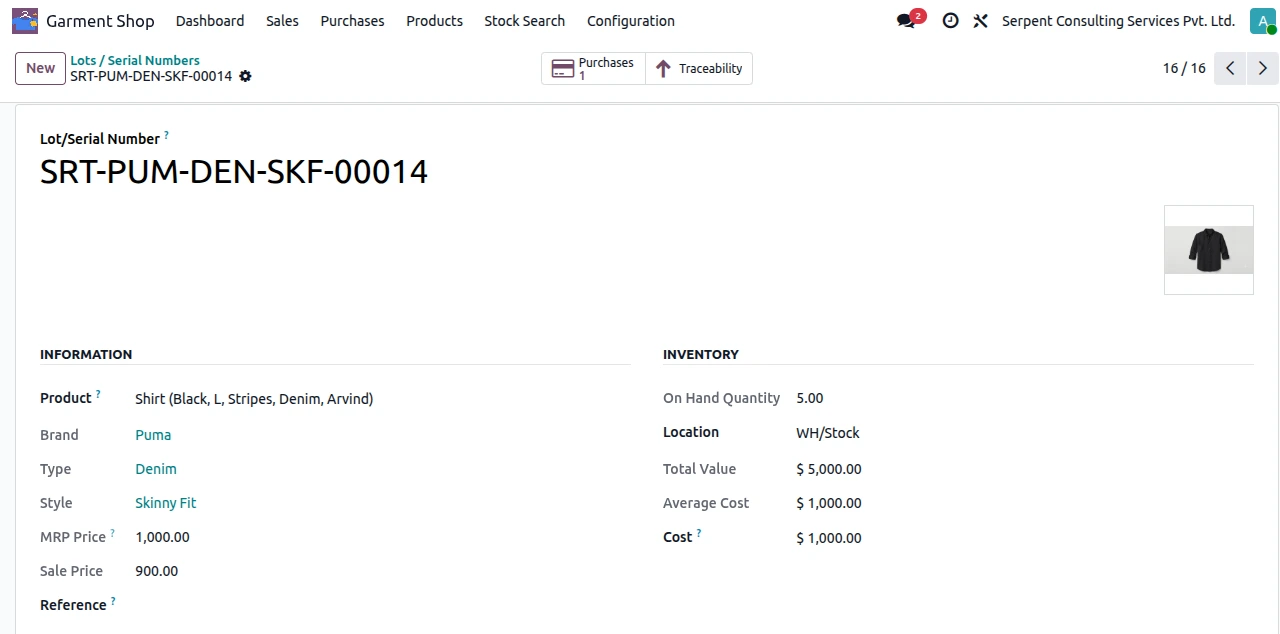
Article No = Product Code + Brand Code + Type Code + Style Code (e.g. SRT-PUM-DEN-SKF)
Lot No = Article No + running serial number (e.g. SRT-PUM-DEN-SKF-00014)
Every batch carries its complete identity to the shelf — garment image, Brand (Puma), Type (Denim), Style (Skinny Fit), MRP and sale price, plus on-hand quantity and value.
3. Lightning-Fast Counter Sales with Scan & Sell
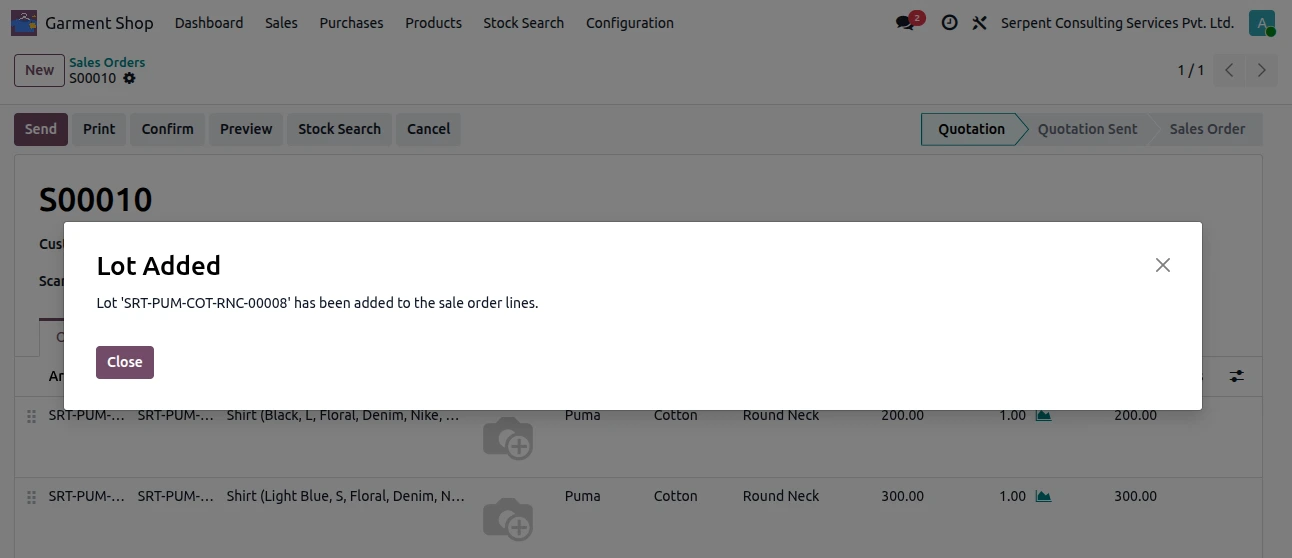
The module offers three ways to sell, and the fastest is Scan & Sell. Scan the barcode or lot number on the garment tag and the system pulls in the product, brand, style and price, adding the line to the order instantly — with a confirmation so the cashier knows it worked.
4. Instant Stock Visibility
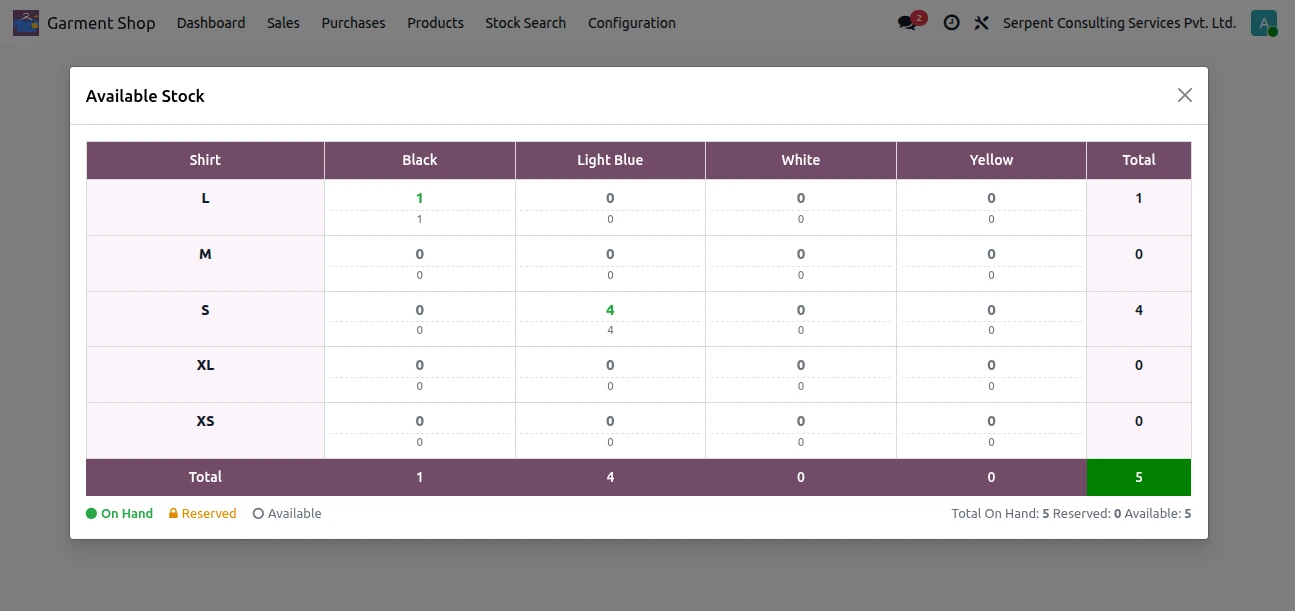
Never oversell again. The built-in Stock Search finds availability by Brand, Type or Style before you add anything to the cart, and shows it as a Size × Colour grid with On Hand, Reserved and Available quantities plus row and column totals.
5. Custom Apparel Labels
Print 2x7 or 4x12 labels containing information on each label. This will show Brand | Style | Type below the product name and barcode for each lot being labelled. Floor staff and customers can then ensure they are using the correct information. The same barcode will be used in Scan & Sell at the till. A Seamless Daily Workflow
A Seamless Daily Workflow
The module fits naturally into the way a garment shop already runs, from setup to the delivery slip.
Step 1 — Configure once
Set up your Brands, Types and Styles one time. The module ships with starter data (such as Nike, Zara, Casual and Denim) that you can edit or archive.
Step 2 — Purchase and receive
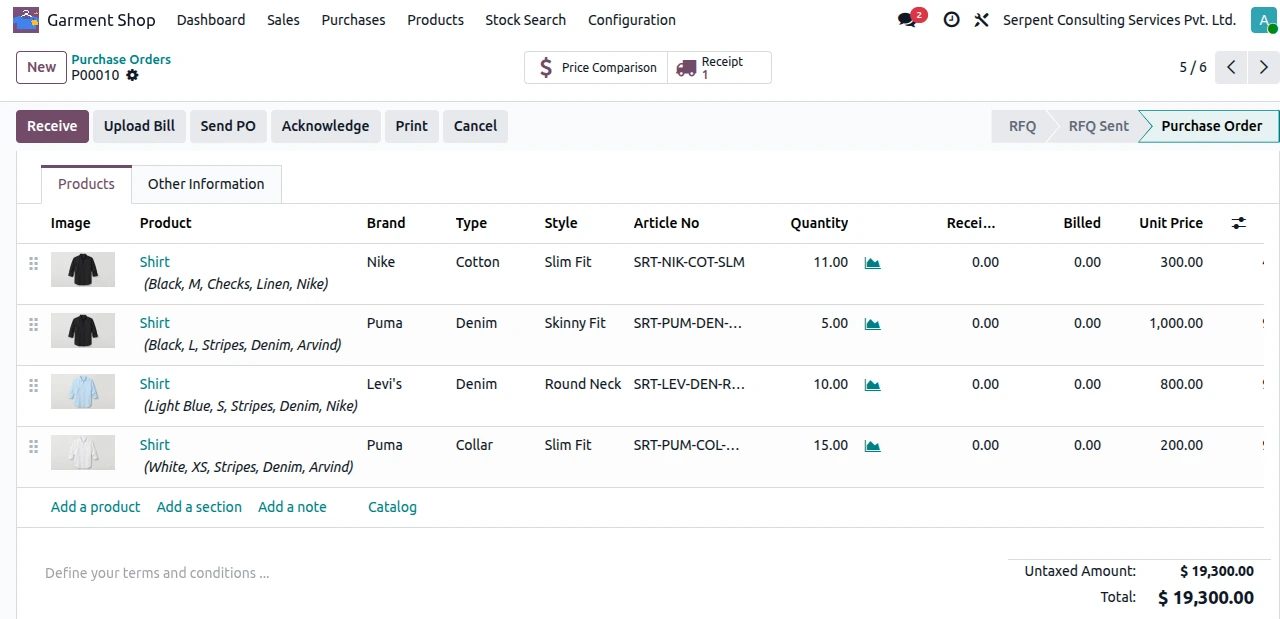
Create a PO, choose your vendor and use the matrix grid to order a full size and colour run in seconds. Each PO line shows the garment image, Brand, Type, Style and auto-generated Article No.
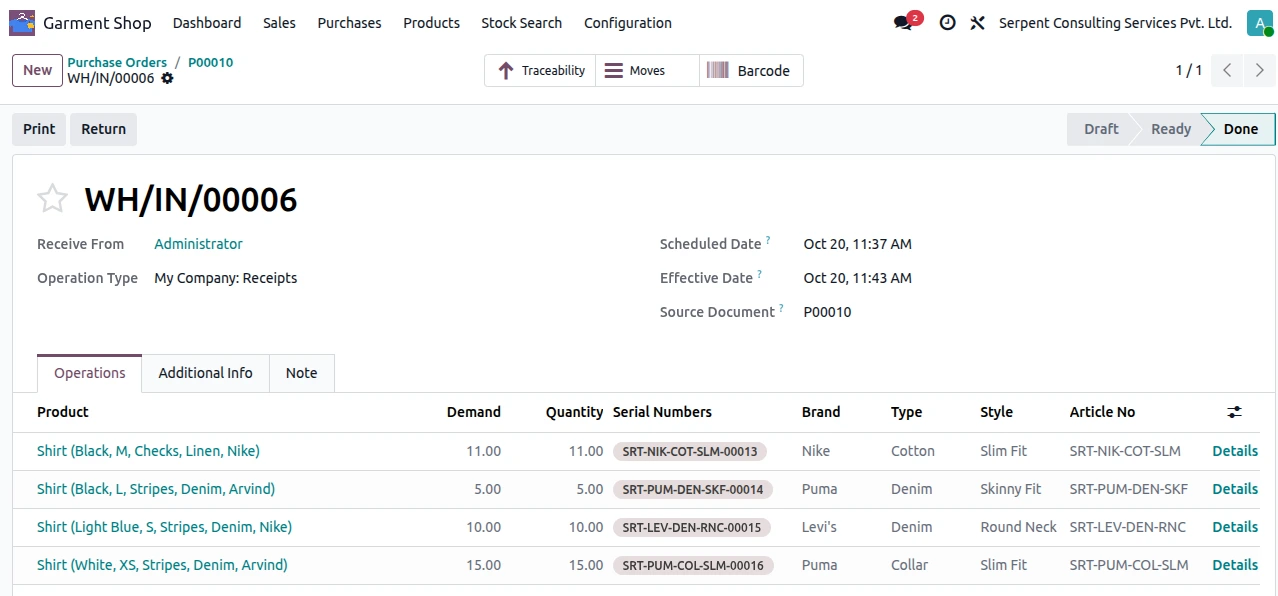
When goods arrive, the receipt's Operations tab lists Brand, Type, Style, Article No and the generated lot for every line, so the warehouse can verify stock at a glance. Turn on Auto Validate Receipt and goods land in stock the moment the PO is confirmed.
Step 3 — Sell and deliver
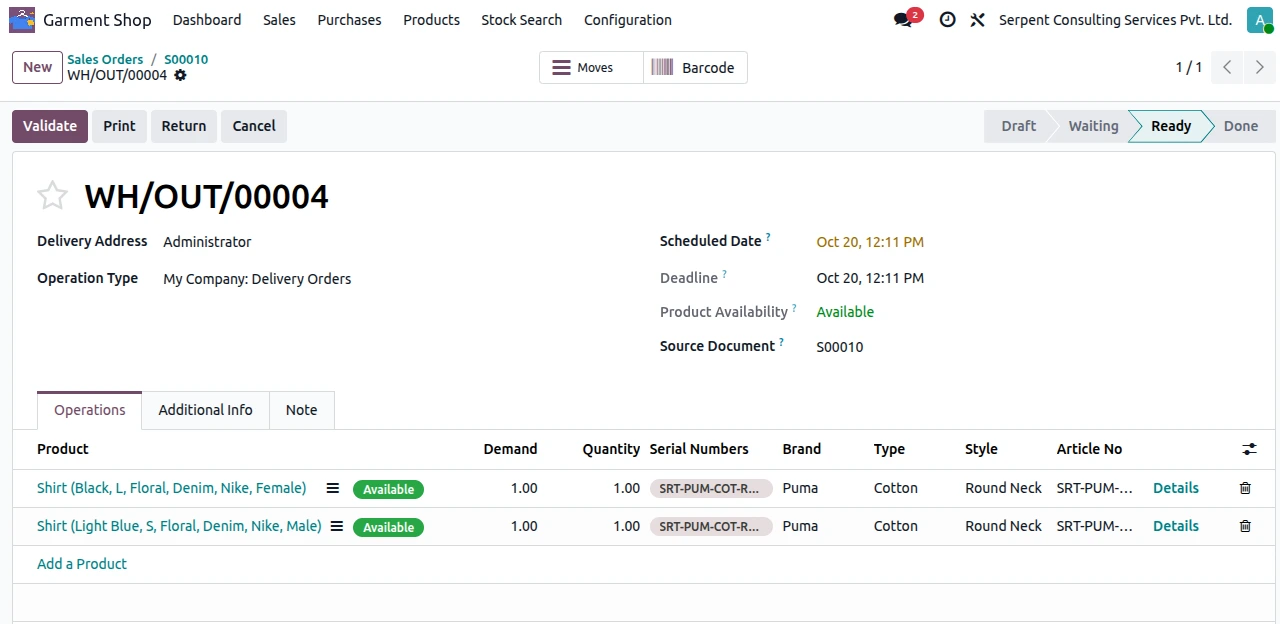
Sell by barcode scan or Stock Search. Every delivery order and packing slip carries the exact Brand, Type, Style, lot and MRP, so the warehouse team picks the right garment every time.
Command Your Business with the Garment Dashboard
Data only helps when you can see it. The Garment Shop Dashboard gives a live, bird's-eye view of your store:
Headline numbers — Sales Today, Orders This Month and Average Order Value.
Visual charts — Revenue by Brand, Purchases by Brand and Top Selling Products.
Stock Registry — filter live inventory by location, size, colour and availability.
Ready to Upgrade Your Garment Business?
Stop wrestling with variant explosions and manual lot tracking. Garment Shop Management for Odoo 19 gives your apparel business the speed, accuracy and control it needs to grow.
Want to see it in action? Contact the team at Serpent Consulting Services Pvt Ltd to book a demo, get the module installed, and transform the way you manage your garment inventory.



