

Introduction
When a customer pays a TDS on an invoice to an Indian business, this payment is subject to deduction and deposit with the government in the name of a recipient business with a PAN. Further, a company that paid this tax may claim it back against its income tax liability for the year and quarter it was charged in, as long as it appears on a record in the form of a 26AS statement (or a Form 168 as per new norms from Tax Year 2026-27). Thus, any TDS recorded on the books of account, but not found on the statement, will create a tax demand, not a tax credit.
Manually reconciling TDS with every customer in Excel is time-consuming and error-prone. With frequently changing names, dates, payments appertaining to multiple invoices, and different statements for each quarter, it is challenging to ensure nothing slips through. That is why the Odoo TDS 26AS Reconciliation module has been designed to bring this task into Odoo 19. This reconciliation statement imports the 26AS file and matches it with the TDS receivable to create a report of all the differences found with the required action.
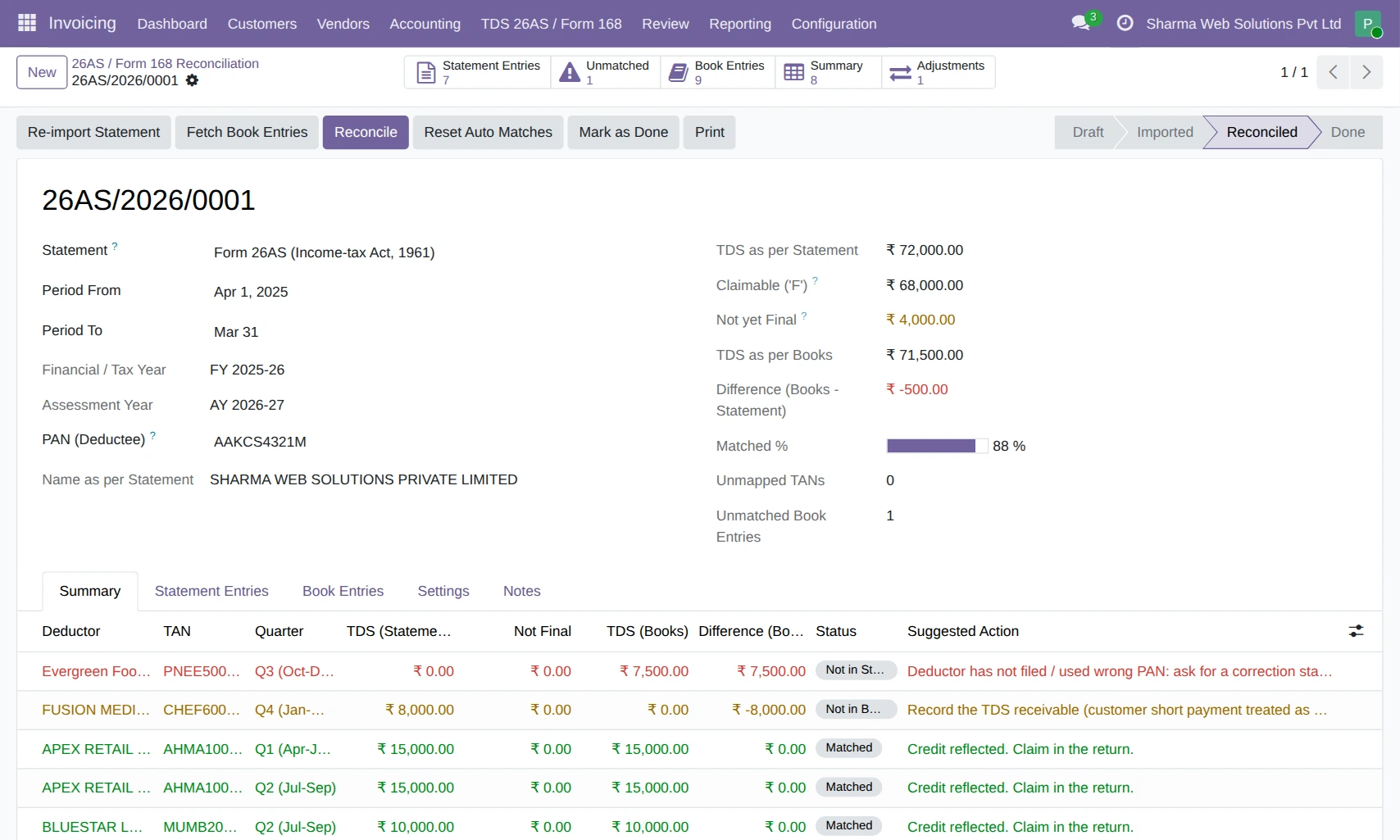
Key Features of Odoo TDS 26AS Reconciliation
Form 26AS and Form 168 Ready
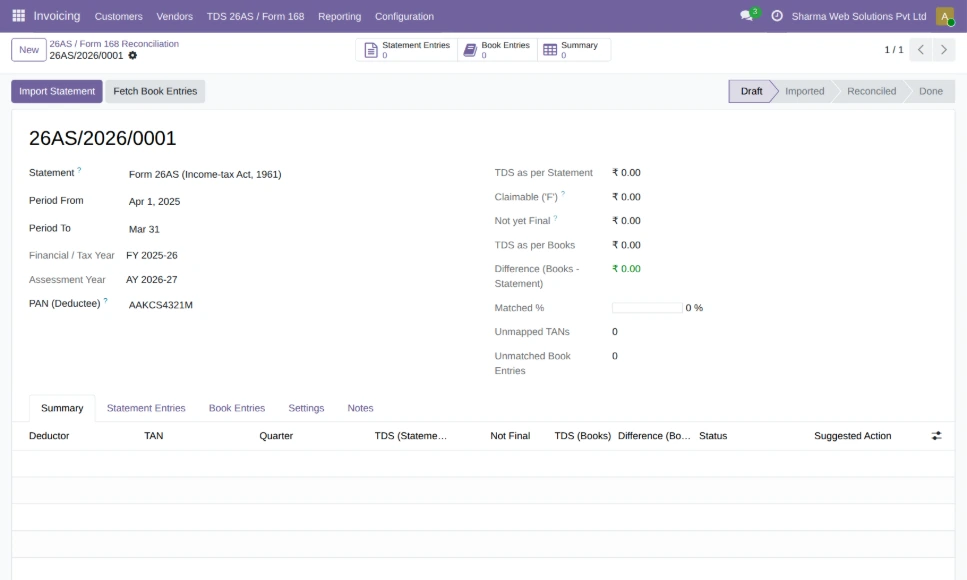
Create one reconciliation per year for your company. Odoo picks the right statement on its own: Form 26AS (Income-tax Act, 1961) up to FY 2025-26, and Form 168 (Income-tax Act, 2025) from Tax Year 2026-27. It also fills in the financial year, assessment year and your PAN.The TDS Receivable account is selected automatically from the Indian chart of accounts. Teams can start reconciling without any extra setup.
Direct Import of the TRACES File
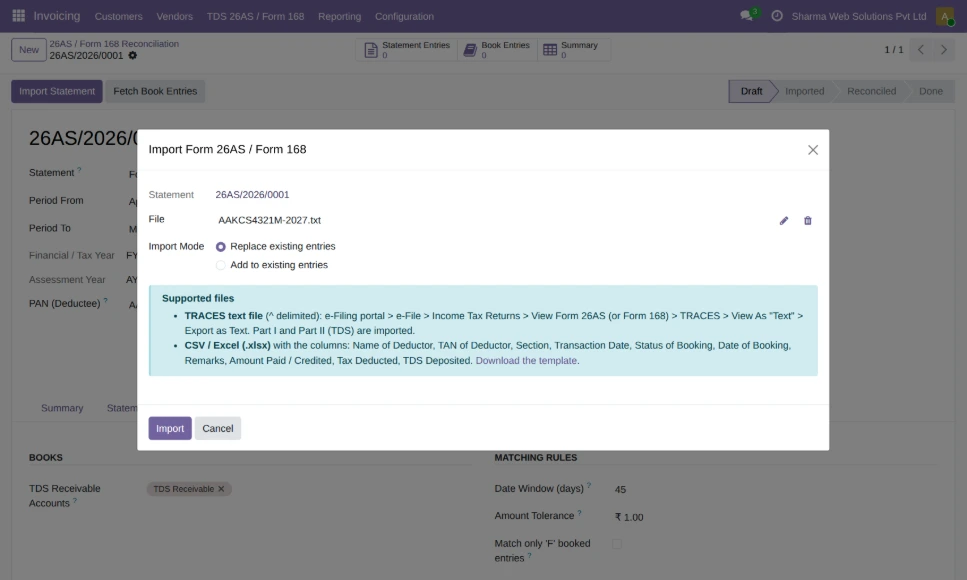
Download Form 26AS or Form 168 as a text file from TRACES and instantly upload in one go. The module understands and parses the data of deductor-wise TDS and automatically skips the non-relevant information of the statement which does not relate to your TDS credit. It extracts the PAN and name from the file and alerts you if it does not match.
Moreover, CSV and Excel files are also supported which are received in a different format by some.
Clear View of Every Statement Entry
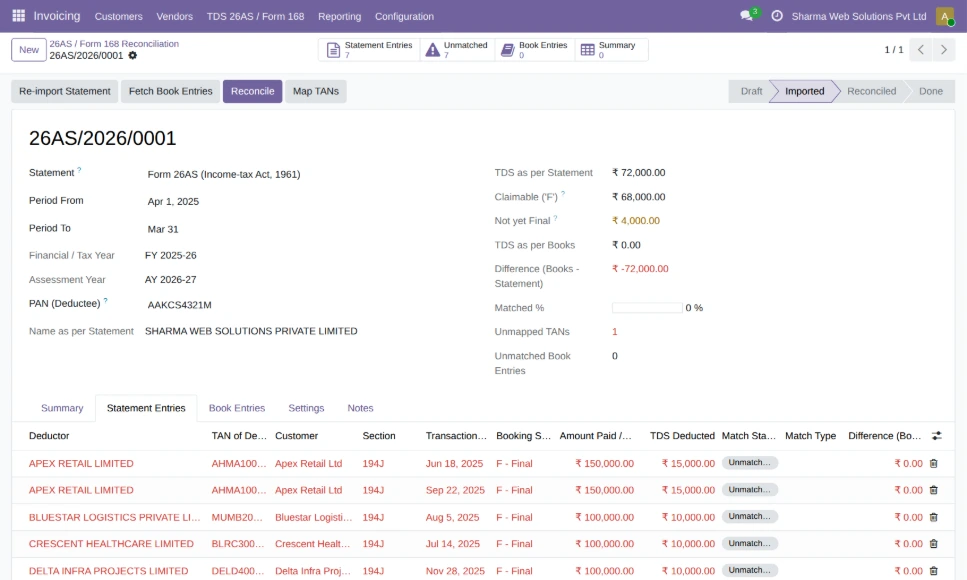
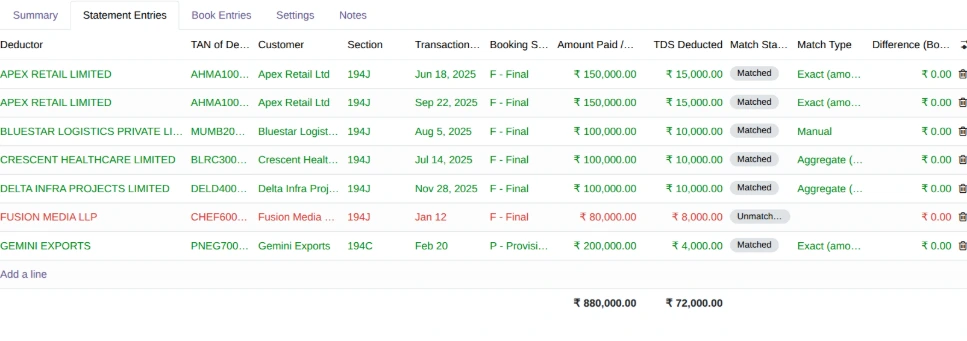
Each imported line displays the deductor, TAN, section, transaction date, booking status, amount paid and TDS deducted and deposited. Entries with a non-Final booking status are highlighted, as the credit for that entry cannot be claimed yet.Deductor TANs are automatically linked to customers, if the TAN is already saved on the customer.
TDS Pulled Straight from Your Books
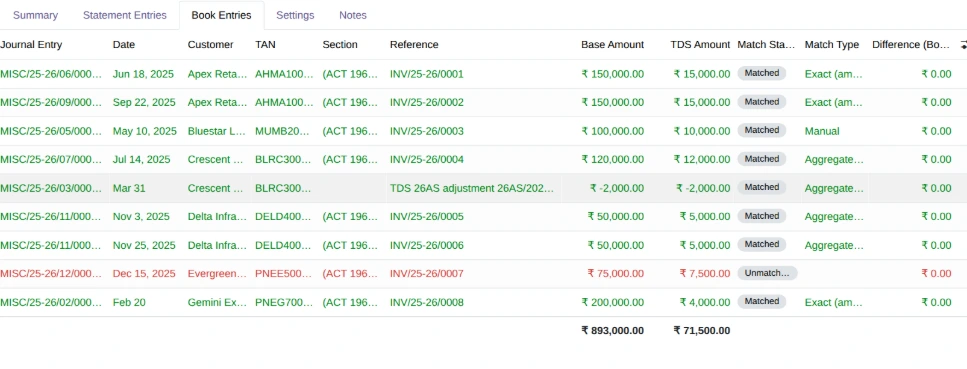
The module accumulates all the entries posted in your TDS Receivable account for the year (including TDS booked via Odoo's own TDS wizard on invoices, payment write-offs and manually via journal entries). The section and the invoice reference are included with each entry. No spreadsheet export is necessary, and the list is refreshed every time you perform a reconciliation.

Smart Matching Engine
One click compares the statement to the books, customer by customer. Odoo first matches the same amount within a date window. It then attempts to match the same amount on any date, then quarterly and yearly totals. The results that do not match are displayed as a partial match along with the exact difference.
This solves real-life situations such as TDS booked in a quarter, but reported by the customer in the next, or one deduction covering several invoices.
Map Unknown Deductors in Seconds
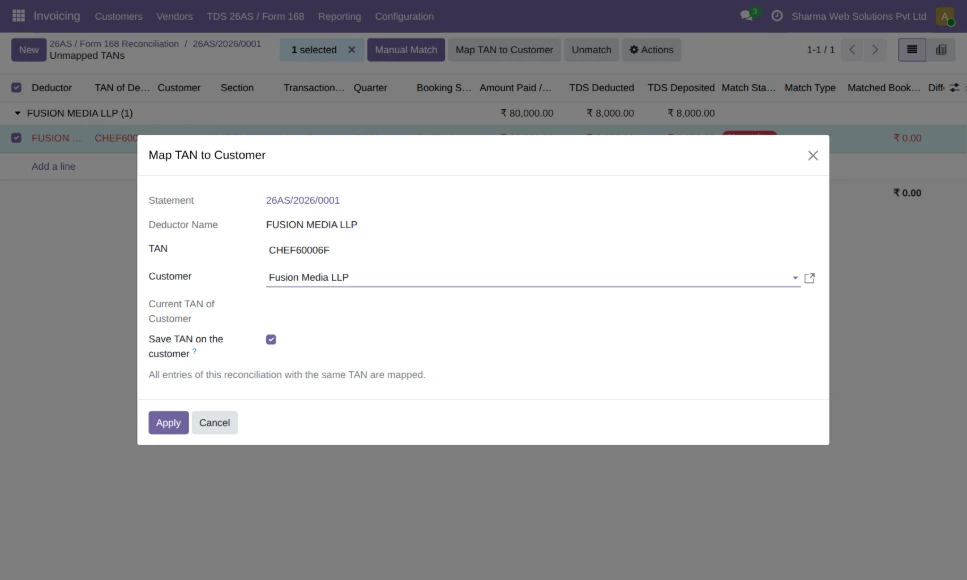
When the statement contains a TAN which is not saved on any customer, it will be listed separately. Select the customer once and Odoo will map all the entries with that TAN. It will also save the TAN on the customer for future years and hence the mapping will be automatic in future years.
Deductor-wise and Quarter-wise Summary
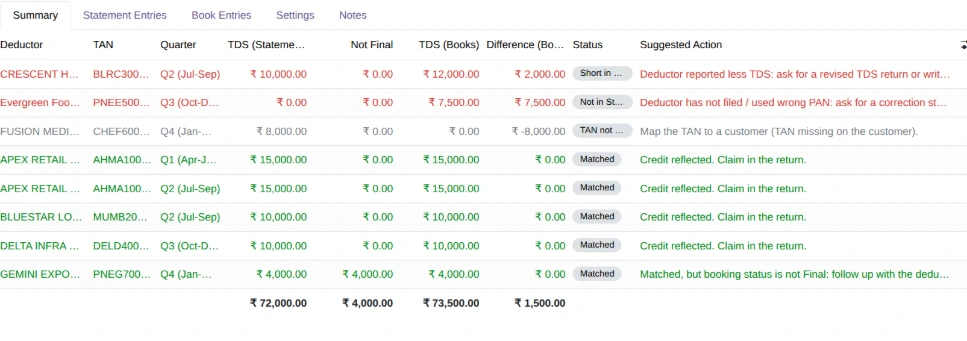
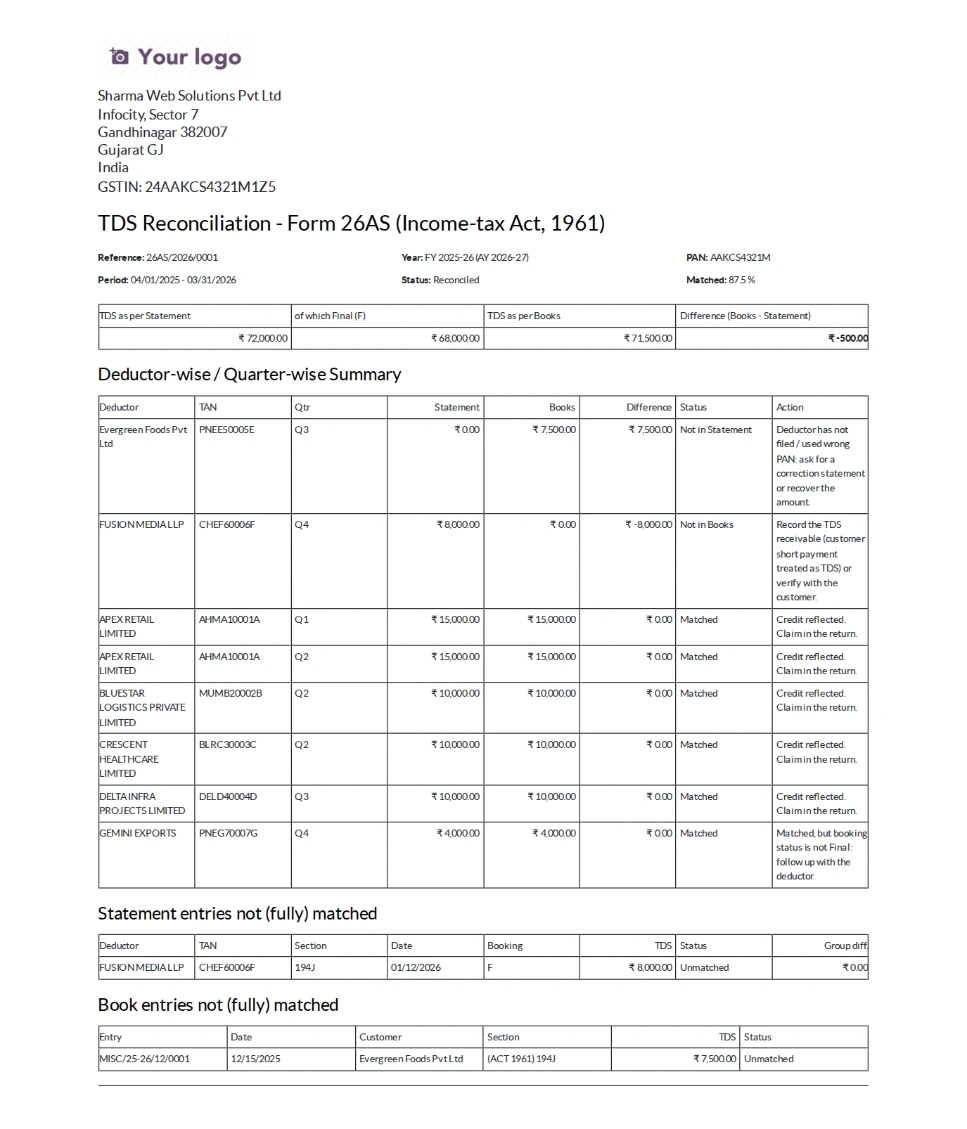
The summary displays one line per customer and quarter which compares the TDS shown in the statement against the TDS in the books. Each line is given a status of either Matched, Short in Statement, Excess in Statement, Not in Statement, Not in Books or TAN not mapped.
This shows the accountant what action to take. Totals of claimable TDS, TDS not yet final and overall difference is displayed at the top of the reconciliation.
Manual Matching with Full Control
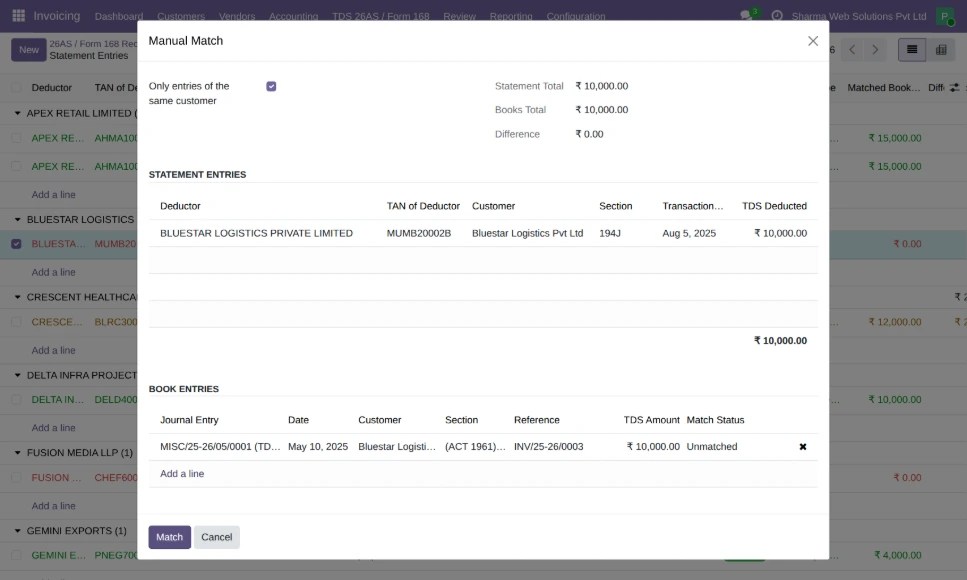
Accountants can manually match any statement entries with any book entries. Odoo displays the two totals and the difference before confirming the match. Manual matches are kept in place when the automatic matching process runs again, and can be removed at any time.
Follow-up Emails to Customers
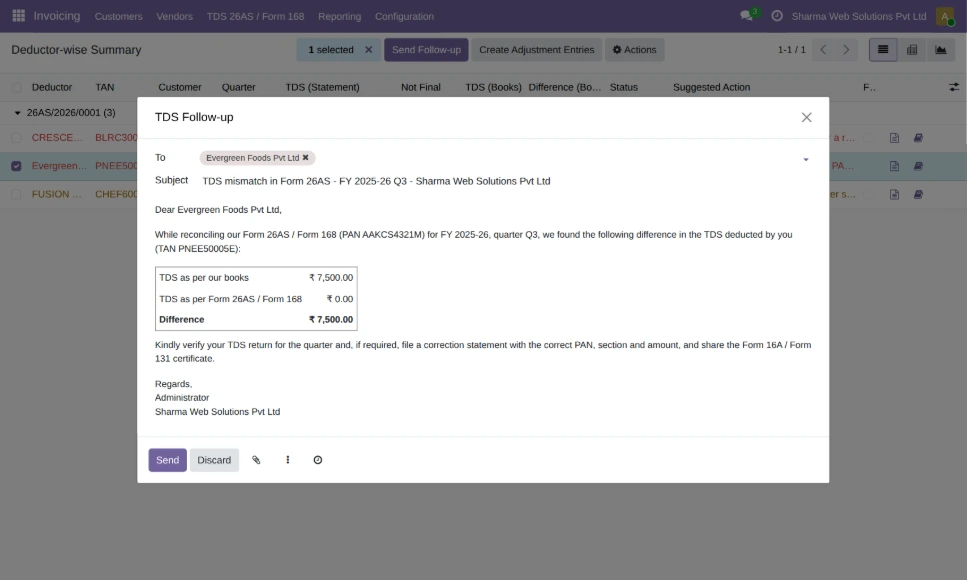
For TDS missing in the statement, send the customer a pre-written email containing the figures from your books as well as the statement. It asks them to file a correction statement along with the TDS certificate. The summary keeps track of each email sent and indicates against which customers have been contacted.
Adjustment Entries in One Step
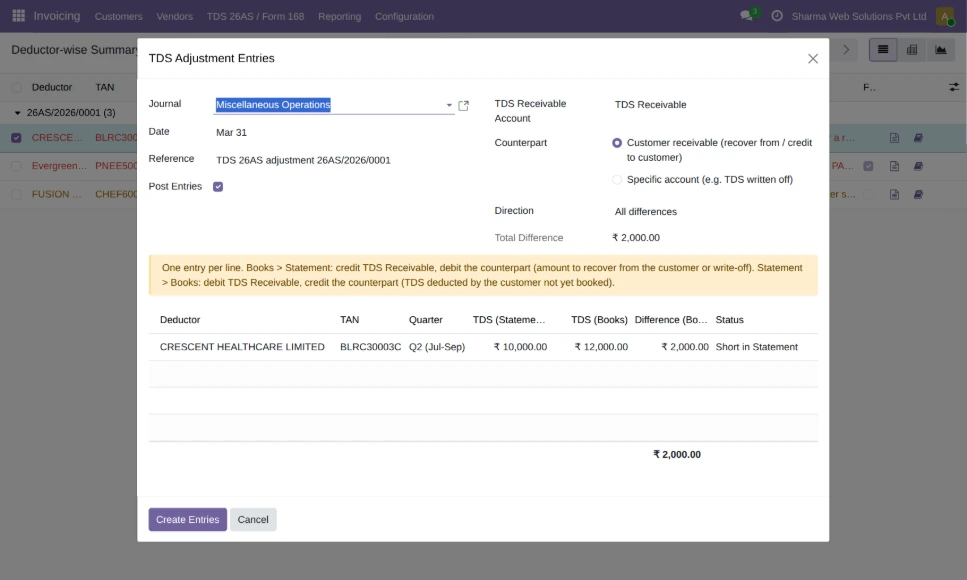
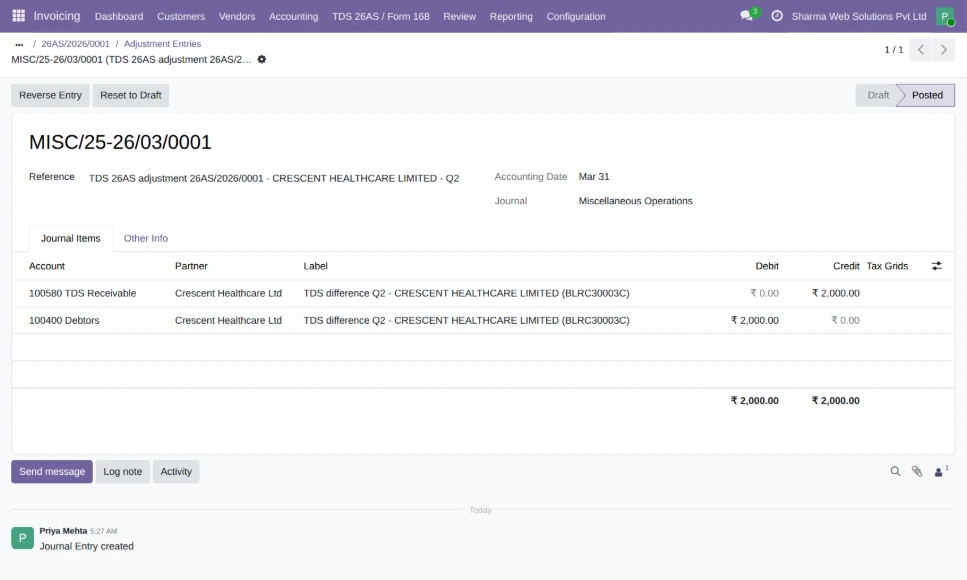
When the books require correction, create the journal entries based on the summary. Select the journal, date and counterpart accounting, and Odoo creates an entry for each discrepancy. Each entry is linked to the reconciliation and the quarter it adjusts to, so that it will appear as matched in the next run.
Reconciliation Report and Audit Trail
Print a reconciliation statement showing the totals, the deductor-wise summary and the unmatched entries. Mark the reconciliation as Done to lock it for audit. All imports, runs and changes are captured in the chatter.
A Connected Solution for Finance Teams
The module is built on the Odoo's Indian localization and makes use of the customer TAN, the TDS taxes and the TDS Receivable account already existing in Odoo, requiring no parallel data maintenance. Invoices, TDS entries, statement, follow-ups and corrections are all in one place.
The result is a reconciliation that takes minutes, not days. Finance teams have a clear view of what to claim, what to follow-up and what to correct, well in advance of the filing of the return.
Simplify TDS Reconciliation with Odoo
From importing the TRACES file to matching and following up with customers and posting corrections, our module keeps your TDS credit under control. The module accommodates your current Form 26AS needs as well as Form 168 (New Income-tax Act, 2025).
Contact us at contact@serpentcs.com and learn more about the product while experiencing a live demo.
FAQ
It is the process of reconciling the TDS Receivable in the books with the TDS appearing in the Form 26AS (Form 168 for Tax Year 2026-27). The TDS appearing in the reconciliation can only be claimed in the income tax return.
Yes. The reconciliation from Tax Year 2026-27 onwards will be created as Form 168 automatically and prior years as Form 26AS.
Text file downloaded from TRACES, CSV file and Excel (.xlsx) file with standard column headings will be supported.
Posted entries in the TDS Receivable account. This includes TDS booked with Odoo's TDS wizard on invoices, payment write-offs and manual journal entries.
The entry will be displayed as TAN not mapped. Mapping to the customer will map the TAN for future years as well.
Yes. The journal entries for the selected difference will be created and posted automatically and linked to the reconciliation.



