

Odoo 20 Manufacturing improves how companies manage Bills of Materials (BoM), plan manufacturing and work orders, control production costs, and run the shop floor. Key additions include continuous production, redesigned planning views, flexible consumption on every order, and expiration dates in the traceability report. This guide covers what’s new, how each feature works, and what to know before upgrading.
Bill of Materials: What's New in Odoo 20 BoM Management
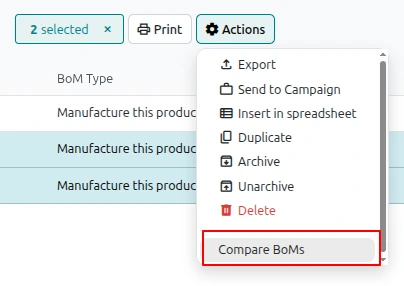
Compare Bills of Materials
For those who have to deal with different designs or multiple variations of a product, comparing BoMs could be slow and cumbersome. However, with Odoo 20, users can check and compare several bills of materials from their list view at the same time.
Thanks to the detailed comparison of component quantities in different bills of materials, the engineering team and the production department can easily spot and check differences, measure changes in designs, and understand the differences in materials and production costs. As a result, product development processes become easier and the company gets better informed about producing them.
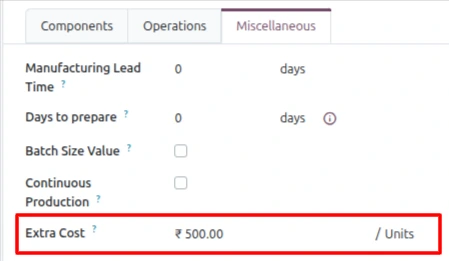
Extra Cost Field on the Bill of Materials
Raw materials are rarely the whole story. Packaging, handling, energy or other overheads often need to be added to what a unit really costs. Odoo 20 adds an Extra Cost field in the Miscellaneous tab of the bill of materials. The value is a fixed cost per unit, and it is carried to every manufacturing order created from that BoM. The field is new and defaults to zero, so your existing product costs will not change when you upgrade.
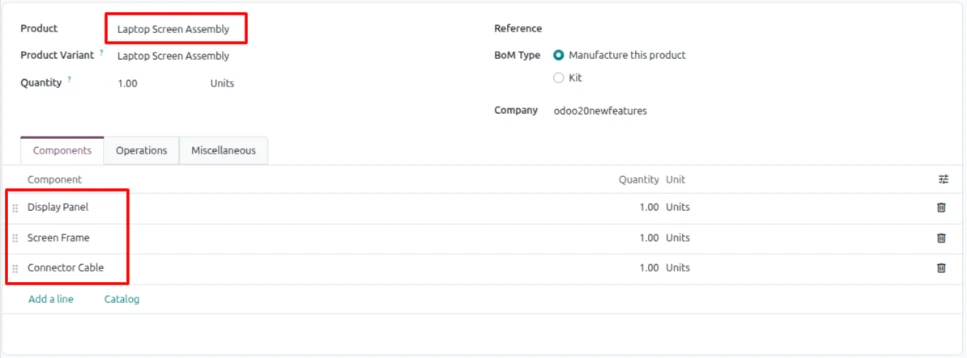
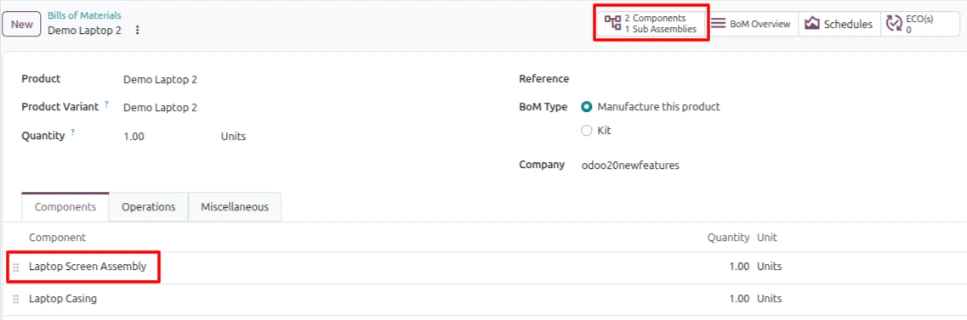
Components and Sub-Assemblies from One Smart Button
Odoo 20 adds a Components / Sub Assemblies smart button on the BoM form. It lists every component line of the BoM together with the lines of its sub-assemblies, exploded into one editable list. For multi-level products, this saves you from opening each sub-assembly BoM just to see what is inside.

One Status Column in the BoM Overview
Previously, when the Forecast option was activated, the BoM Overview was showing status and availability in separate categories. With the recent update, these two aspects have now been merged into a single Status column that informs on the availability of a line or whether it needs to be bought or produced. The overview is now easier to scan at a glance

Component Replacement with the Used In Smart Button
At some point, all manufacturers will have to change a part of their product line; whether it is due to the fact that a supplier has stopped production or the introduction of a superior product. In past releases of Odoo, the “Used In” button would open the list of the product’s bills of materials, but Odoo 20 allows users to see not only the bills of materials associated with BoM, with this button, users will see the finished product with the amount of used parts and can modify the BoM.

Continuous Production
Odoo 20 features Continuous Production, enabling manufacturers to streamline complex multi-stage processes. The option is available to be used in a Bill of Materials (BoM) to allow the next operation to begin when some quantity has been produced in the previous operation, instead of completing an entire batch. With the help of this feature, manufacturers can operate several work centers more efficiently thus reducing production delays. By default, the feature is turned off and existing BoMs will function as they did earlier.

Manufacturing Order Planning in Odoo 20
Redesigned Manufacturing Order Kanban
The Manufacturing Order Kanban system has been remodeled according to planners' thought processes: by week. Cards are neatly organized by planned date, and each card provides the details about the current status of each component as well as the active work center, the due date, and the remaining time left. The group header shows the total remaining time for its orders, which is also displayed in every Group By search. 
Orders Planned as Soon as Possible
When you click Plan, Odoo 20 schedules manufacturing orders as soon as possible. When planning a lot of orders at the same time, they are queued using the same sequence as the list, which means the queue you see is the order of priority. Free capacity is immediately used instead of waiting for the scheduled time.

Split Ongoing Manufacturing Orders
Sometimes the production process does not proceed smoothly. With Odoo 20, you now have the opportunity to divide the order that is being manufactured: the produced part will remain in the original order, while the rest will be moved to a new backorder immediately and will be linked to the chatter. You complete the manufacturing involving what is already on the line today and then tackle the rest later.

Production Execution on the Shop Floor
Flexible Consumption for Every Order
The flexible consumption option has been removed, and now all production orders are flexible. If the quantity actually used is not equal to that of the bill of materials, an alert will appear indicating that there was a discrepancy in consumption that can be confirmed at any time. This is a positive development for workshops that have to deal with scrap and minor variations.

Finished Products Go Straight into a Package
When you set a destination package on the finished product of a manufacturing order, Odoo puts the product in that package at the moment of production. The order also gains a Packages smart button, and Barcode offers a Put in Pack action. You will need the Packages setting enabled in Inventory. For manufacturers who pack standard batches immediately, it removes a separate warehouse step.

Reset Cancelled Orders to Draft
A cancelled manufacturing order can now be brought back with a new Reset to Draft button, so a plan that was cancelled by mistake can be repaired on the same order instead of rebuilt from scratch. Orders that are already done get a slightly different action, Set to In Progress, which reopens them to the confirmed state rather than to draft.


Work Order Planning: New Kanban and Gantt Views
New Work Order Kanban View
The Kanban view has been added to the Planning --> Work Orders functionality so planners now have one column for each work center. This allows planners to visualize their workload more easily because they can see what is queued and adapt the plan accordingly, which is indeed easier than looking through a list of several machines competing for the same jobs.

Rebuilt Gantt Planning and Employee View
The Gantt for work orders has been revised. It allows for drag-and-drop planning while using a better color scheme. The newly added Planning --> Employees --> Planning menu shows similar work orders for each employee which is useful when people rather than machines cause delays. All previously completed work orders are now shown by default in a faded manner, and one can get to know the work history of the work center at once.

Reporting and Traceability
Reworked Production Analysis
Work order and manufacturing order reporting has been refreshed with new default metrics. Production Analysis now shows the cost per unit, broken down into components, work centers, subcontracting, employees and operations, next to the quantity produced. Cost visibility is available straight away without choosing measures one by one.

Expiration Dates in the Traceability Report
An Expiration Date column has been included in the traceability report for any lots that have one. When it comes to food, pharmaceutical and chemical manufacturers, recall verifications and shelf-life analyses are quicker and easier because it is all summarized in one report.

How These Odoo 20 Manufacturing Features Work Together
What makes this release unique is the correlation of various modifications. An interested planner can compare BoMs, change extra costs, let the purchasing department create draft orders, plan them in advance, analyze the week in Kanban, confirm the plan provided in Gantt, and witness how actual costs appear in MO Overview when operators hit the Produce button. Finished products are then put in a box, and batches are automatically formed while the Production Analysis report gives a complete picture.
For a real-world example of end-to-end visibility, read how Bhuj Polymers streamlined its manufacturing operations with Odoo.
Which Industries Benefit Most?
Discrete manufacturers, which include companies that manufacture furniture, machinery, electronics, and automotive parts will undoubtedly be the ones who benefit the most from improvements in planning and BoM. Process and regulatory industries alike - e.g. food, beverages and pharmaceuticals - may value tracking their products' expiry dates. Regardless if your business mainly revolves around production, manufacturing ERP or both, using Odoo 20 will give you the tools you need.
Implement Odoo 20 Manufacturing with SerpentCS
To utilize Odoo 20 Manufacturing optimally, choose solutions based on your production needs. Serpent Consulting Services can help businesses efficiently manage their manufacturing processes using Odoo implementation, customization, migration, and support services.
Our services ensure that whether you are upgrading to Odoo 20 or implementing a manufacturing ERP for the very first time, you end up with a solution that is efficient and scalable as per your factory processes.
Conclusion
Odoo 20 Manufacturing offers significant advantages in terms of production planning, workflow, cost management, and traceability. The use of such capabilities as continuous manufacturing, screens for Manufacturing Order, Work Order, enhanced visibility of expenses and accurate costs of outsourcing allow producers to improve daily activities and better control the whole manufacturing process.
Are you ready to improve your manufacturing processes using Odoo 20? Contact SerpentCS at contact@serpentcs.com so that our experts can help you with Odoo implementation, modification, and upgrades.
FAQ
Odoo 20 Manufacturing adds BoM comparison, an Extra Cost field, continuous production, a Kanban view of manufacturing orders grouped by week, the ability to split ongoing orders, new work order Kanban and Gantt views, flexible consumption on every order, and expiration dates in the traceability report.
Continuous Production lets the next operation start once part of a quantity has been produced in the previous operation, instead of waiting for the full batch. It’s set on the Bill of Materials and is off by default, so existing BoMs behave as before.
No. The Extra Cost field defaults to zero, so existing product costs stay the same until you enter a value. When set, it adds a fixed cost per unit to every manufacturing order created from that BoM.
Yes. You can select several bills of materials from the list view and compare their component quantities side by side to spot design and cost differences.
Yes. The produced quantity stays on the original order, and the remainder moves to a new backorder that is linked in the chatter.
The flexible consumption option was removed, and every production order is now flexible. If the quantity consumed differs from the BoM, an alert shows the discrepancy and you can confirm it.
When you click Plan, orders are scheduled as soon as possible. For multiple orders, the queue follows the list sequence, so the order you see is the priority order, and free capacity is used immediately.
Yes. The traceability report now has an Expiration Date column for lots that have one, which speeds up recall checks and shelf-life analysis.
Contact SerpentCS at contact@serpentcs.com for help with implementation, customization, migration, and support



