

It could be quite difficult managing business information from various platforms, especially when information needs to be moved between your business application and accounting software. Entering customers, products, invoices, and sales information manually in QuickBooks not only consumes time but also results in duplicate entries, errors in information, and wasted efforts.
The QuickBooks Connector by Serpent Consulting Services helps businesses simplify this process by connecting their application with QuickBooks through secure API integration. It supports flexible data imports, batch processing, data mapping, and detailed error handling, helping businesses maintain a more connected and efficient data flow.
Whether you are transferring master records or transaction data, the connector provides the tools needed to make QuickBooks integration easier to manage.
Seamless Integration with QuickBooks APIs
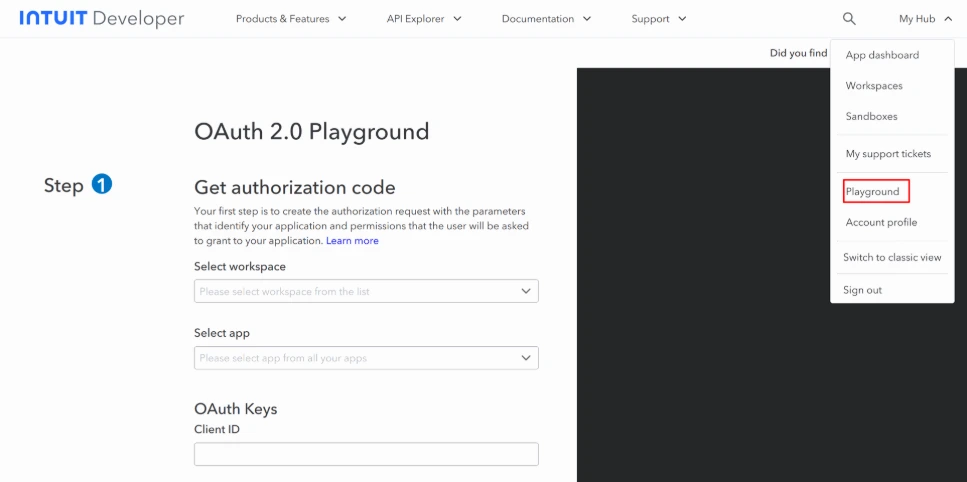
A successful integration begins with the secure link between two systems. The QuickBooks Connector helps your business application connect to QuickBooks APIs for the exchange of the relevant business data.
The connector uses the API key data authentication along with OAuth-based authentication in making the link between the systems. Through this API integration, companies can avoid relying on the cumbersome task of manually entering data.
Flexible Batch Data Import
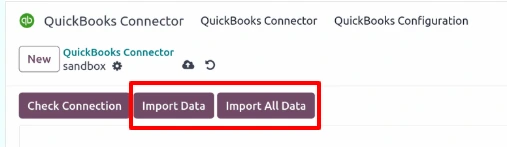
If a firm must manage a vast amount of details, going through every detail on an individual basis can result in a long process. Fortunately, with QuickBooks Connector, a company enjoys different import options that give users power over processing their information.
Users can take advantage of the Import All Data option, which is perfect for cases when they deal with bulk import of information, or they can choose to import data one by one if they want to select different details individually. All this flexibility makes the connector a good option for companies that are looking for a solution to bulk data transfer.
Import Master Data and Transaction Data
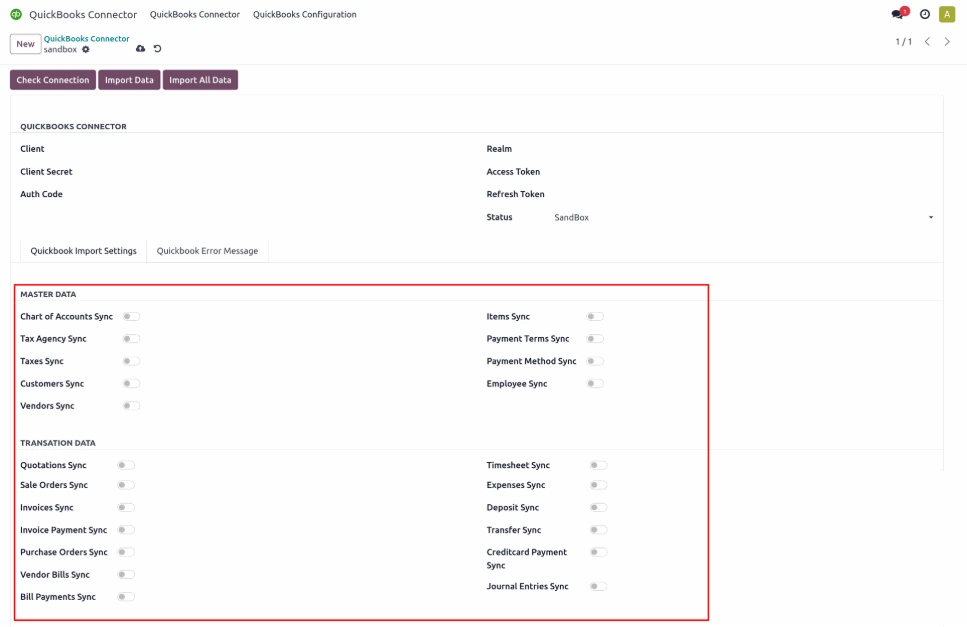
Accounting integration generally requires dealing with more than just transferring basic customer data. In addition to that, businesses should also deal with the routine transactions moving the whole process across their systems.
The QuickBooks Connector is able to assist in introducing not only master data like clients and products, but also transaction data, like invoices, and sales. In this way the connector enables companies to pull their most important information from their systems to QuickBooks, without having to enter the same data manually over and over.
Accurate Data Mapping for QuickBooks
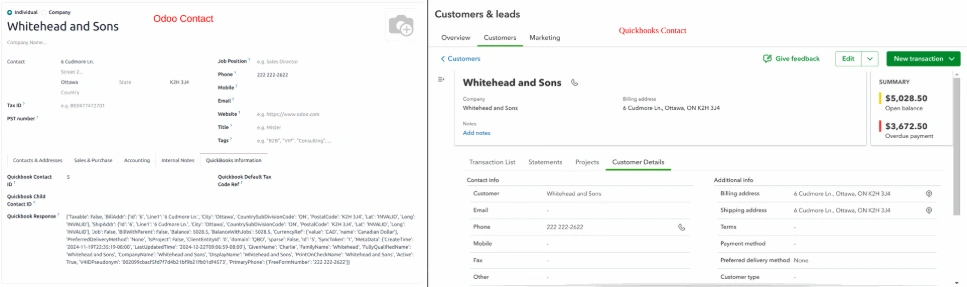
Data structures differ across business applications and QuickBooks. Fields used to store the data in one might not have similar structures in another. If there is no appropriate mapping applied, this could lead to receiving incomplete or improperly imported records.
QuickBooks Connector provides data mapping functions that let users match their data with the required QuickBooks fields. Moreover, data validation helps make sure records are in the suitable format when they are processed in QuickBooks and thus imported correctly.
Better Visibility with Error Handling and Diagnostics
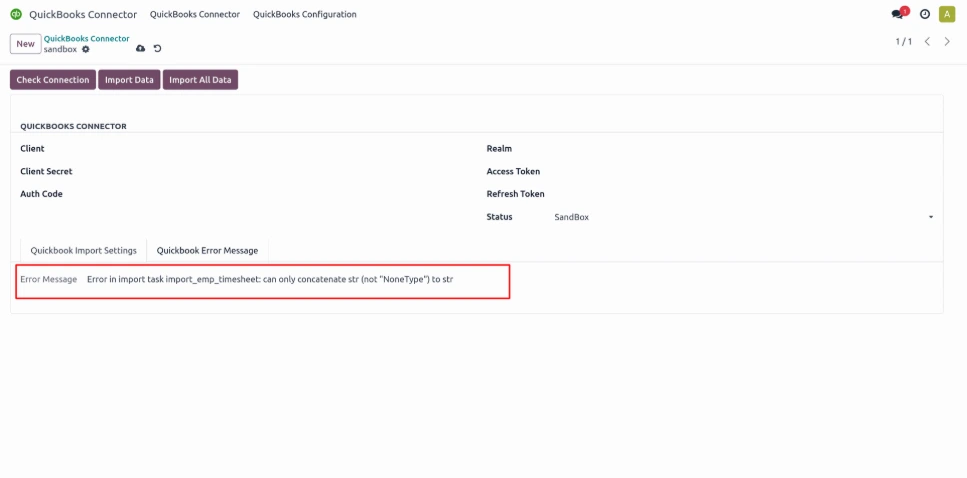
Despite having a properly installed integration, usage may result in a number of errors due to wrong information, API responses, or short issues with the internet connection. It is essential to resolve these errors as soon as they are detected not to interrupt the process of synchronization.
The QuickBooks Connector indicates errors and gives explanations as to why they occurred. The tool provides logs to monitor API calls and make use of error information. Errors are also simplified when coded automatically, which helps users figure out where the errors occurred. Automatic retries can also be applied without users having to go through the entire process themselves.
Secure Authentication for Connected Data
Information related to businesses and accounting is subjected to restricted access. The QuickBooks Connector uses effective authentication methods in order to guarantee the validity of the connection between the software and the QuickBooks application.
The users are able to generate the API keys for authentication purposes and use OAuth for gaining authorized access to QuickBooks. Thus, the authentication process is well-organized and allows the connector application to work with QuickBooks.
Manage QuickBooks Data Imports More Efficiently
The connector brings data import controls, verification, and diagnostics together in one integration workflow. Instead of relying on separate manual processes, businesses can manage their QuickBooks data transfers through a connected system.
The ability to process data sequentially or in batches, map fields, verify compatibility, and review integration logs gives users greater visibility and control over how information moves into QuickBooks.
Why Use a QuickBooks Connector?
An integrated accounting process can save companies from having to do repetitive office work and guarantee that the quality of information is consistent.
Together with QuickBooks Connector, organizations will have everything they need for an easy integration with QuickBooks, offering safe API integrations, agility while importing data, data mapping, and diagnosing mistakes in the app.
Need a dependable QuickBooks integration service for your business? Connect with us via contact@serpentcs.com, we have right solutions for you when it comes to the implementation and personalization of the QuickBooks Connector per your business operations, data requirements, and specific integration needs.
FAQ
The Odoo QuickBooks Connector is an integration tool that links Odoo with QuickBooks through secure API and OAuth authentication. It automates the transfer of customers, products, invoices, and sales data, removing the need for manual entry between the two systems.
The integration works by connecting Odoo to QuickBooks APIs using OAuth authentication, then transferring master data and transaction data through flexible import options. Users can import all records at once or select individual entries, with built-in data mapping and validation.
Yes, the Odoo QuickBooks Connector supports batch data import, letting users import all records at once via the "Import All Data" option or process entries individually. This flexibility suits both large-scale data transfers and selective, one-by-one imports.
The connector syncs master data (customers and products) and transaction data (invoices and sales records) from Odoo to QuickBooks. Accurate field mapping ensures data structures align correctly between the two systems during transfer.
Yes, the connector uses API key authentication and OAuth-based authorization to secure the connection between Odoo and QuickBooks, ensuring only authorized access to business and accounting data during synchronization.
To set up the connector, install it, authenticate via API key or OAuth, and configure which master and transaction data to sync. For implementation help, contact SerpentCS at contact@serpentcs.com.



