A customer may ask for a waste collection and a member of staff may write down a post code. Later, this is manually entered into a large excel spreadsheet. There is often a considerable delay between receiving an enquiry and being able to provide a quotation. Problems can then also occur on the day of the collection meaning either that a truck is not sent or is sent to the wrong place. Many waste companies regularly experience these issues.
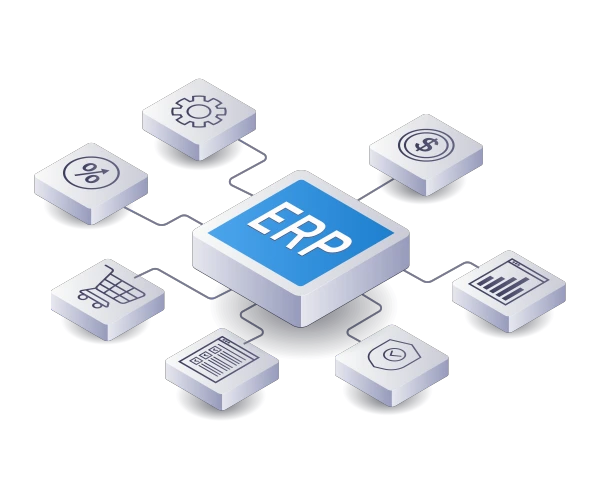
The Waste Collection Management System for Odoo is highly advantageous as it seamlessly integrates all areas of a business. As a customer browses your website and asks for your waste collection service, an automatic CRM lead is created. This is then used to generate a quotation, followed by a booking order and then a job sheet for your drivers. Whether a customer is requesting a one-off or subscription waste collection, this can all be easily and effectively achieved.
Download from the Odoo Apps Store: Odoo Waste Collection Management
Who Can Use It?
Waste (public and private) companies who offer domestic and/or commercial waste collections.
Companies involved in recycling and industry who need to know specific details regarding the type, weight and risk rating of the waste they collect.
Companies who offer scheduled (weekly and/or monthly) waste collections and want to automate the billing and dispatch processes.
Companies seeking to enhance their waste collection provision and looking to move away from paper based tools (such as clip-boards and excel) towards a digital solution.
Common Problems in Waste Collection Operations
New businesses are frequently requested via telephone, ad-hoc WhatsApp and/or in-tray mail.
Often sales and dispatch staff work with differing lists of customers.
Customers can also sometimes fail to be included, or be included incorrectly, within regular waste collection schedules.
Drivers often just receive a paper note showing a customer's address and so lack knowledge of what and how much waste needs to be collected.
Around half of back office staff's time is often spent answering customer telephone queries regarding where their waste is to be collected.
This customisable Odoo solution successfully overcomes these problems and incorporates them into one integrated system.
How It Works
Below is an outline of the general process adopted for a one-off waste collection:
Customer Enquiry: Customers complete a basic online enquiry form.
Lead Generation: An enquiry is automatically added to your CRM and a relevant lead is then generated.
Quotation: Members of staff in sales can then generate a quotation for this lead and send this to a customer.
Booking Order: On a customer agreeing to a quotation, an easy to generate booking order can be created.
Dispatch: A collection order can then be generated from the booking order. Dispatch staff can then assign an appropriate driver and truck.
Collection: When drivers have completed a customer's waste collection, the collection, booking and enquiry are all simultaneously updated to show that waste has been 'Picked Up'.
Similar to the one-off collection process, subscription customers also go through a quotation stage. A Subscription Order is then created to manage billing. This in turn automatically generates subsequent booking orders.
Features
1. Web Enquiry Form
Customers do not need to create an account to receive a quotation. The form is divided into two main sections, one for Customer and one for Waste Information. Customer information includes customer and address details. Waste Information involves specifying the type of waste, an estimated weight and the number of units, risk rating and any extra comments. An automatic phone number validation check is also in place so that staff do not need to follow-up with customers for incorrect numbers.
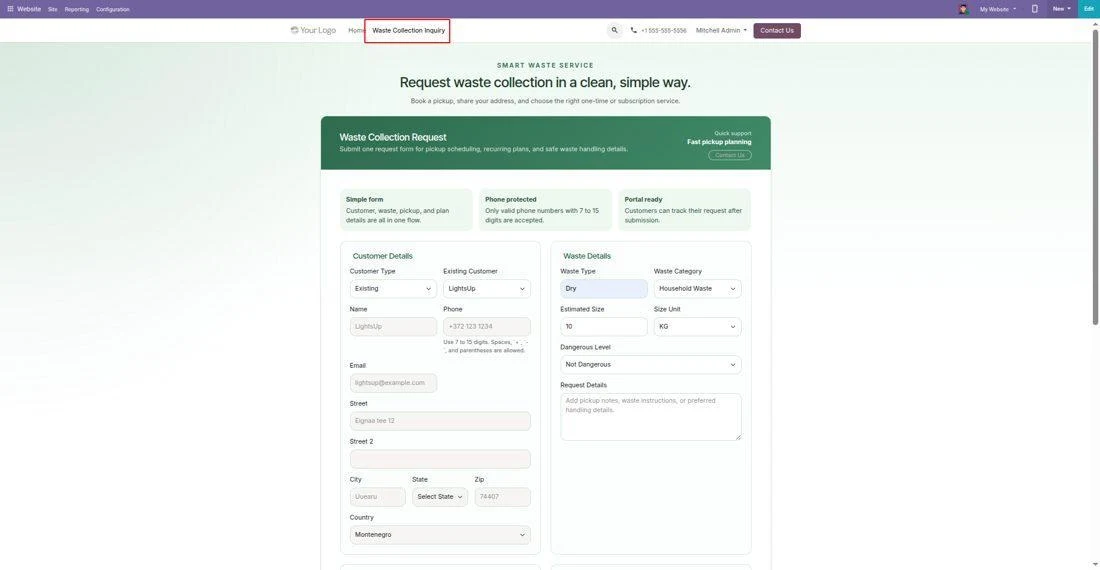
Menu path: Website > Waste Collection Enquiry
Customers can then specify when and where they would like their waste to be collected. They can also choose whether they wish to receive a one-off or subscription waste collection. Further details such as the frequency of collections, billing periods and initial costs are all clearly shown so that both you and your customers can understand the service to be provided.
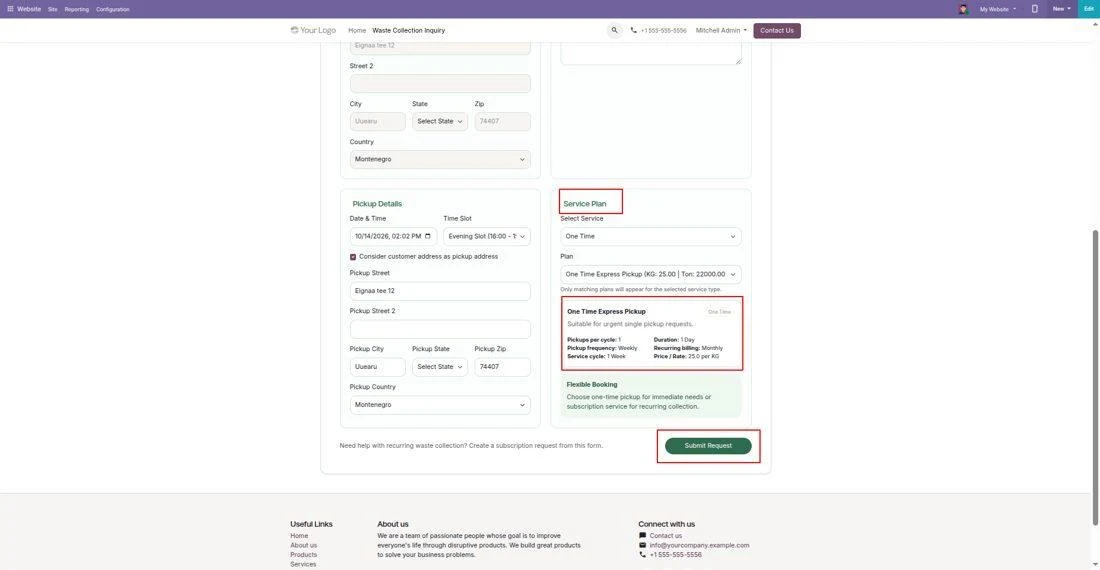
Menu path: Website > Waste Collection Enquiry > Collection Details / Service Plan
2. Customer Portal
After customers have completed an enquiry form, they are taken to a confirmation page which provides basic guidance on how to log into their portal. Customers can then themselves review their existing enquiries and/or booking orders. Consequently, your back office staff do not need to answer as many customer queries.
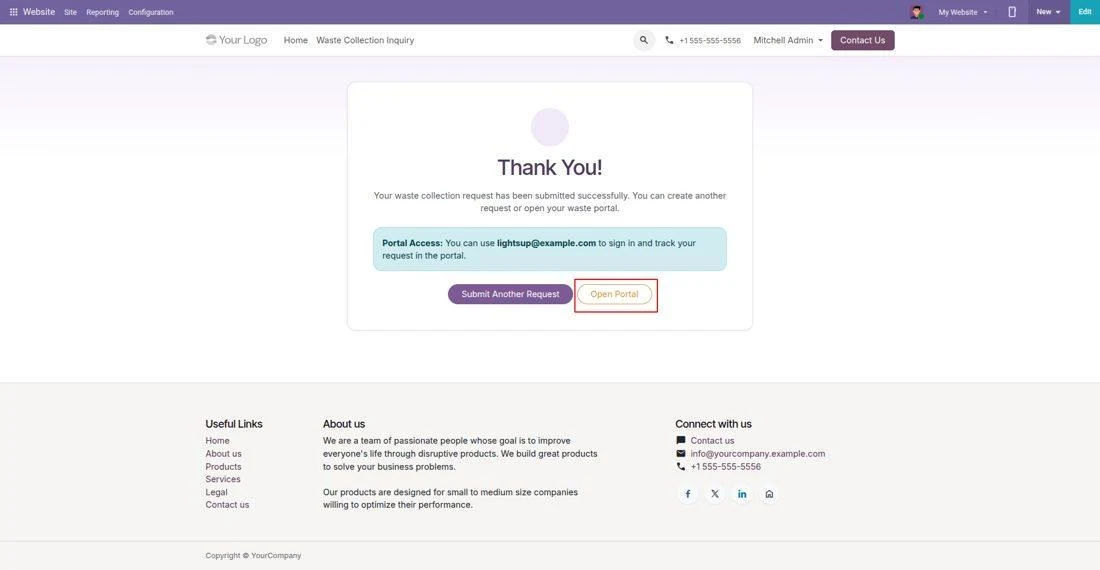
Menu path: Website > Waste Collection Enquiry > Submit Enquiry
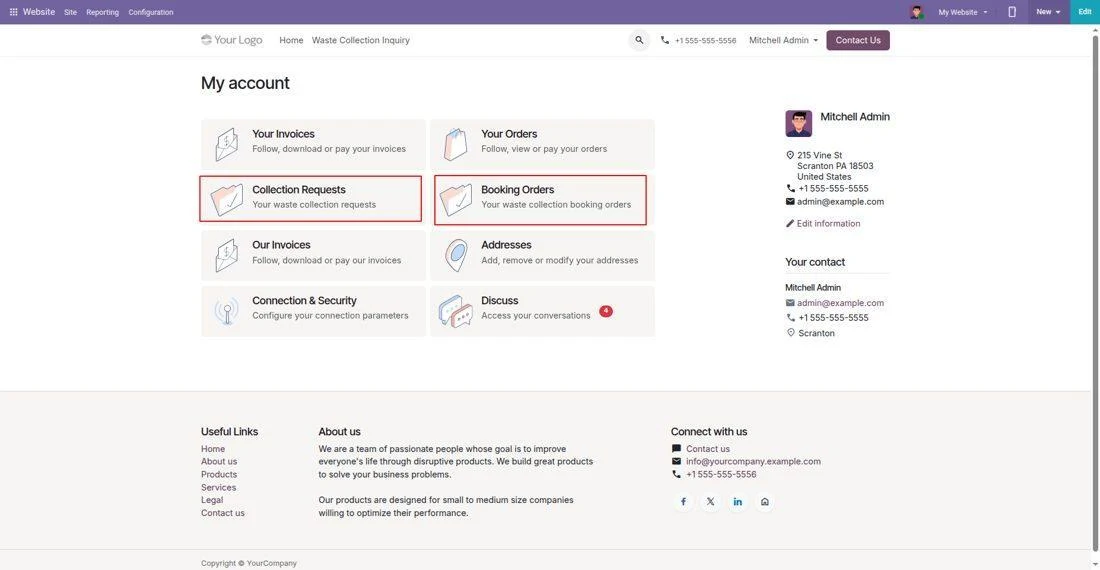
Menu path: Website > My Account (Portal) > Enquiries / Booking Orders
3. Enquiry Log
Online and telephone enquiries are brought together and displayed within one central enquiry log. Staff can readily examine this data and view details such as enquiry references, customer information, requested collection times, waste types and estimated weights. Managers can then swiftly advance an enquiry along its journey from Draft, Approval, Confirmation, Dispatch and Pick Up by clicking on the relevant button.
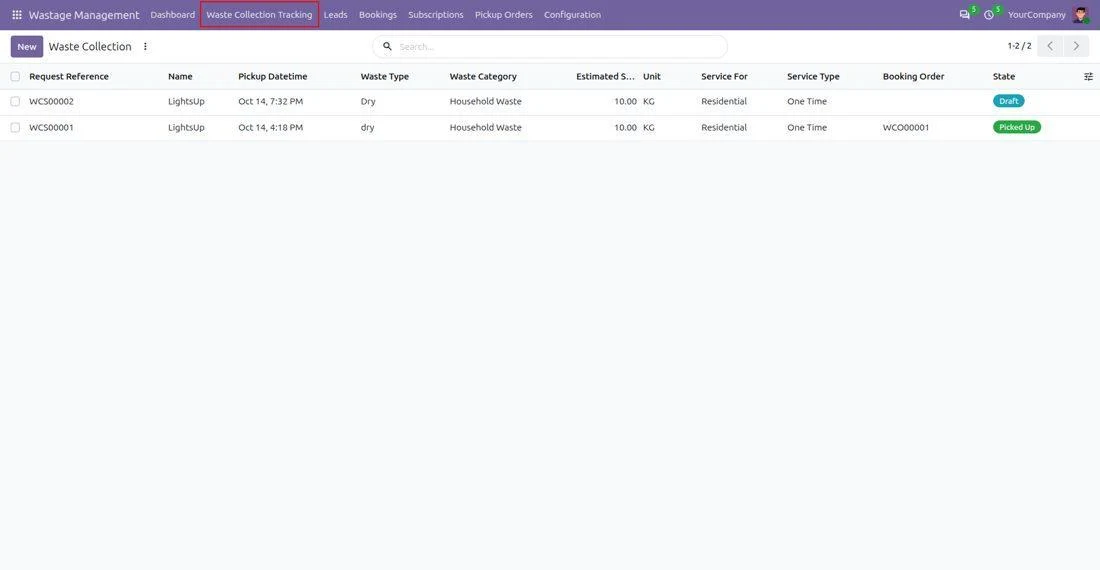
Menu path: Wastage Management > Waste Collection Log
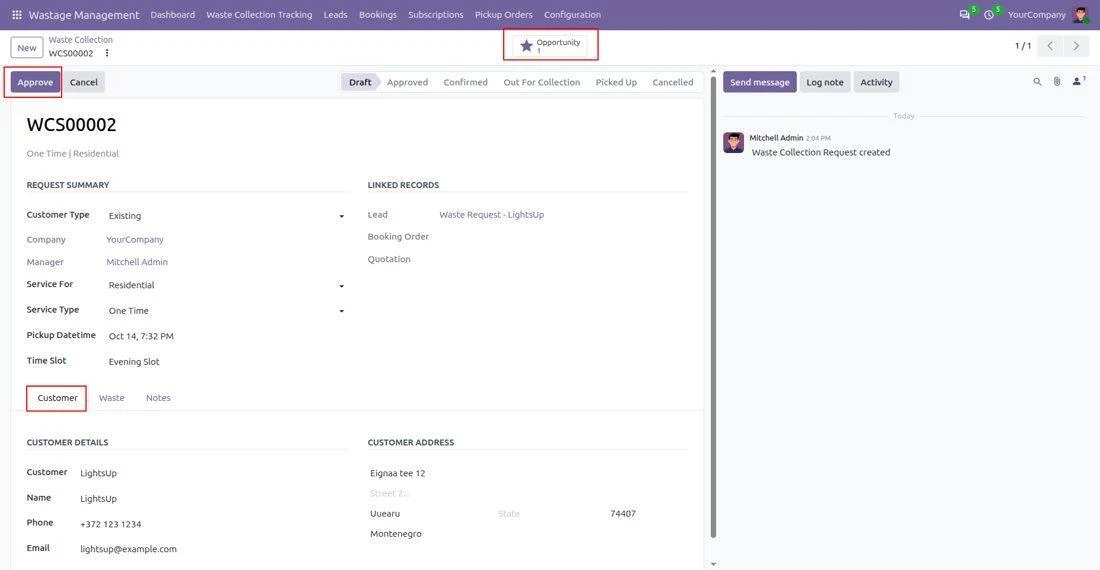
Menu path: Wastage Management > Waste Collection Log > Open Enquiry
4. CRM and Sales Quotation
As online enquiry forms are completed, linked CRM leads are automatically generated. Within a lead there is a Waste Collection tab where all pertinent information is summarised including waste type and addresses. Sales staff can then click on the ‘New Quotation’ button to generate a quotation. Related quotation line items, weights and billing are automatically populated depending on your Service Plan (for instance, 10KG x $25.00 per KG = $250.00). Upon a customer agreeing to a quotation, this is converted into a confirmed sales order.
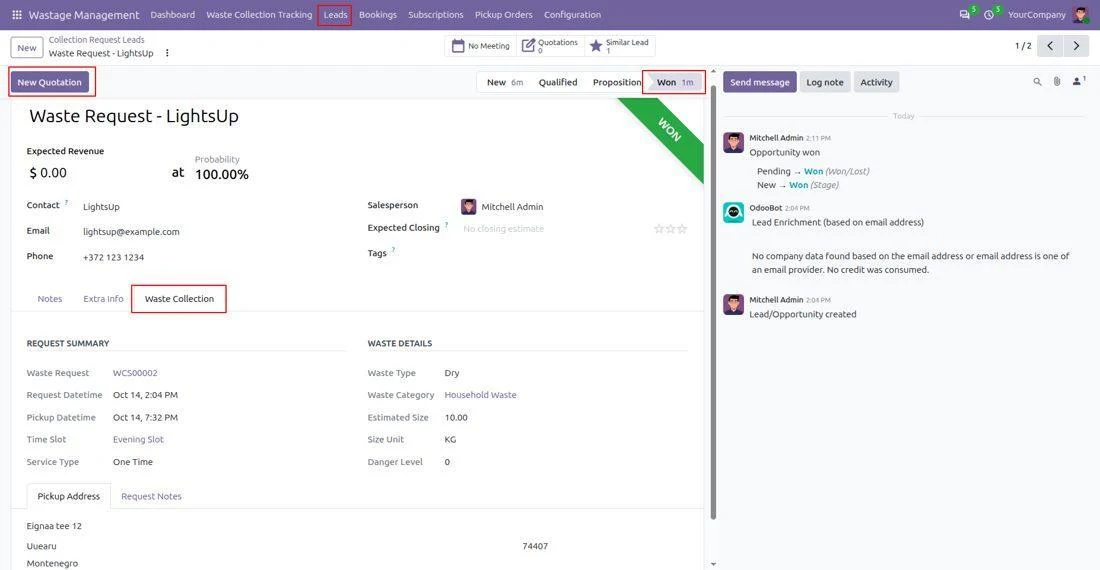
Menu path: Wastage Management > Leads > Open Lead > Waste Collection
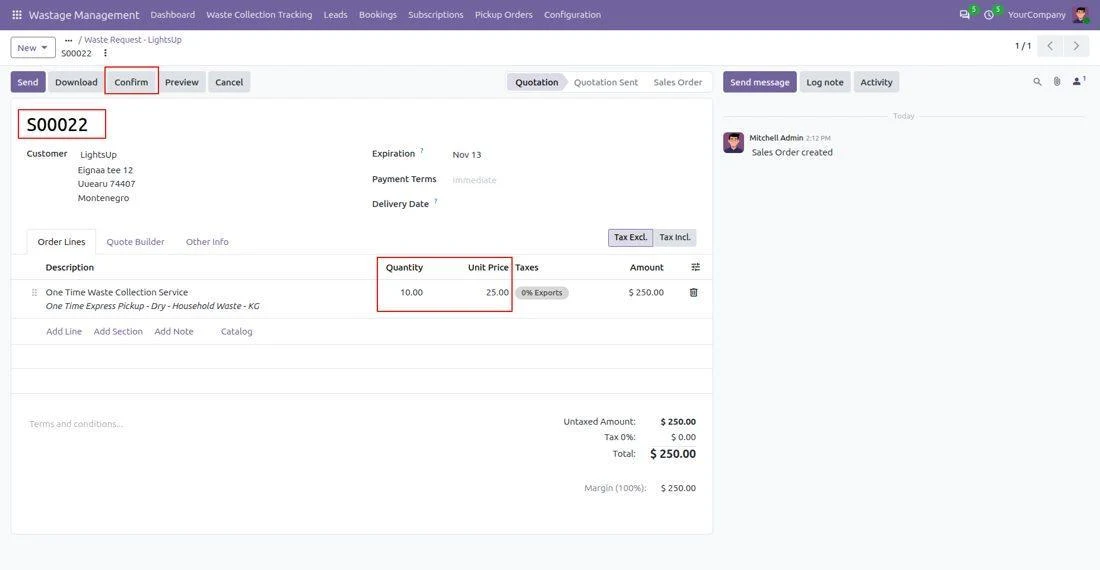
Menu path: Wastage Management > Leads > Open Lead > New Quotation
5. Booking Order
Once an opportunity has been labelled as ‘Won’, the ‘Create Booking Order’ function can then be accessed. This combines enquiry, customer, timing and lead data with sales order information. As soon as a booking order is approved by management, dispatch staff can then formulate a collection order so that drivers can carry out a collection.
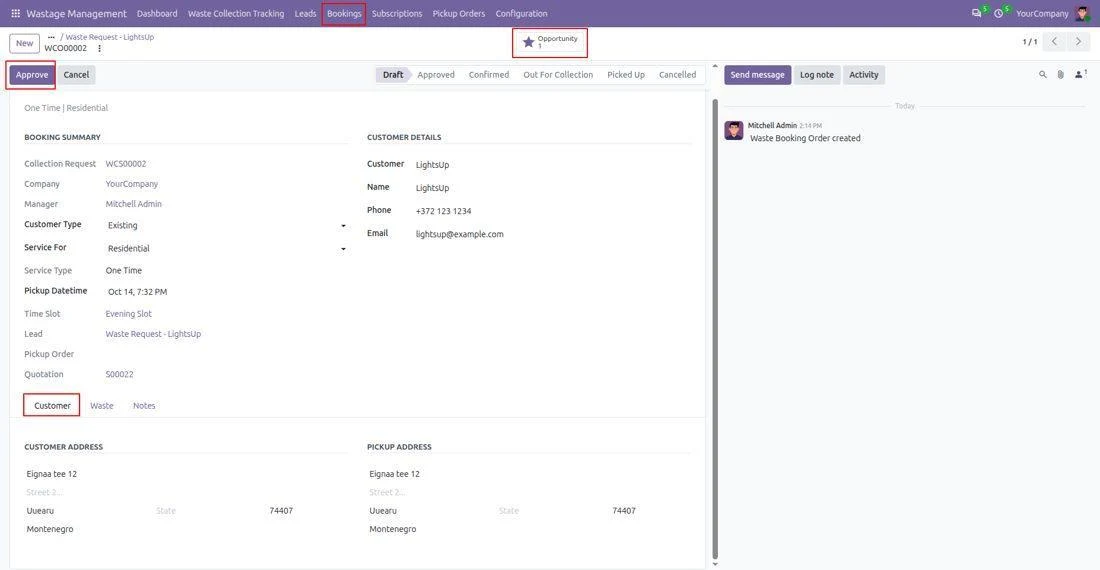
Menu path: Wastage Management > Bookings > Open Booking Order
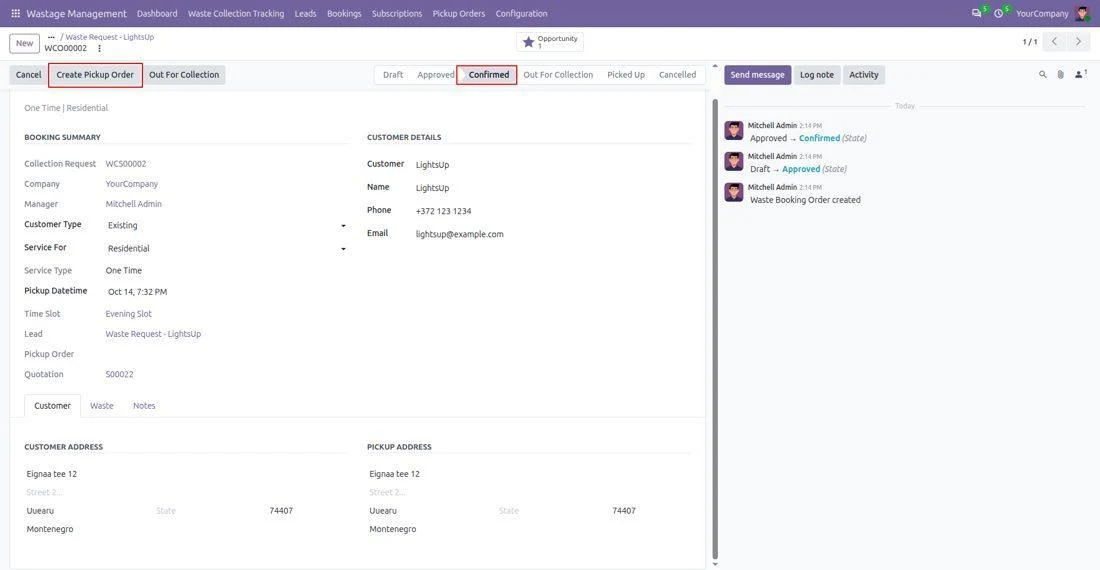
Menu path: Wastage Management > Bookings > Open Booking Order > Confirmed
6. Driver Job Sheets
A digital job sheet is generated from a booking order and given to drivers. It displays details of when, where and what is to be collected. Fleet managers can also allocate trucks and drivers and identify collection and delivery points. Initial odometer readings can also be documented. Pressing ‘Schedule’ updates an enquiry to both ‘In Progress’ and ‘Completed’. On completion of a customer's collection, Odoo automatically logs finishing times and the actual weight of waste. An open audit trail is also maintained using the chatter tool.
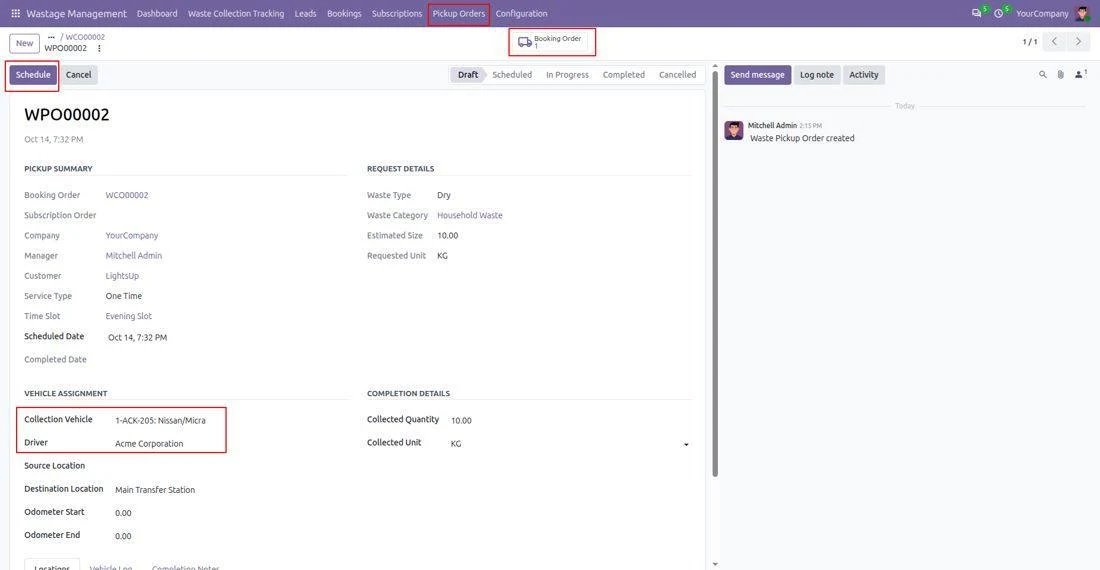
Menu path: Wastage Management > Collection Orders > Open Collection Order
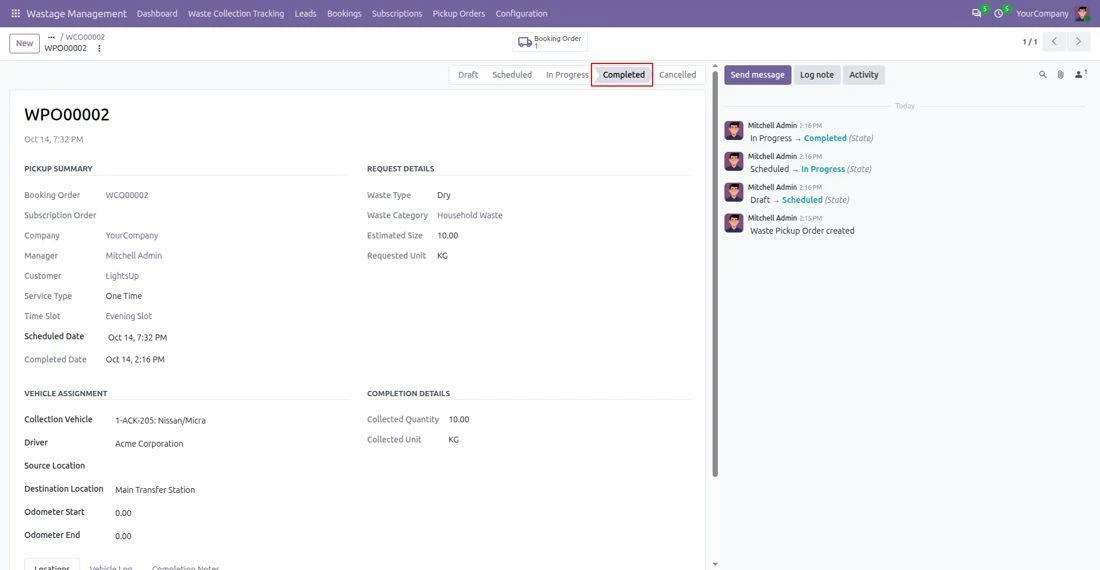
Menu path: Wastage Management > Collection Orders > Open Collection Order > Completed
7. Print Reports
Where hard copies are needed, you can print 3 key reports (Waste Enquiry Summary, Booking Order and Collection Order) from the Action menu. Drivers can use the collection order as formal proof of a customer's waste being collected. This details which drivers carried out a collection together with the collection route and initial and finishing odometer readings together with weights and additional comments.
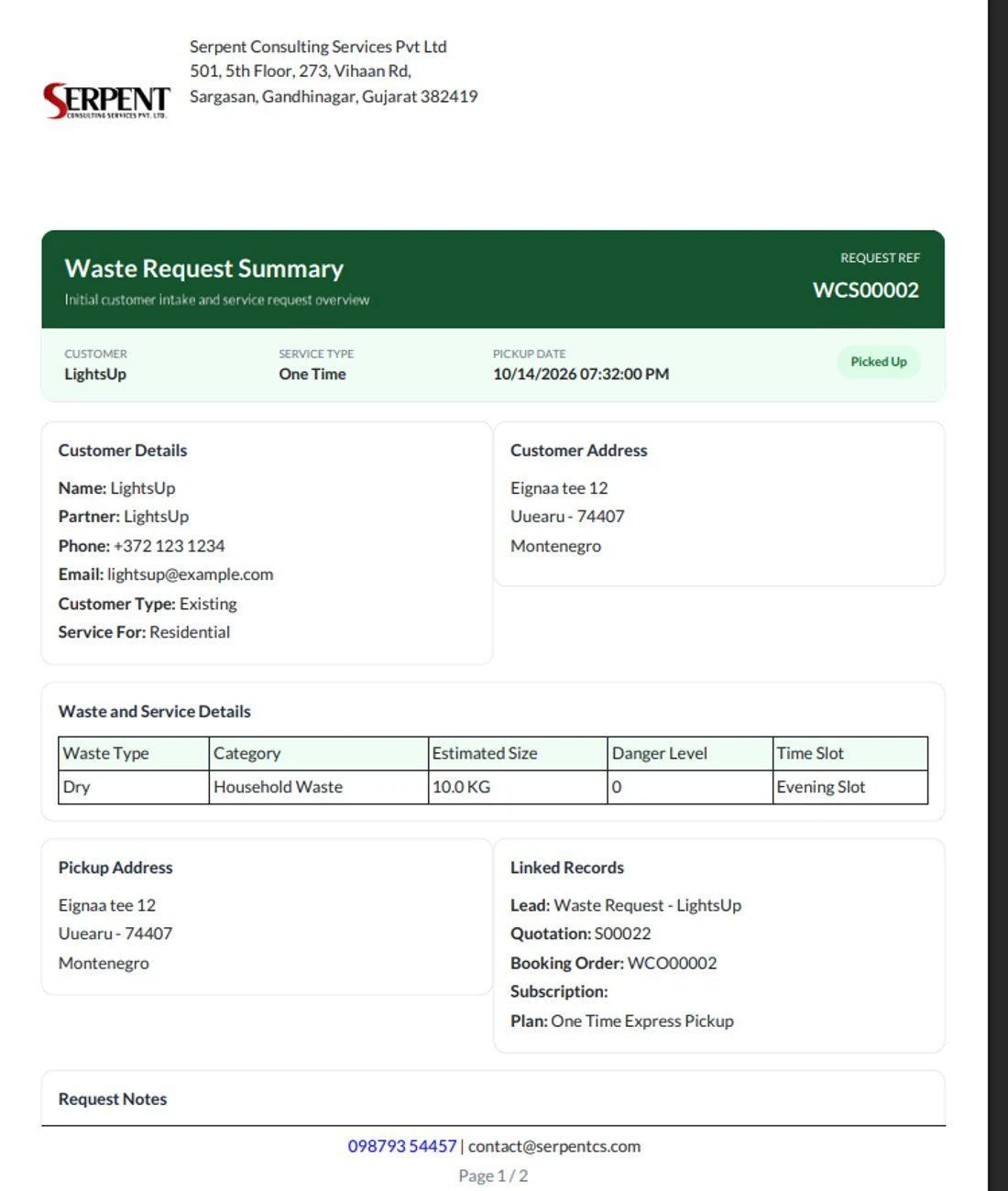
Menu path: Wastage Management > Waste Collection Log > Open Enquiry > Action > Waste Enquiry Summary
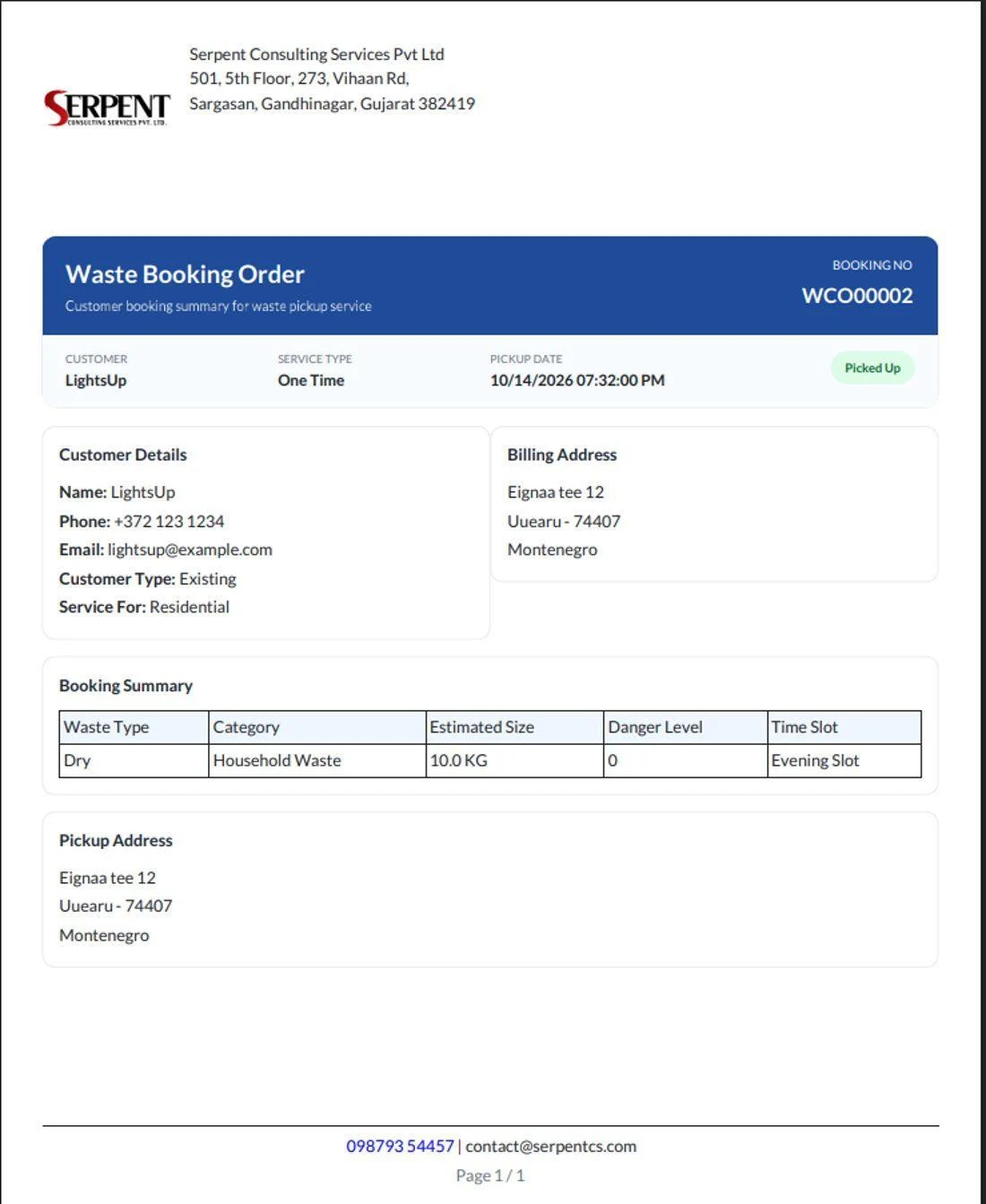
Menu path: Wastage Management > Bookings > Open Booking Order > Action > Waste Booking Order
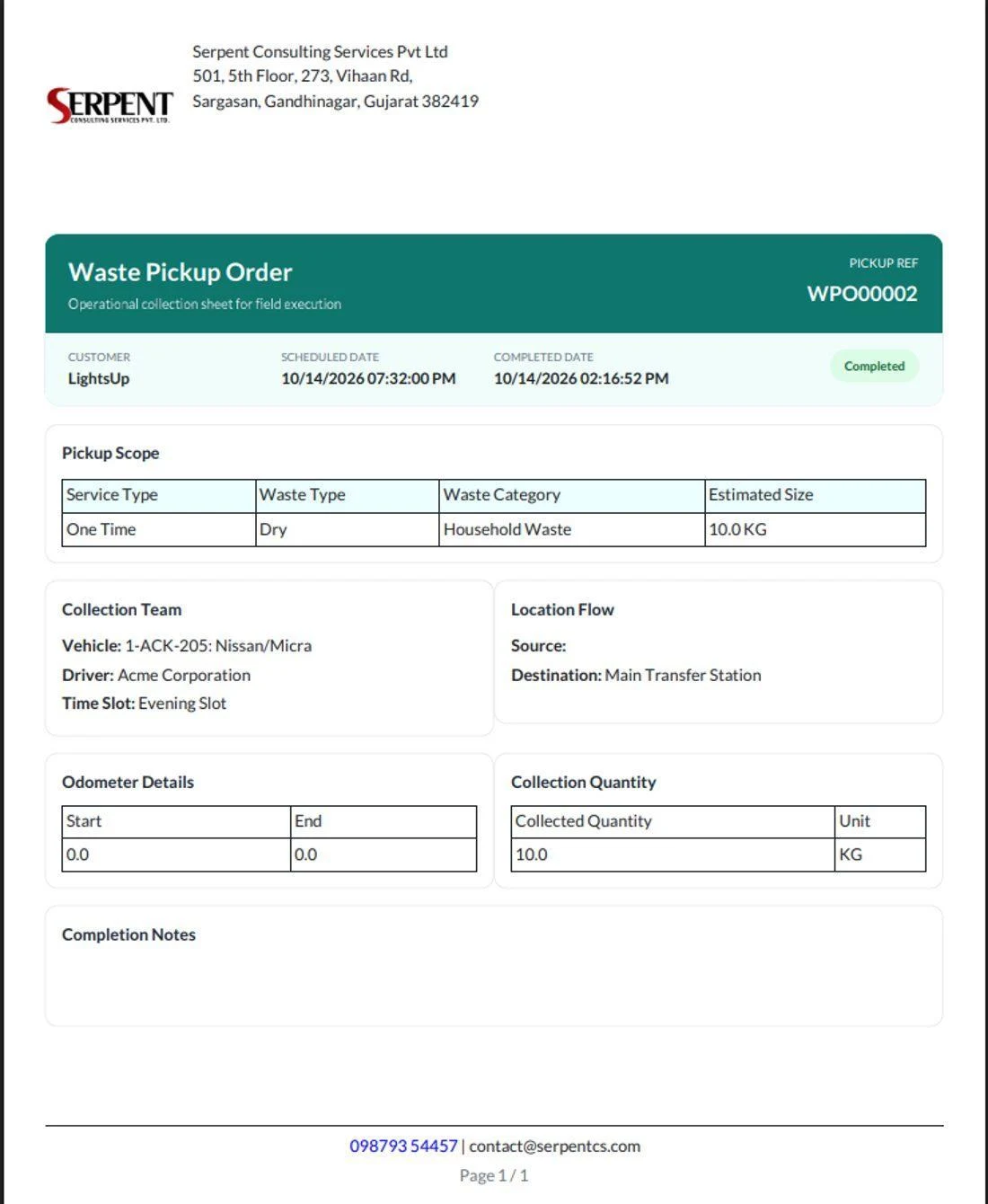
Menu path: Wastage Management > Collection Orders > Open Collection Order > Action > Waste Collection Order
8. Business Dashboard
Gain an overall picture of your business. Specific dates and/or areas can be filtered. Numerous essential metrics can be analysed such as Total Enquiries, Open Leads, Current Bookings, Active Subscriptions, Daily Collections and Total Waste Collected (KG). Graphic charts are also provided on a monthly basis showing trends, conversion rates, enquiry and order status’ together with principal waste types and customer groups. Consequently, you can effectively manage your business.
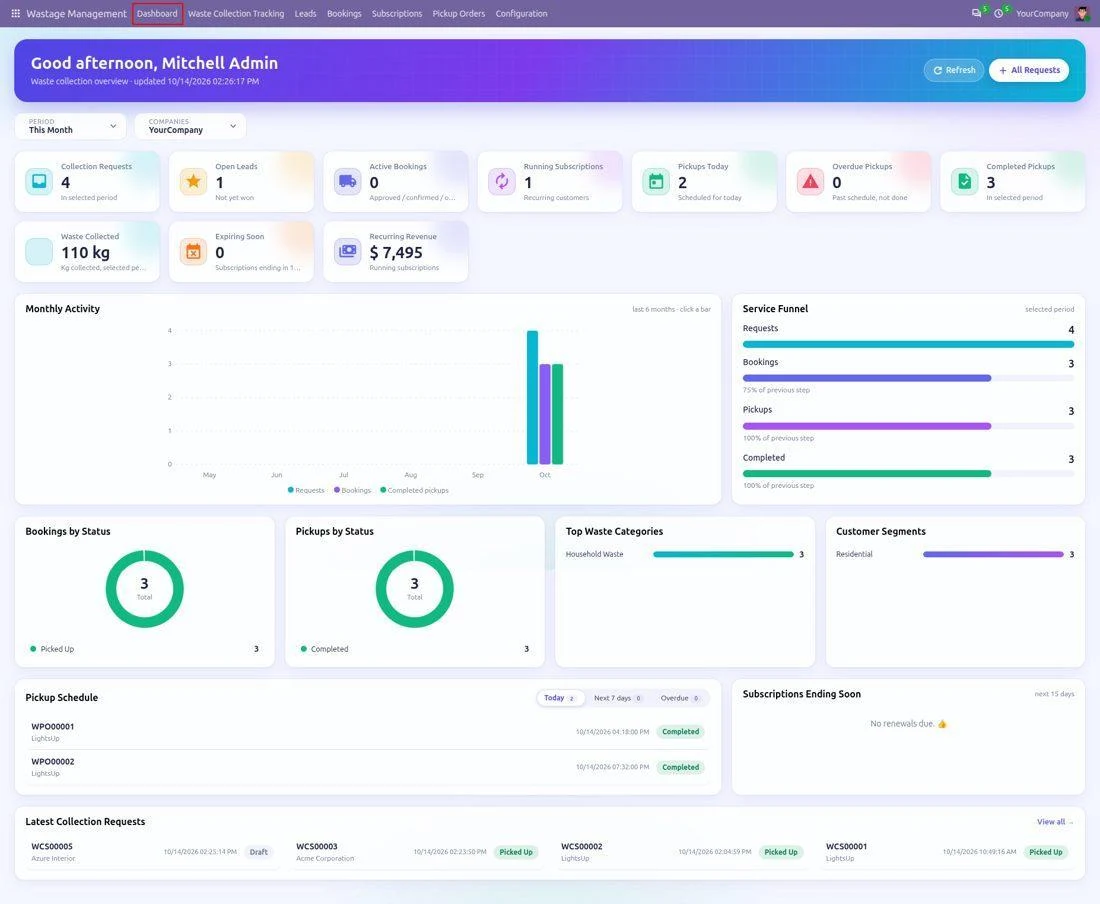
Menu path: Wastage Management > Dashboard
Subscription
Odoo particularly excels at managing subscriptions. Once a customer approves a subscription quotation, a live Subscription Order is generated in line with your Service Plan. Behind the scenes, every day automatic processes are in place to both generate subsequent subscription invoices and to schedule upcoming booking orders. At any point, managers can edit subscriptions by activating, deactivating, reserving and/or extending them.
Why use the Waste Collection Management System?
Customers benefit from an intuitive web enquiry form and customer portal. Back office staff also greatly reduce the time they spend as online enquiry details are automatically transformed into CRM leads (there is no need to manually type this in). Both one-off and subscription collections are managed in similar fashion. Drivers are provided with detailed job sheets showing collection routes and Waste Details. Moreover, management can efficiently manage the business by analysing data on the business dashboard and by printing reports.
Benefits
No Manual Data Entry: Online enquiry details are automatically changed into CRM leads, quotations and booking orders. Manual data entry is thus unnecessary.
Fast Dispatch: Following a customer agreeing to a quotation, ideal driver collection routes can quickly be planned. Customers thus suffer from little if any waiting times.
Automatic Subscription Billing: Subscriptions easily facilitate uniform billing for the whole business together with the generation of forthcoming booking orders. This prevents late and/or missed billing.
Easy Customer Access: Customers can themselves check the status of their booking orders and past enquiries using their portal. Consequently, your back office significantly reduces the number of customer related calls that it must answer.
Complete Business Management: You can immediately analyse information such as collection status, current subscription revenue and daily waste collection statistics all on your business dashboard.
FAQs
Yes. Customers can specify their address, waste type and preferred collection times via your website enquiry form. The system will then automatically log this information and create a CRM lead.
Yes. If customers wish to become subscription customers, Odoo will generate a Subscription Order. This will bill customers and automatically schedule future booking orders for each subscription period.
Yes. By editing the ‘Publish on Website’ function for certain times, you can effectively control when customers can book.
Mail, Website, Portal, CRM, Sales, Fleet and Accounting.
Unfortunately, the standard Odoo Online (SaaS) version does not permit the installation of custom or third party apps. Therefore, you will either need to run the system on Odoo.sh or on-premise (self-host).
All licences provide 30 days problem solving support together with 3 hours free initial set up support. If you require further customisation of the process, please email contact@serpentcs.com.
In Summary
Good waste companies typically exhibit good communication and effective management. However, if separate systems are used to manage customer enquiry, quotation, booking and dispatch, ineffectiveness can result. The aforementioned Odoo module successfully integrates all areas of a business so as to continue to satisfy customers, to ensure good sales performance and to allow drivers to stick to their schedules.
Would you like to explore how this may be applicable to your business and services?
Please contact us for a free consultation.
What you will get
Waste Collection setup
3 hours free initial set-up support
30 days problem solving support
Process customisation on request
Contact us View on Odoo Apps Store