

Orders for 10 boxes of fish arrive and are invoiced at 20kg. A warehouse scale reads 20.3kg. There is often some confusion as to what stock is really worth. This is a common problem if you trade in goods that are sold by weight and bought/sold in units, such as meat, cheese, fruit and rolls (to name but a few). The Smart Product Catch Weight for Odoo solution lets you set two quantities for a product; the normal unit quantity (10 Units) and the true weight quantity (20kg).
Weight can be added to purchase and sales orders and is then passed onto receipts, deliveries and invoices. It can be added to, and viewed in, lots and is also monitored for stock. Further add-ons mean that catch weight can also be used within replenishment, manufacturing and point of sale as well as stock valuation.
Overview
Item | Details |
Product | Smart Product Catch Weight (smart_product_catch_weight_inventory) |
Category | Inventory and Warehouse |
Modules integrated with | Sales, Purchase, Inventory and Invoicing |
Add-on modules | Replenishment, Valuation, Manufacturing (MRP), Point of Sale and All in One |
License | LGPL-3 |
Developer | Serpent Consulting Services Pvt. Ltd. |
Download from the Odoo Apps Store: Smart Product Catch Weight for Odoo
For Which Businesses?
Those in the meat, poultry and seafood sectors which buy and sell in cartons but invoice in kilos.
Dairy and cheese companies as each block can vary slightly in weight.
Fruit and vegetables businesses as fruit and veg can come in differently weighted crates.
Textile, metal and frozen food businesses which sell in rolls, coils and/or cartons and charge for by weight.
How Variable Weight Businesses Lose Out
Stock is measured in units but invoiced in kilos.
True weights are noted on paper but are not inputted into Odoo.
Customers are charged for an estimated weight rather than that of the dispatched stock.
Physical stock checks are conducted in units meaning that any weight loss goes unnoticed.
Neither delivery notes nor invoices display a weight.
With this module, both the unit and weight quantities are displayed together on all documents.
How It Works
Product
Enable Catch Weight Product and select a Catch Weight UoM, e.g. kg.
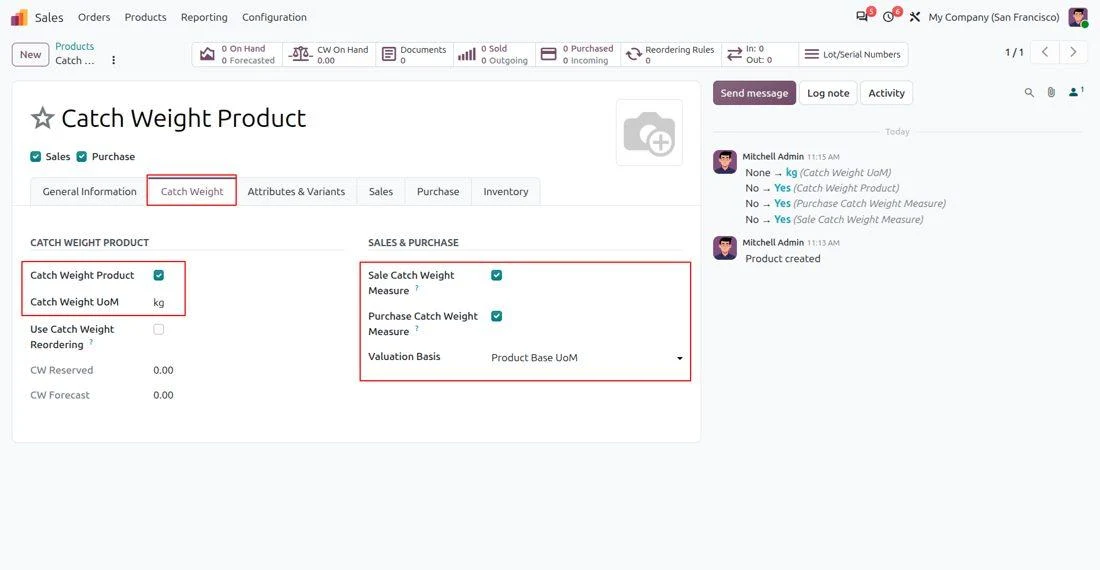
Menu path: Sales > Products > Products > Catch Weight Product > Catch Weight tab
Purchase
Add the product with a quantity and associated weight (approx 2kg/unit). Once the purchase order is confirmed, the weight is added to the receipt automatically. The purchase order can also have a Catch Weight column printed by enabling the Print Catch Weight Details box.
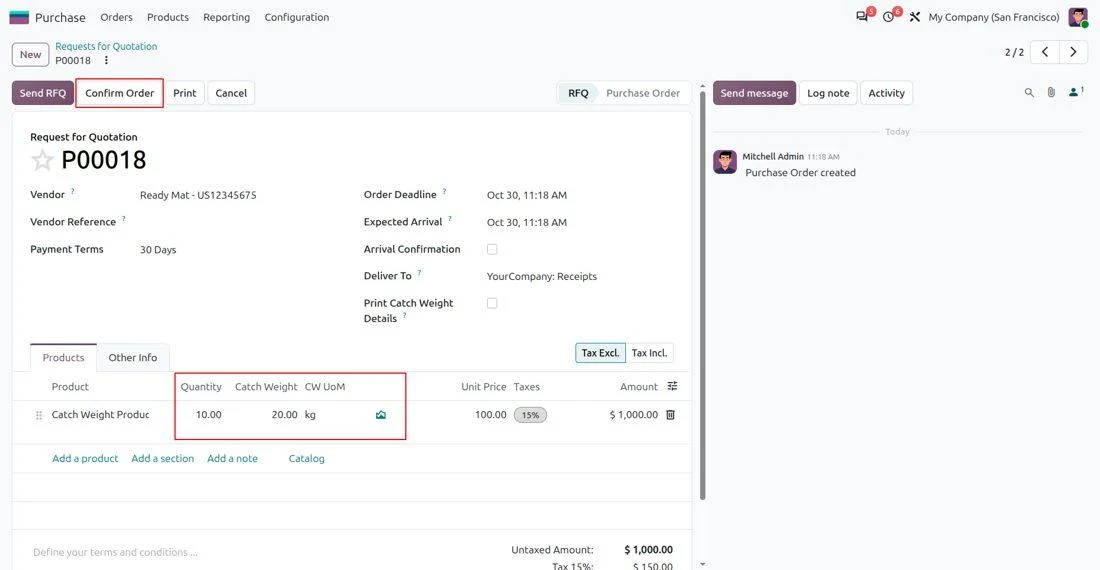
Menu path: Purchase > Orders > Requests for Quotation > New
Receipt
Whilst the receipt displays pre-populated Demand CW, warehouse operatives can manually input a lot number and true weight for each line. The receipt’s Done CW is simply the sum of the Actual CW figures for each lot. Should a lot weigh 24.6kg (rather than the expected 25kg), this figure is inputted and is what is used for stock.
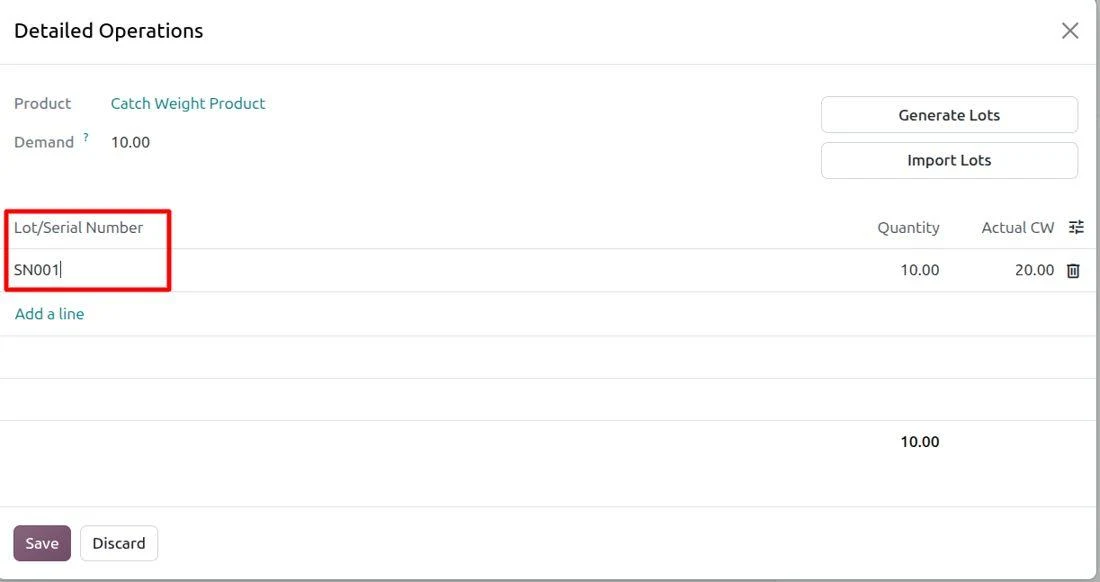
Menu path: Receipt > Operations tab > Details
Stock
Post-validation, a product’s On Hand and CW On Hand quantities are displayed. For instance, 10 Units and 20kg. Within the Physical Inventory function, the same data can be seen for each lot. True catch weights can also be inputted during physical stock checks. This allows for variation in weight to be amended without affecting unit quantities.
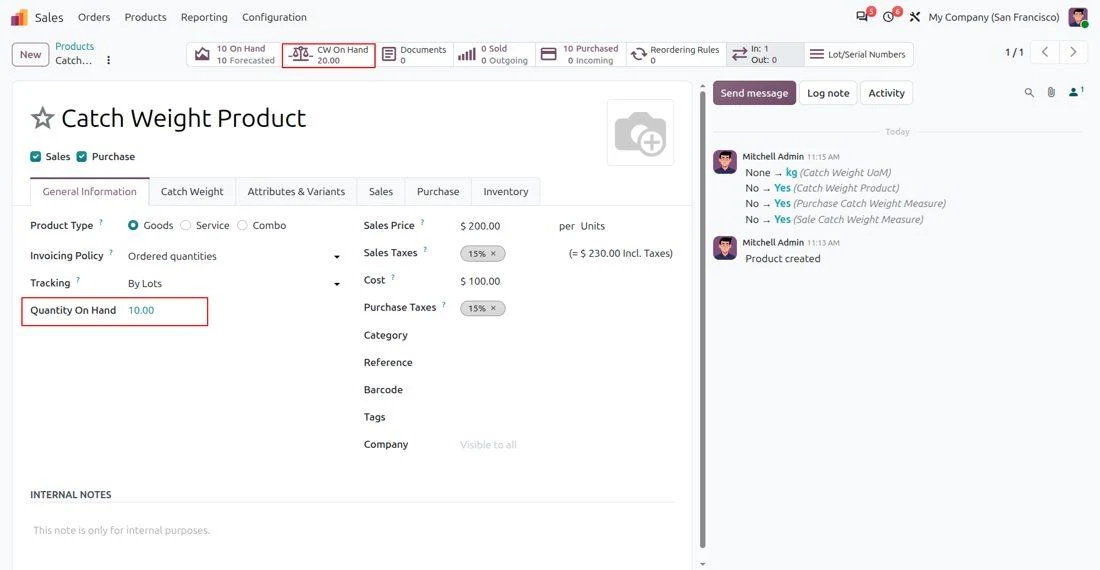
Menu path: Sales > Products > Products > Catch Weight Product > CW On Hand
Sales
Add the product with a quantity and weight (for example, 2 units and 4kg). As usual, the line price, tax and margin are calculated correctly. The sales order’s weight is then replicated onto the delivery as its Demand CW. Within the delivery’s Detailed Operations, a lot can be selected and the Actual CW altered if the dispatched stock differs from that ordered. Post-validation, the product’s On Hand and CW On Hand quantities are reduced by 2 units (to 8) and 4kg (to 16kg) respectively.
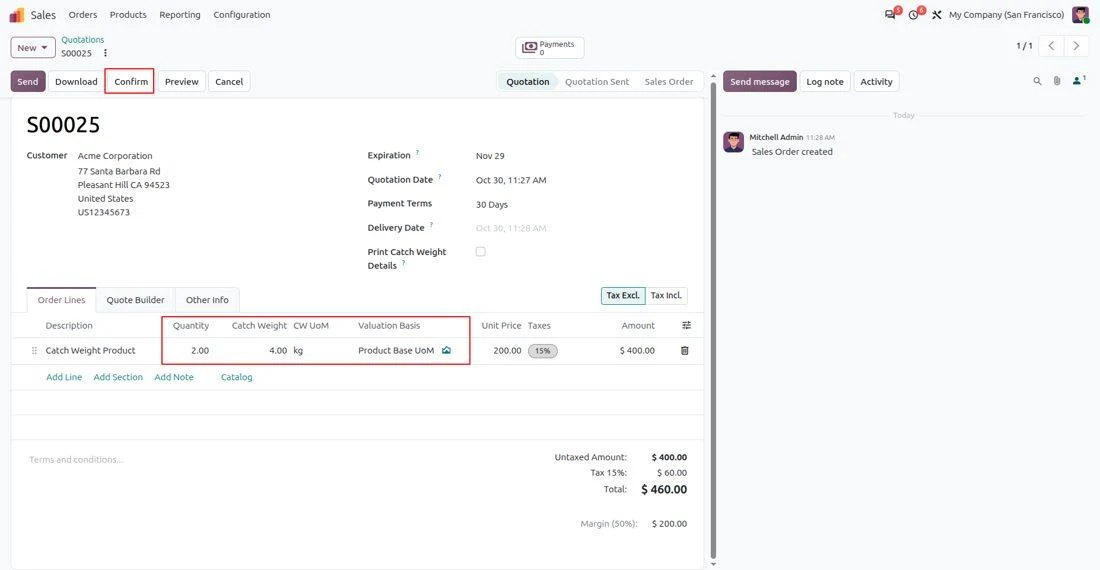
Menu path: Sales > Orders > Quotations > New
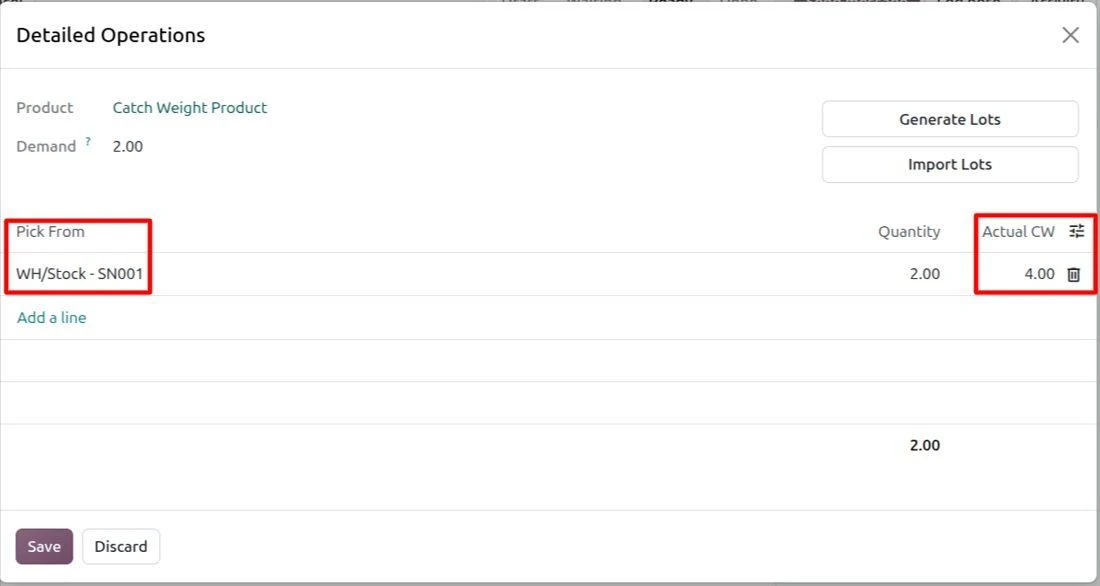
Menu path: Delivery > Operations tab > Details
Invoice
As with the sales order, the customer invoice includes both the unit and catch weight information. Customers can therefore compare the weight for which they have been charged with that of their dispatch. Weight can also be printed on purchase and sales orders, picking operations, delivery notes and invoices. Furthermore, the Picking Operations report includes a barcode for each lot.
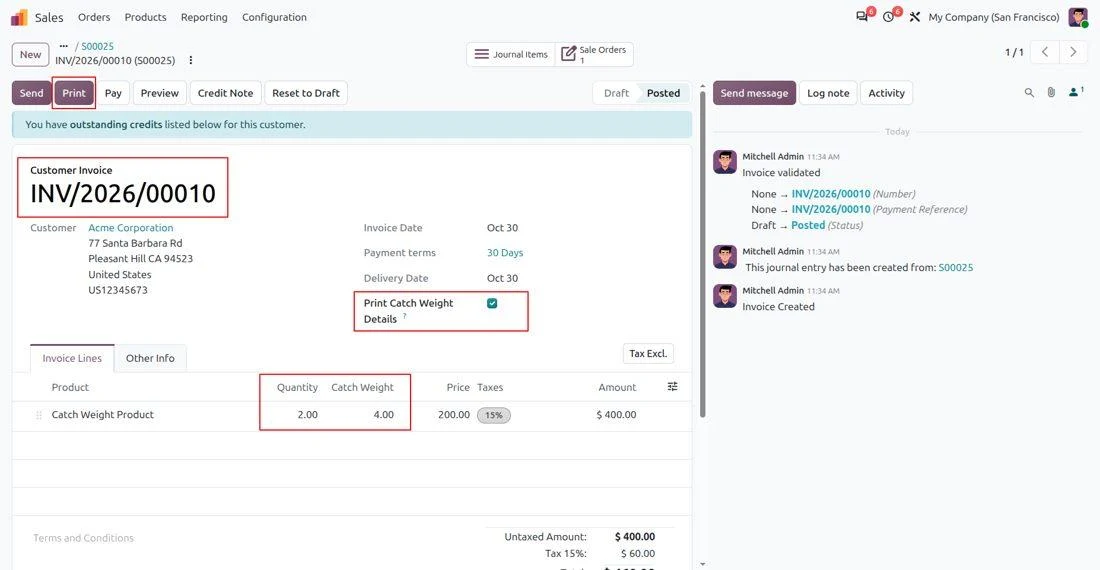
Menu path: Sales > Orders > Create Invoice
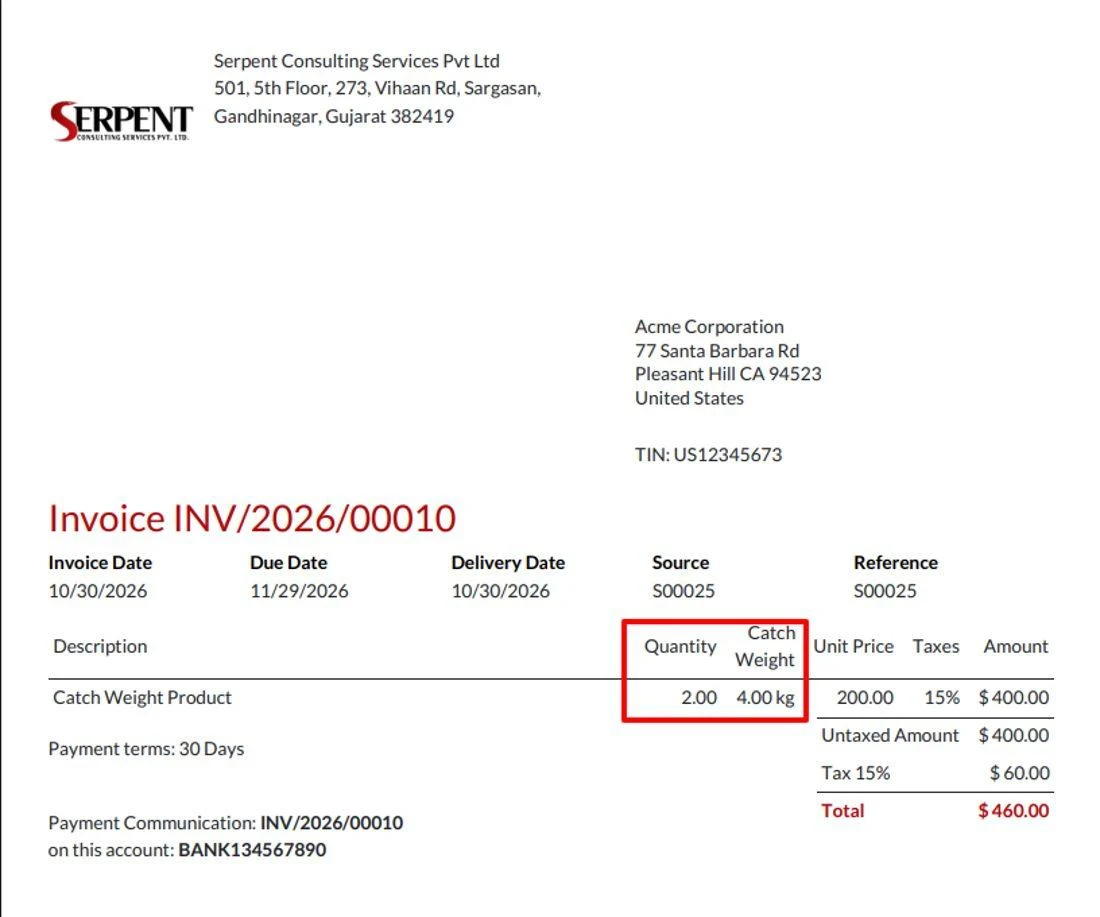
Menu path: Sales > Orders > Invoices > Print > Invoices
Returns and Reports
The return wizard recognises catch weight. Full returns maintain the original unit and weight quantities. Partial returns scale the weight accordingly. Sales Analysis and Purchase Analysis reports include a Catch Weight Products filter. These can then be sub-grouped by catch weight product and UoM to easily identify weighted products.
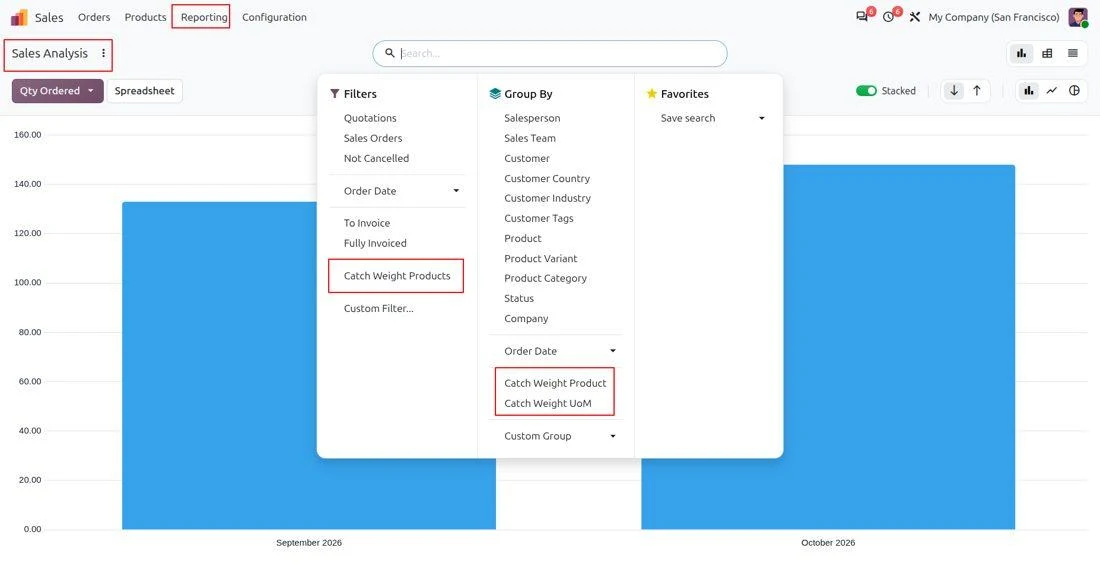
Menu path: Sales > Reporting > Sales Analysis > filter drop down
Further Add-ons to Support Catch Weight
Whilst the core module supports purchase, stock, sales and invoicing, further add-ons can be used if your business also engages in replenishment, manufacturing and/or till sales.
Replenishment based on Catch Weight
Following selection of a Catch Weight UoM and an average base unit catch weight, monitor CW On Hand, Reserved and Forecast quantities. CW Min and Max can be configured and the To Order quantity is calculated based on the weight forecast. Standard Min/Max functionality still applies for non-catch-weight products.
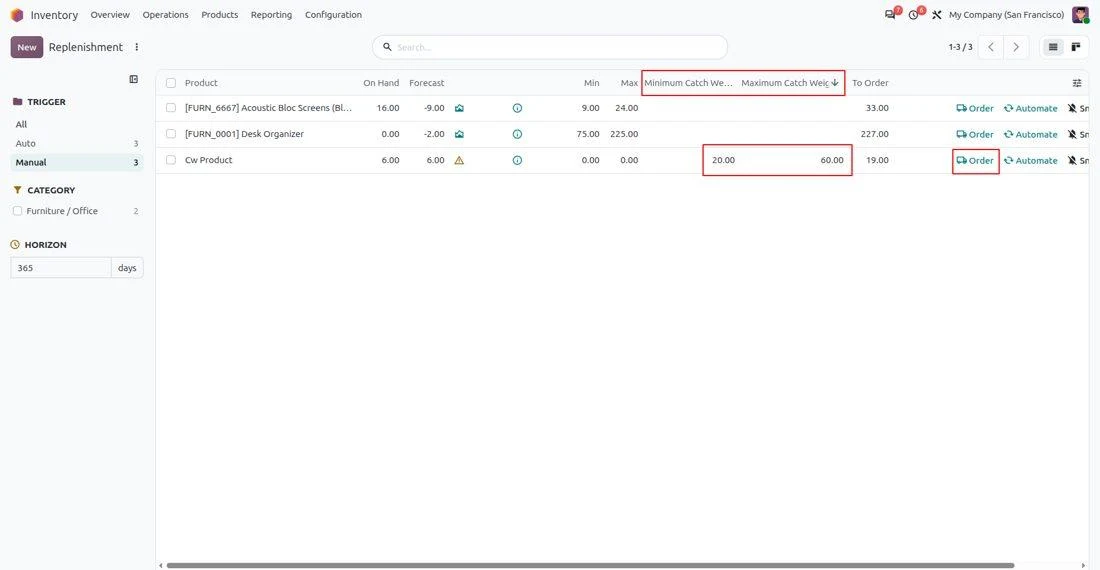
Menu path: Inventory > Operations > Replenishment
Valuation based on Catch Weight
Select either Product Base UoM or Catch Weight UoM as the valuation method for each product. Should catch weight be chosen, purchase cost, stock value and sales values are affected by the true weight. For example, if 4 units (10kg) are purchased for $300 per kg, the sales invoice will be for $3,000. Dispatched stock will then be shown as 10kg. This method of valuation is also displayed as a read-only box on the sales order line for reference.
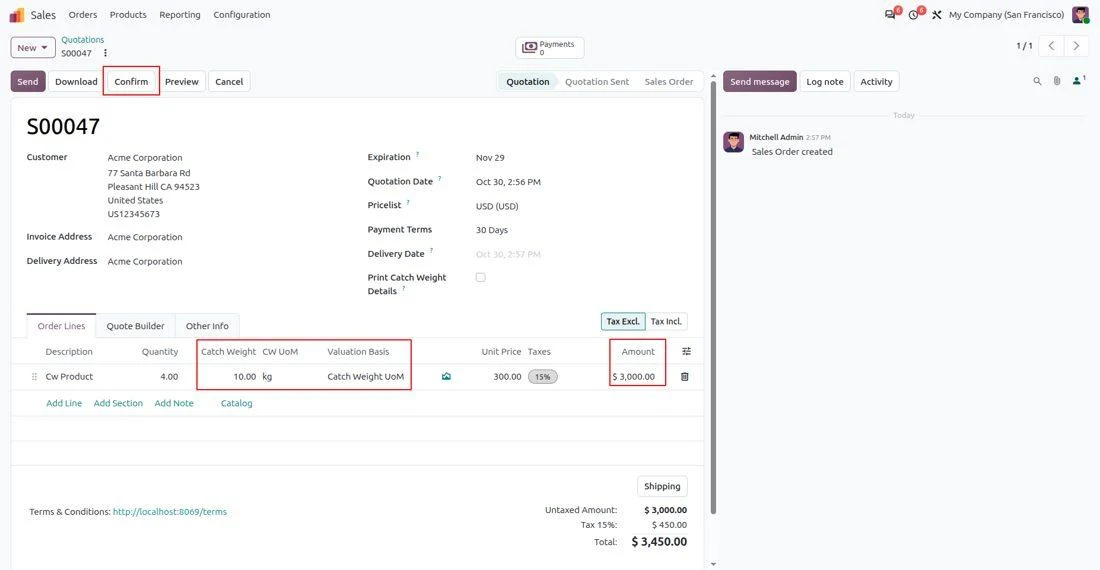
Menu path: Sales > Orders > Quotations
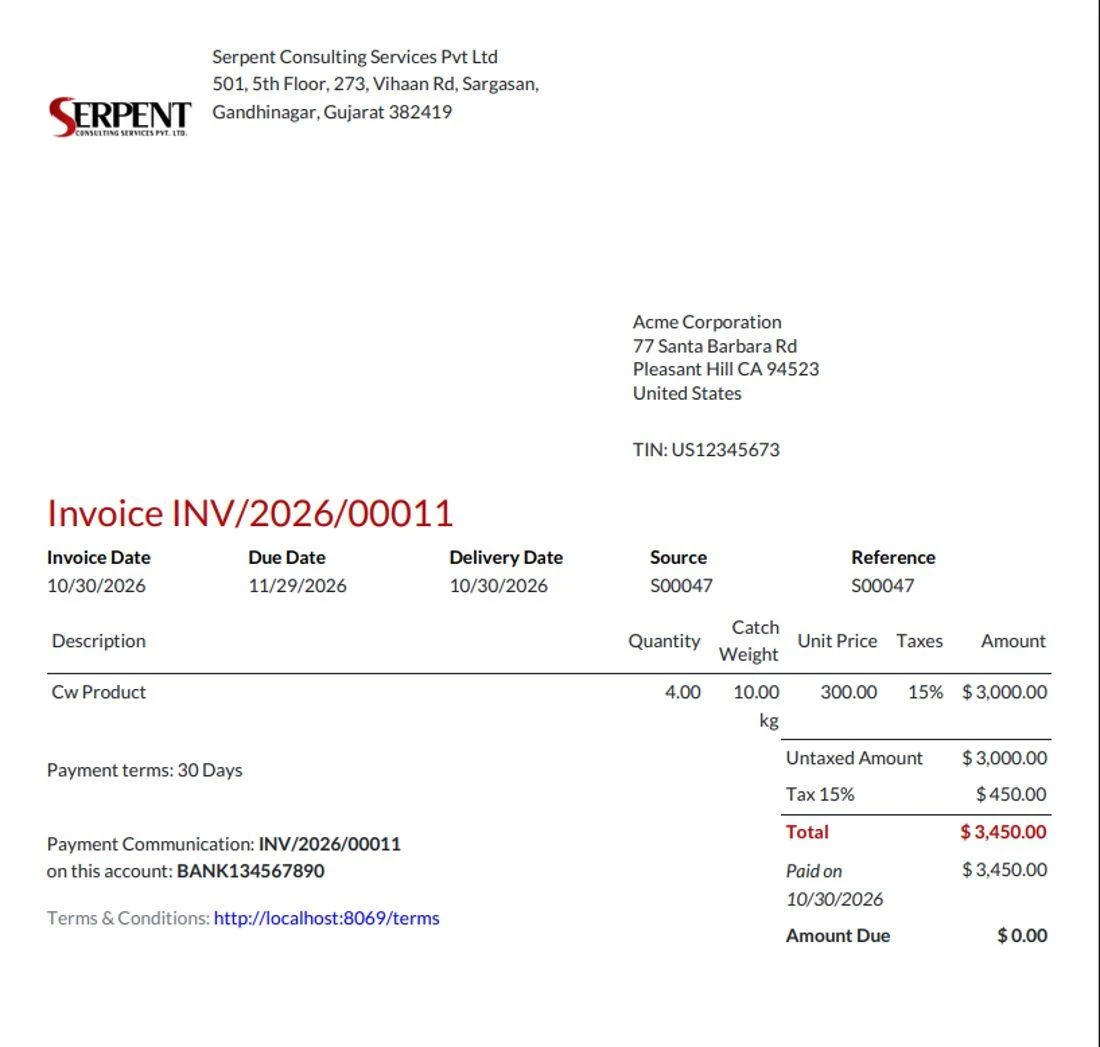
Menu path: Customer Invoice > Print
Manufacturing
Input component catch weights into a Bill of Materials. Odoo then calculates To Consume CW based on the Manufacturing Order quantity. As production occurs, the Consumed CW is monitored. Finally, the Produced CW is inputted. This is then spread across the move lines of the finished product and into stock.
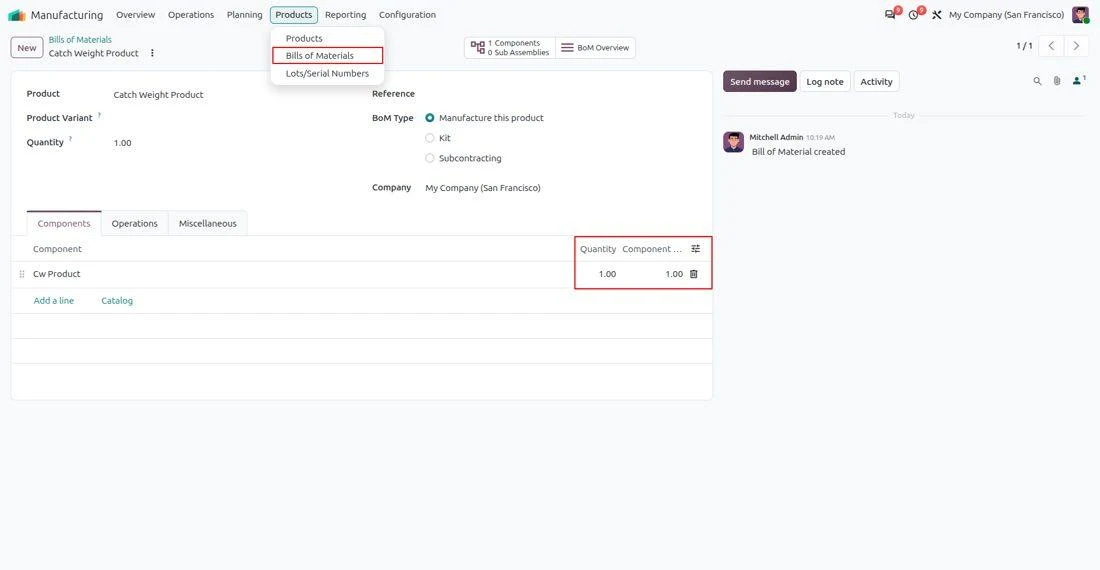
Menu path: Manufacturing > Products > Bills of Materials > Components
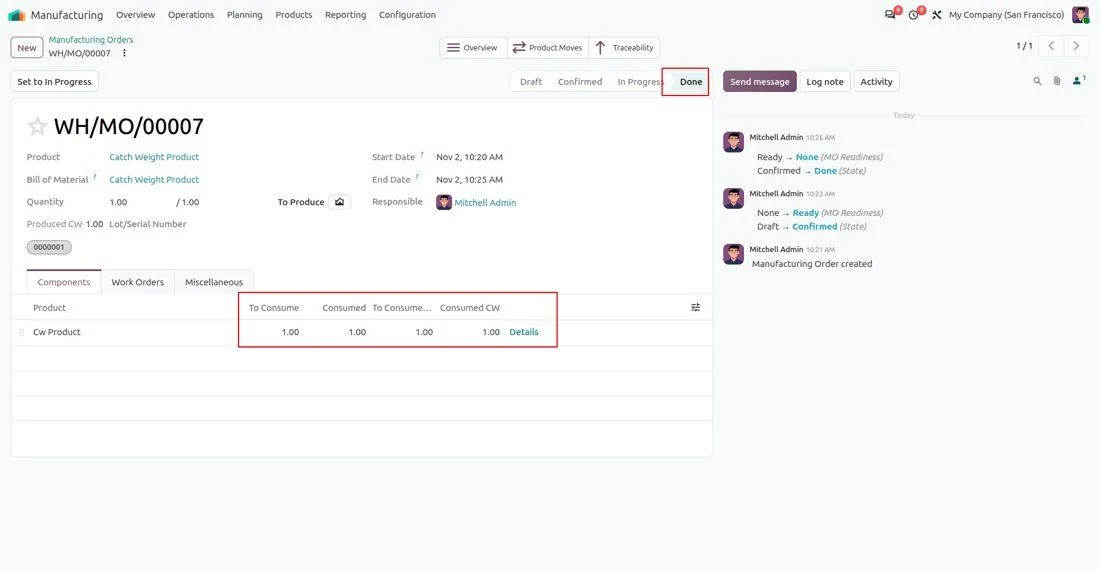
Menu path: Manufacturing > Operations > Manufacturing Orders
Point of Sale
A specific ‘Enter Catch Weight’ screen with a numeric keypad is used at the till to input a stock item’s true weight. Sales can then be charged for either the Product Base UoM or Catch Weight UoM. Weight details are printed on the sales receipt and are then passed to stock movements and invoices. Partial sales refunds also scale the catch weight.
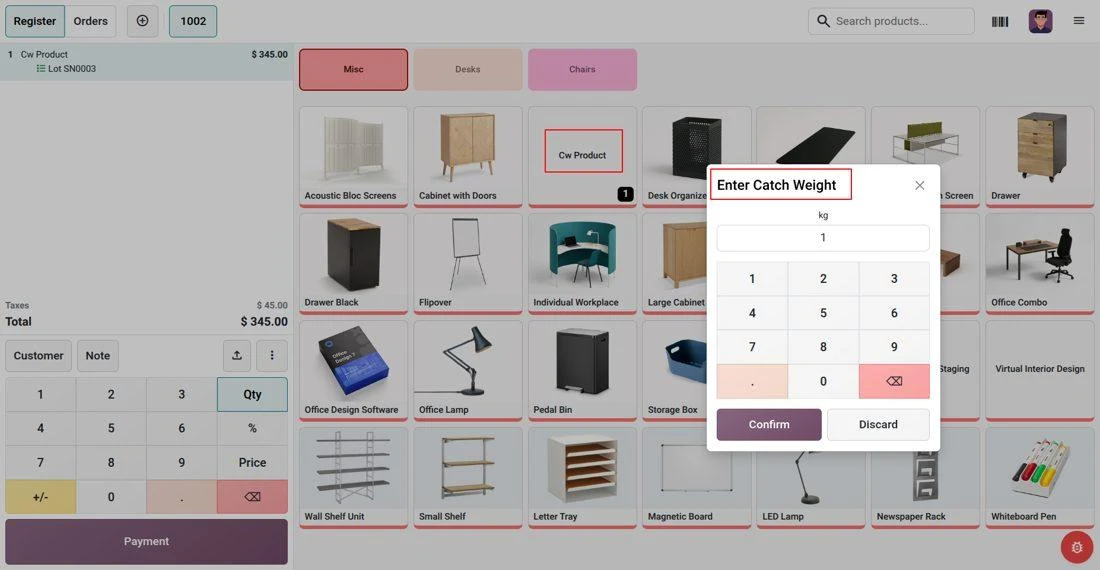
Menu path: Point of Sale > Active Session > Select Catch Weight Product
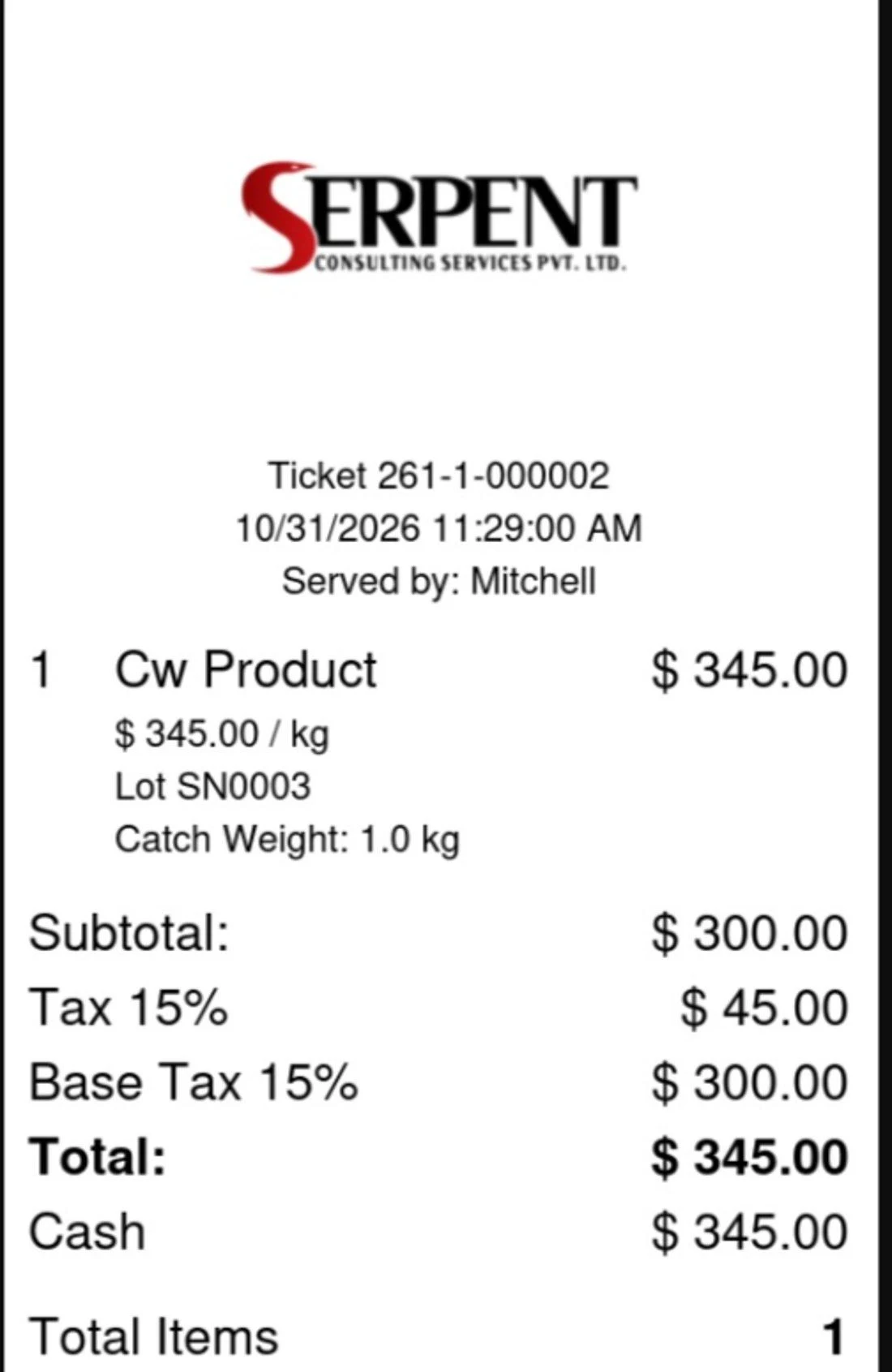
Menu path: Point of Sale > Orders > Open POS Order > Download Receipt
All in One Suite
If you wish to install just one module, the Smart Catch Weight All in One suite bundles the core and add-ons together. Alongside, it also integrates Website Sale, Barcode, Batch Picking and India GST functionality, so separate installations are not required.
Module | Additional Functionality |
Smart Product Catch Weight Core | Enables dual quantity tracking for sales, purchase, stock, returns, invoicing and reporting. |
Replenishment | Enables CW Min/Max and reorder functionality based on forecasts. |
Valuation | Lets products be valued and charged out using either Product Base UoM or Catch Weight UoM. |
Manufacturing | Includes component and produced catch weights within Bills of Materials and Manufacturing Orders. |
Point of Sale | Facilitates entry of, and charging for, stock items by weight. Receipts, and partial sales refunds, are also supported. |
All in One | Provides all the above functionality in one place. |
Benefits of Using Smart Product Catch Weight
As unit and weight quantities are displayed together, there is no requirement to manually convert between them. Nor is a further spreadsheet needed. True weights are inputted for stock items at the point of dispatch or receipt meaning that your stock and invoicing data accurately reflects what has been dispatched/received. Sale and Purchase Catch Weight Measure functionality is separate so products can be either weight or unit bought and/or sold.
Non-catch-weight products continue to operate in a wholly typical manner. Rather than creating new boxes, the native Delivered, Invoiced, Received and Billed fields are utilised within the core module. Should your business develop to include manufacturing, point of sale and/or weight-based valuation, relevant add-ons are available for implementation.
FAQs
No. Products can be individually enabled for catch weight. Non-catch-weight products continue to operate in the usual Odoo manner.
Yes. As previously mentioned, the Sale and Purchase Catch Weight Measure functionality is separate so products can be set to be bought and/or sold in either weight or units.
True weights are inputted in the receipt and/or delivery Detailed Operations. For each line, a lot number and true weight must be provided.
Yes. The return wizard acknowledges catch weight. Partial returns scale catch weights.
No. External applications cannot be installed on Odoo Online. Instead, Odoo.sh or an on-premise installation should be used.
30 days post-purchase bug solving support is provided. Additionally, up to 3 hours’ free configuration support is available. For bespoke developments, please email contact@serpentcs.com.
In Summary
As often, businesses measure and sell goods in differing units, so a single quantity will never be fully accurate. By displaying both unit and true weight information together, from purchase order through to invoice, uncertainty is eliminated. Consequently, your stock, invoicing and reporting data will consistently reflect reality.
Would you like to view this for your own products?
Please contact us for a free consultation.
What you will get
Catch Weight configuration
3 hours free configuration support
30 day bug solving support
Bespoke development on request
Contact us View on Odoo Apps Store