As well as organising the transport of goods, freight forwarders manage customer orders and freight information. Alongside customs and customer and supplier billing, this information can become fragmented and so it can become difficult to understand where freight has been sent and assess its profitability.
Odoo’s Freight Management System can successfully manage the above. It can organise air, sea and land freight. Shipments can be generated from sales and/or purchase orders. Shipping routes can be monitored. Billing and invoicing information can also be examined.
Overview
Item | Details |
Module Product | Freight Management System including Direct, House and Master Shipments (scs_freight) |
Sector | Transport |
Delivery | Air, Sea and Land |
Integrated With | Invoicing, Sales, Purchase and Website |
Licence | LGPL-3 |
Developer | Serpent Consulting Services Pvt. Ltd. |
Who Would Benefit from This?
Those who book Direct and/or House group freight for customers.
Those who group customers’ freight onto one supplier booking.
Logistics businesses delivering freight by air, sea and/or land and wishing to have a central source of information.
Import and Export departments wanting to link freight to sales and/or purchase orders.
Common Freight Issues
Even when sales and/or purchase orders exist, information often needs re-entering.
It can be difficult to ascertain the shipping route taken for freight.
Often issues are only realised after speaking to customers.
Assessing supplier shipping charges and multi-customer billing can occasionally also present difficulties.
Staff frequently spend time responding to customer queries regarding the delivery location of freight.
Direct, House and Master Shipments
Three shipment types are included. Within a group, house shipments relate to a customer. Supplier shipping routes and charges are linked to a master shipment.
Shipment Type | Description |
Direct | An individual customer shipment. There is no master shipment. Particular shipping, billing and invoicing information relates to this shipment. |
House | A sub-shipment of a master shipment. It is also a customer shipment. Customer billing and shipping information is relevant. It shares a shipping route with the master shipment. |
Master | The supplier booking containing several house shipments. It manages shipping routes and shipping charges. Only supplier billing relates to it. |
Functionality
Generate Shipments: Shipments can be both manually and automatically produced from recognised sales and/or purchase freight orders.
Set Information: Shipping destinations and involved parties can be established. Incoterm, shipping and freight information can also be set.
Confirm: Information is analysed and if no shipping route has been entered a primary one is automatically generated.
Dispatch: Disposal of parts of a shipping route can then occur. Automatic shipping tracking information is produced.
Invoice and Bill: Customer billing and supplier invoices can then be generated.
Analyse: Expected and actual customer billing and shipping charges can be analysed. Margins can also be assessed.
Key Functionality
1. Input Freight Information
Trading partner information can be input. This can then be specified for air, sea and/or land shipping.
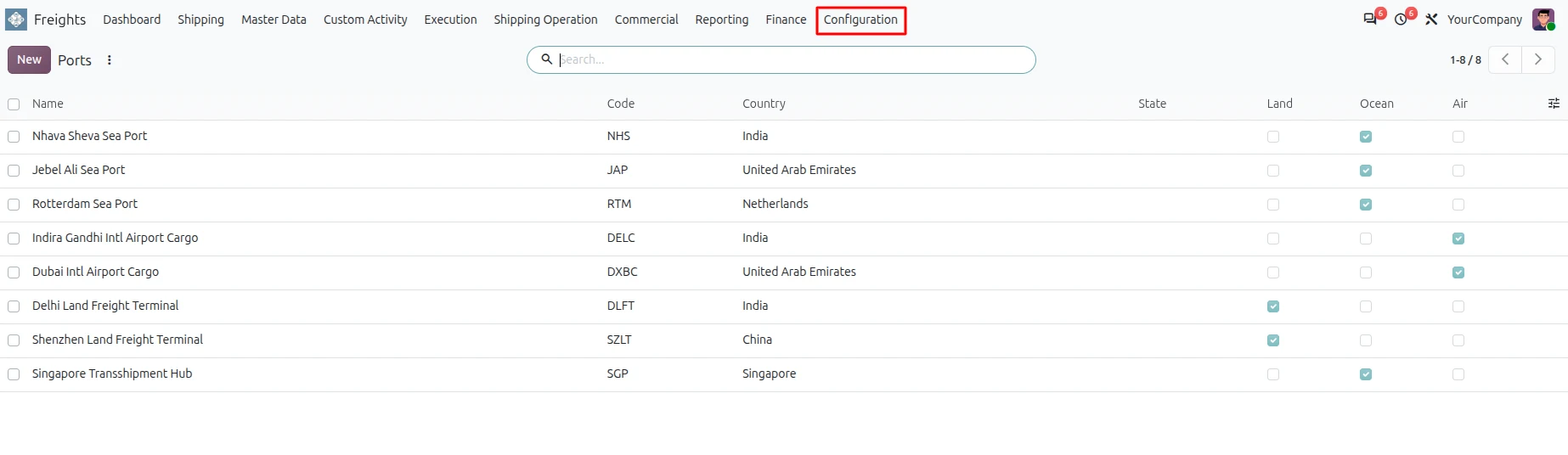
Menu path: Freights > Configuration > Locations
Particular transport pricing can be input for air, sea and/or land shipping in each direction. Billing can be calculated by weight, volume and/or service. Partner, origin and destination ports and dates can be added to pricing. A minimum price can also be defined.
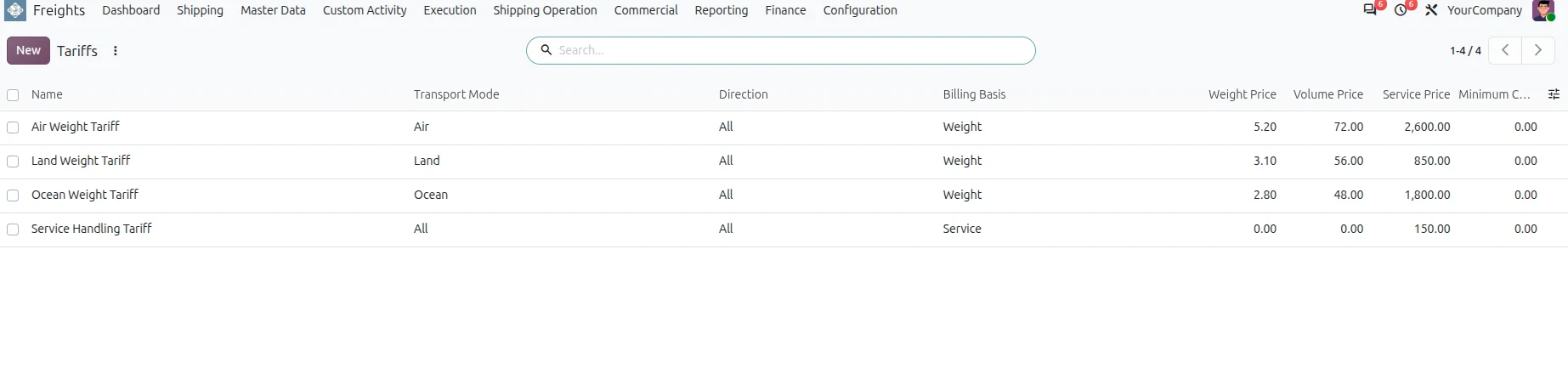
Menu path: Freights > Configuration > Tariffs
Vessels, aircraft and containers can be inputted within Configuration. Further container information such as maximum weight and volume can additionally be provided.
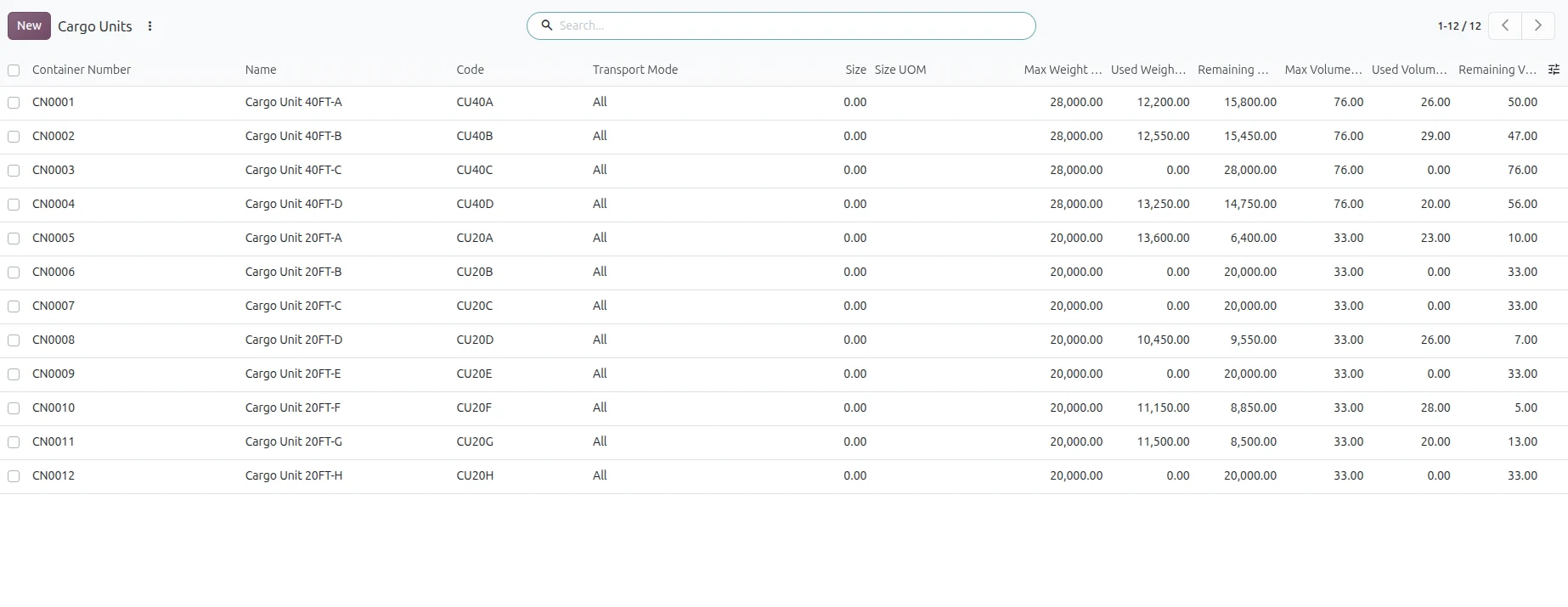
Menu path: Freights > Configuration > Containers
2. Generate Shipments from Sales and/or Purchase Orders
Sales and/or purchase orders can be recognised as freight orders. Shipping information is then inputted in the Freight tab. Upon order confirmation, a shipment is automatically generated. Export shipments are generated from sales orders and import shipments from purchase orders. Sales orders can then be forwarded to jobs using ‘Open Freight Shipment’.
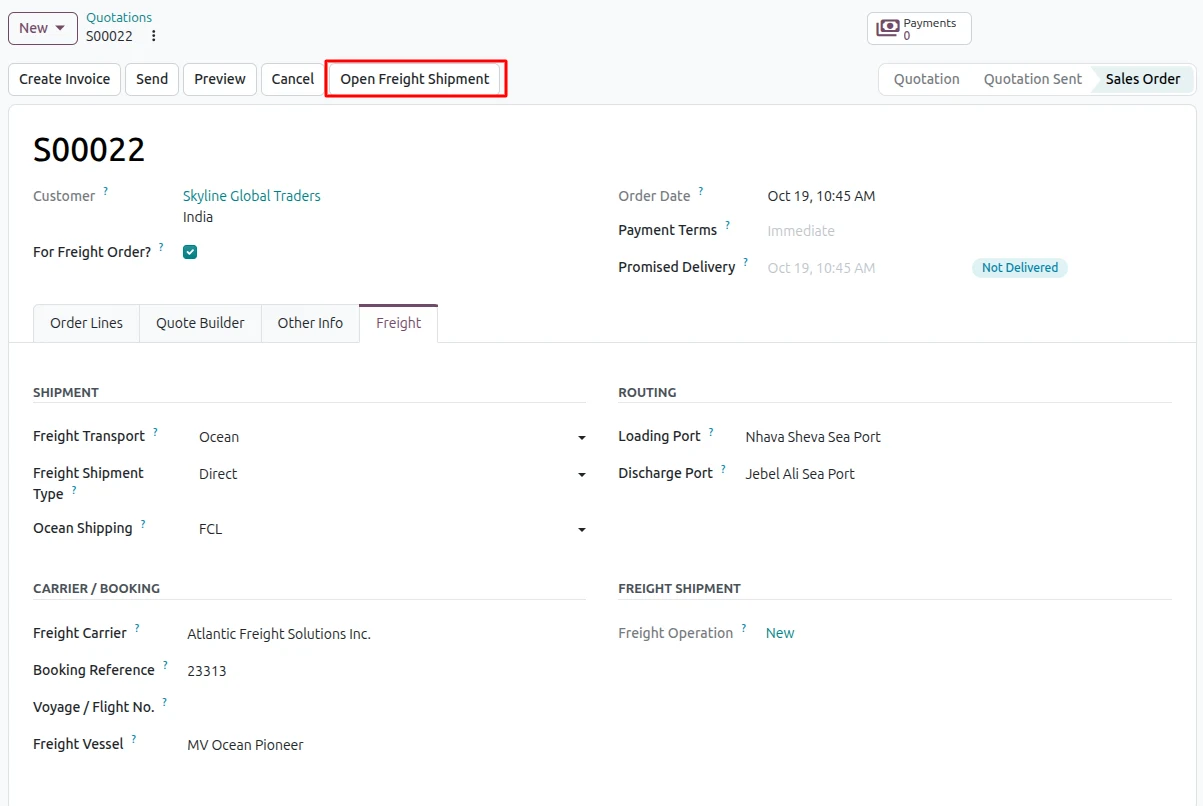
Menu path: Sales order > Freight tab > Open Freight Shipment
3. Input and Confirm Shipments
Further shipment information such as Incoterm, agent, freight and gross weight can be inputted. This information is then analysed and verified by selecting Confirm. For example, origin and destination ports cannot be identical. Freight is also analysed to ensure that it complies with a container’s weight and/or volume allowance for sea and land shipping. Units are allocated to shipments for Full Container Load (FCL) and/or Full Truck Load (FTL) shipping bookings.
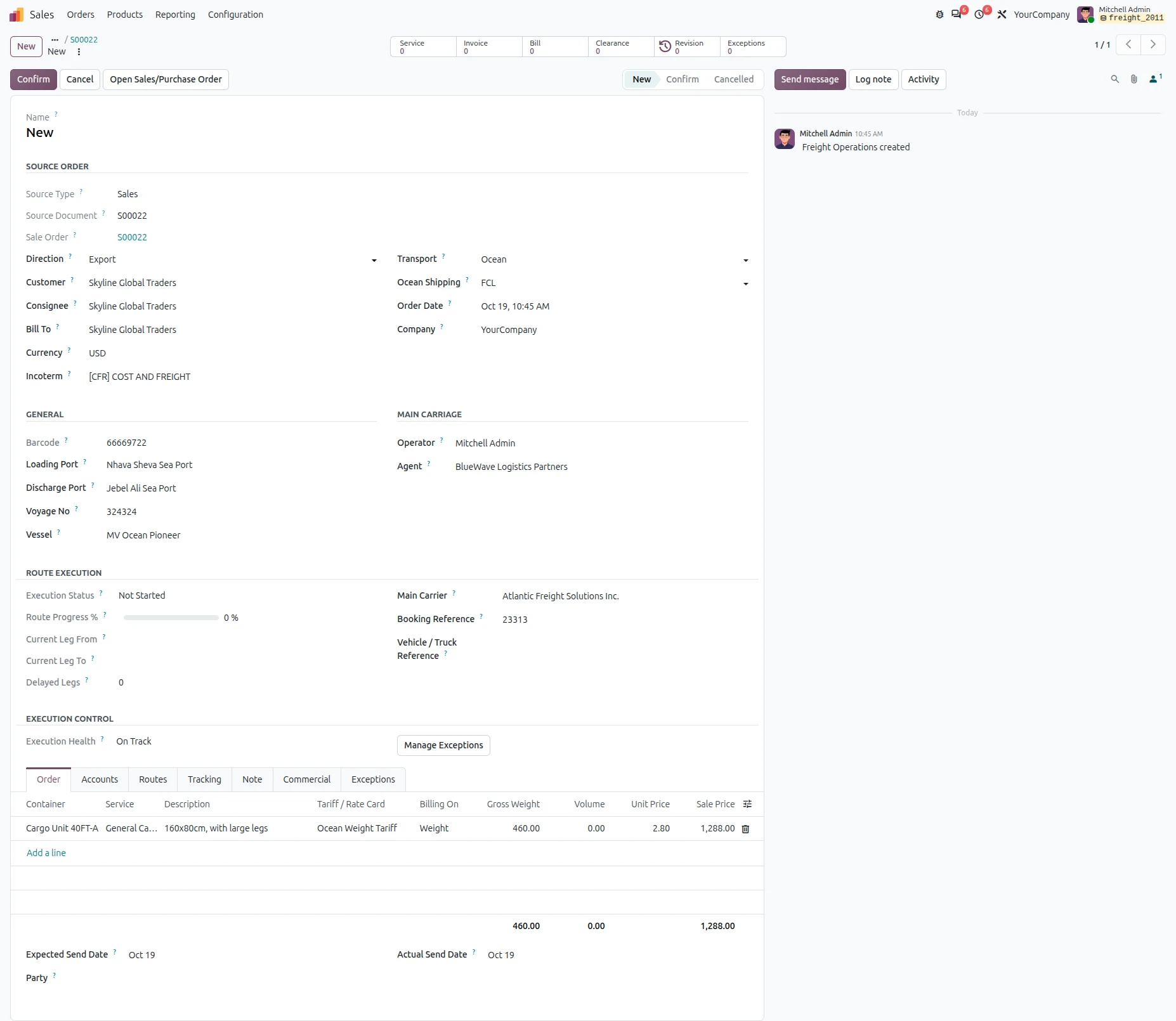
Menu path: Freights > Shipping > Direct Shipping > open shipment
4. Input and Monitor Shipping Routes
One or more shipping routes can relate to a shipment. These have origin and destination locations and a transport method. Estimated and actual durations can be input. Services can also be entered against a shipping route. Routes are in a sequence of Planned, Ready, Departed, In Transit, Arrived and Completed. The current part of a relevant shipment’s shipping route together with the overall route can then be analysed.
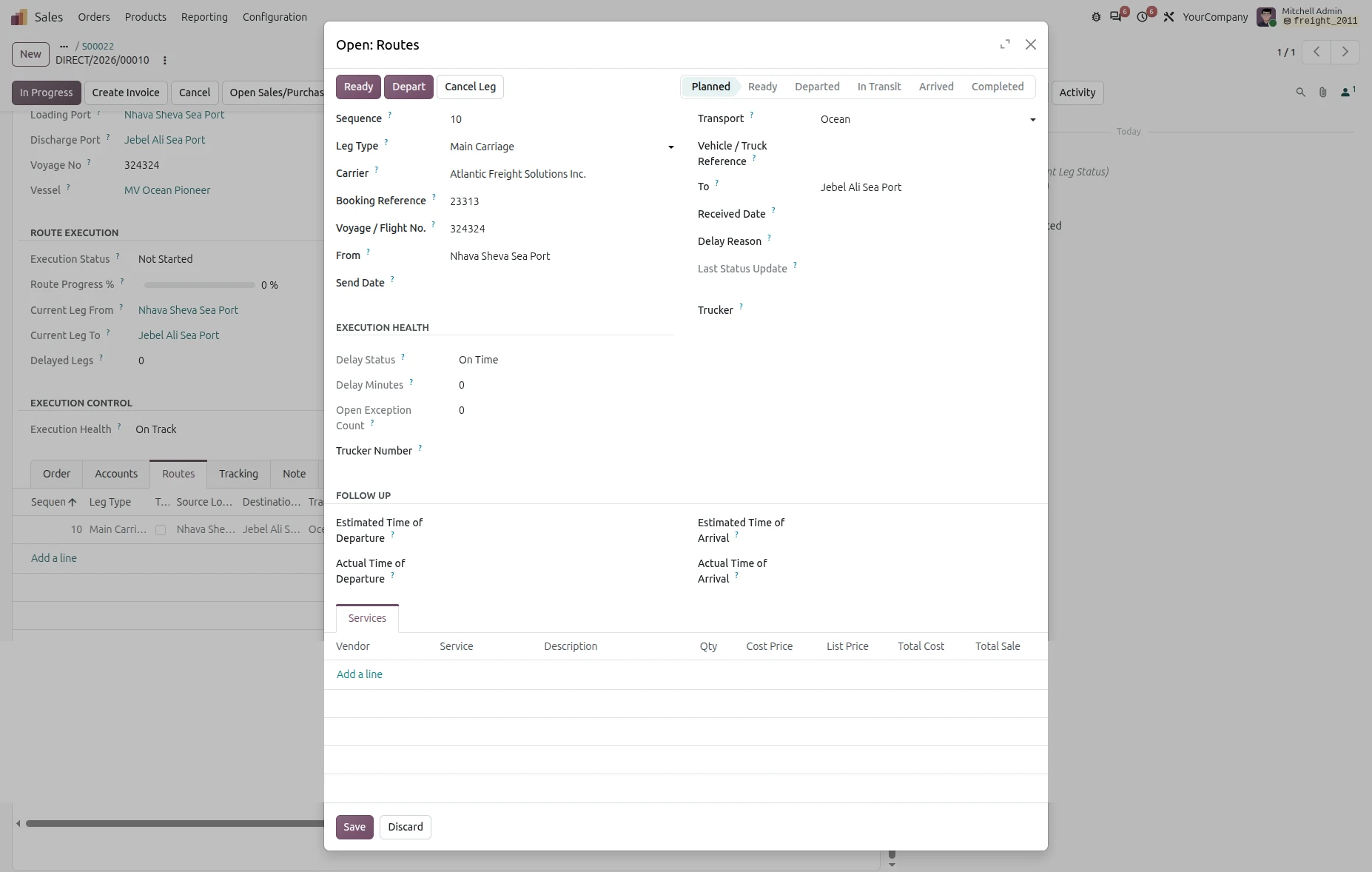
Menu path: Open shipment > Routes tab > open route
Automatic shipping tracking information is generated when a shipping route stage is altered.
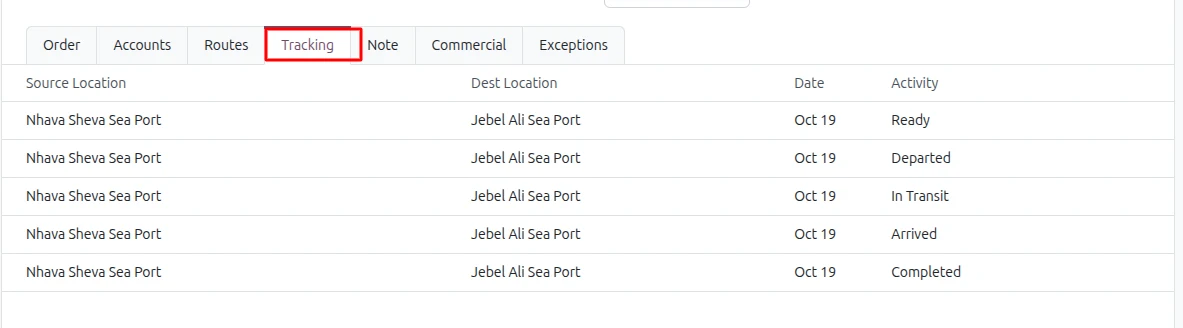
Menu path: Open shipment > Tracking tab
5. Detect and Manage Issues
The system routinely analyses shipment information. Sections of shipping routes which are due to be dispatched within 24 hours are labelled as At Risk. Sections where the actual arrival time is later than the estimated arrival time are highlighted as Delayed. Appropriate automatic issues are then generated for the delayed sections of active shipments.
Custom issues (such as those relating to customs, documentation, freight, space and/or suppliers) can also be detected. Each issue has a level of severity, an owner and a status. Prior to addressing an issue, a solution must be documented. Should there be an active high or critical issue, a shipment is shown as Blocked.
Menu path: Open shipment > Exceptions tab or Manage Exceptions
6. Manage Customs Clearance
Customs Clearance can be tailored for individual shipments and relevant documents can be attached. Post-shipment confirmation, an email containing relevant documents can be sent to an agent via the Outgoing Mail function. Reasons for alterations to clearance can be noted and a history of such changes can be maintained. Upon labelling a confirmed clearance as complete, a shipment status is updated to In Transit.
Menu path: Freights > Custom Activity > Custom Clearance
7. Input Services and Invoice/Bill
Services for example, handling and/or trucking can be inputted against a shipping route. Supplier, quantity, price and list price information can also be defined. Data is compiled in the Commercial tab. Here, cost, selling price and margins can be analysed.
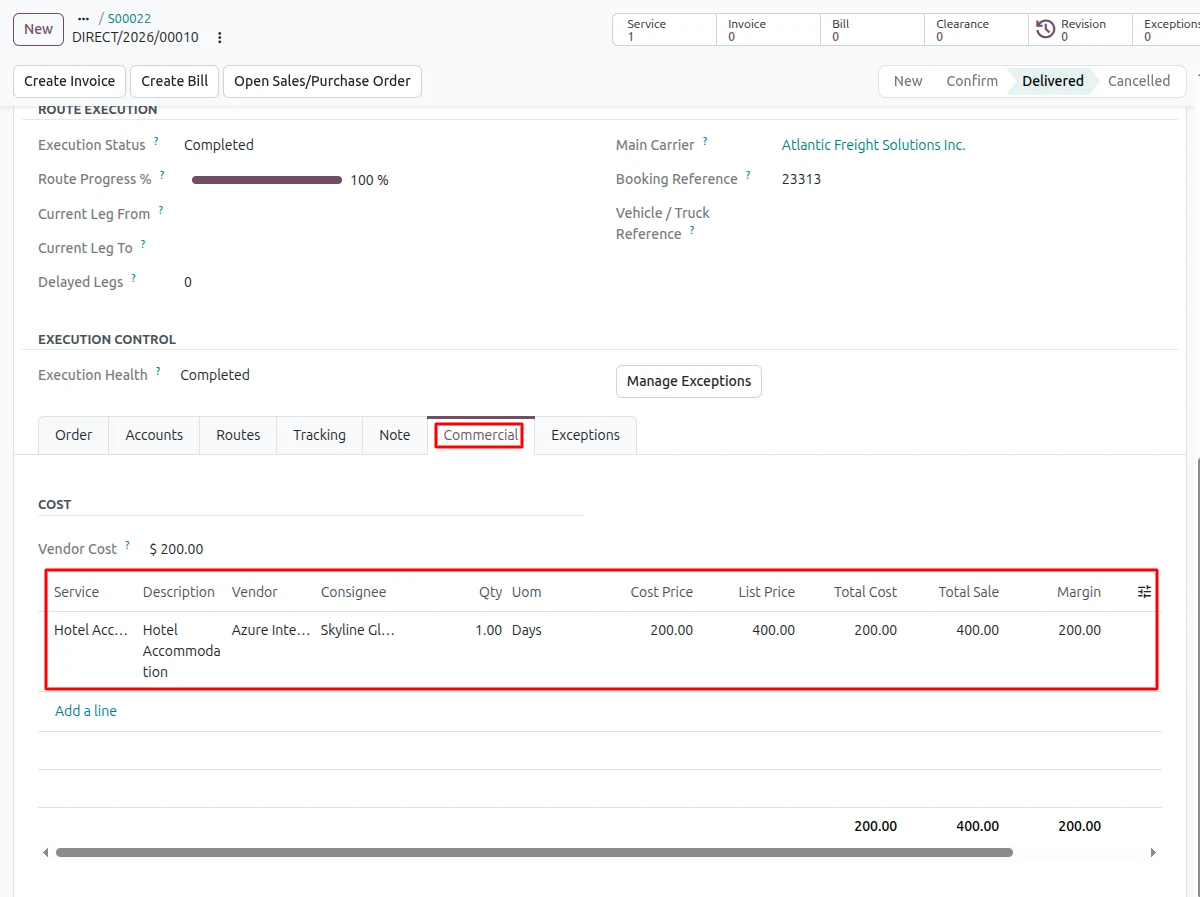
Menu path: Open shipment > Commercial tab
Customer invoices are generated using payable freight information from shipments. However, purchase order freight information is used for supplier billing. Furthermore, services which also have a supplier are added to supplier bills. Although selling prices for services can be analysed, these are not automatically shown on customer invoices.
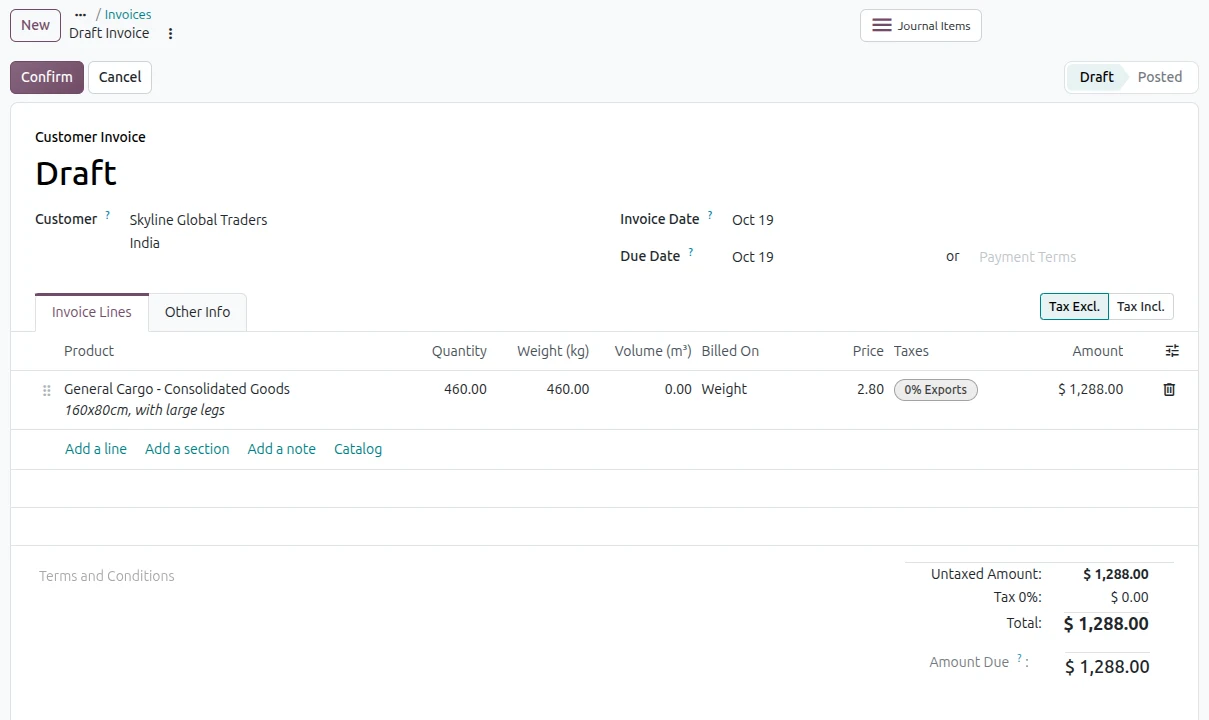
Menu path: Open shipment > Create Invoice
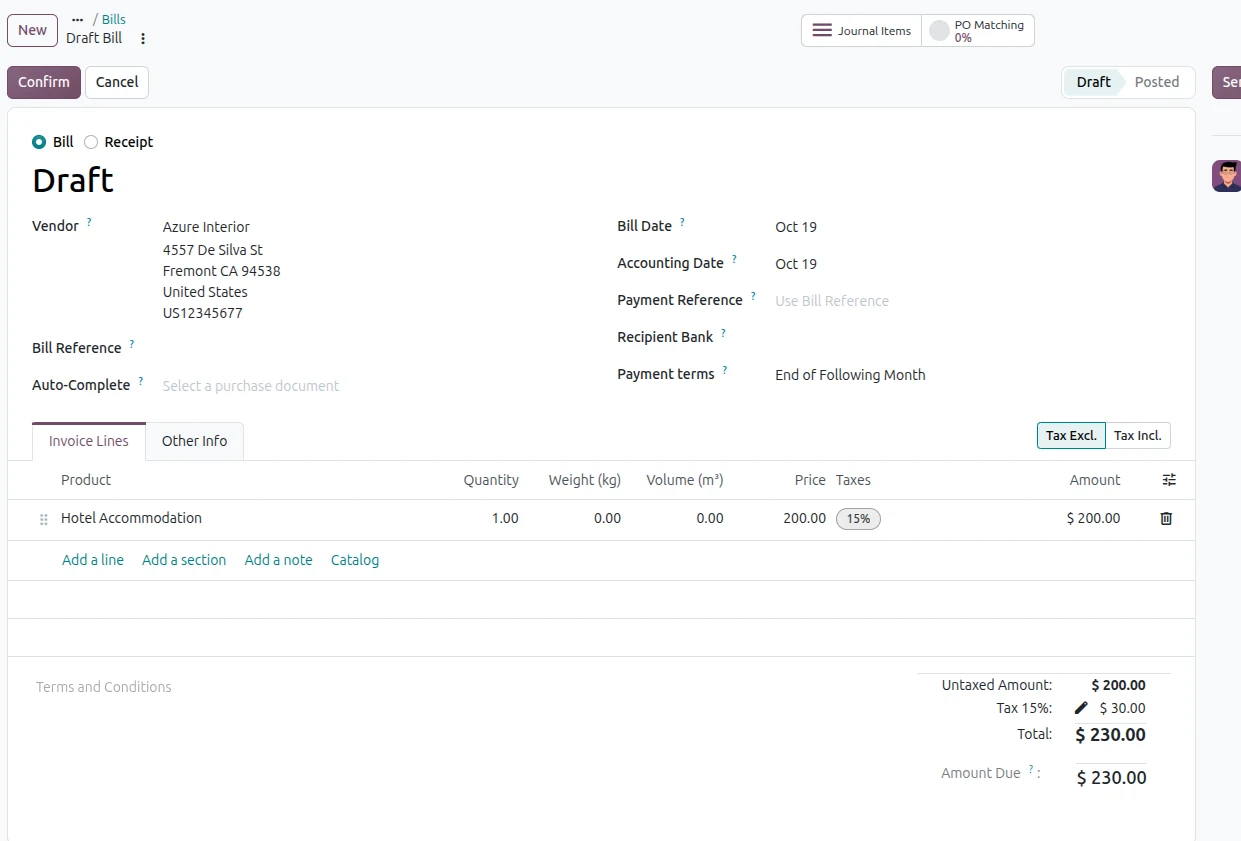
Menu path: Open shipment > Create Bill
Billing and expenditure information including expected and actual billing and money received, paid and outstanding can be analysed within the Accounts tab. The financial status of a shipment is also displayed here.
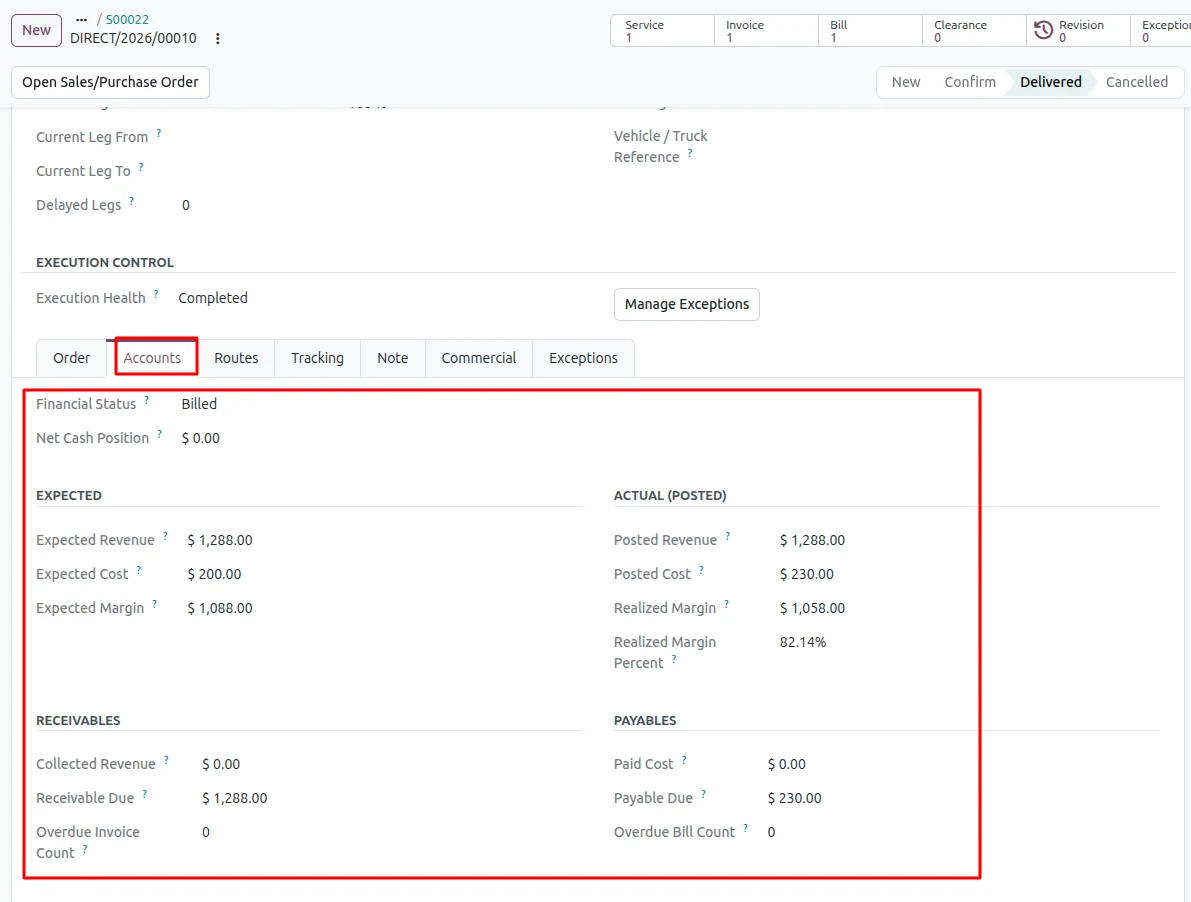
Menu path: Open shipment > Accounts tab
8. Link Houses to a Master
For every customer a house shipment can be generated and this can then be linked to a master shipment. Houses can also be directly generated from a master. Prior to confirming a shipment, houses must be related to a master. Masters must contain at least one house.
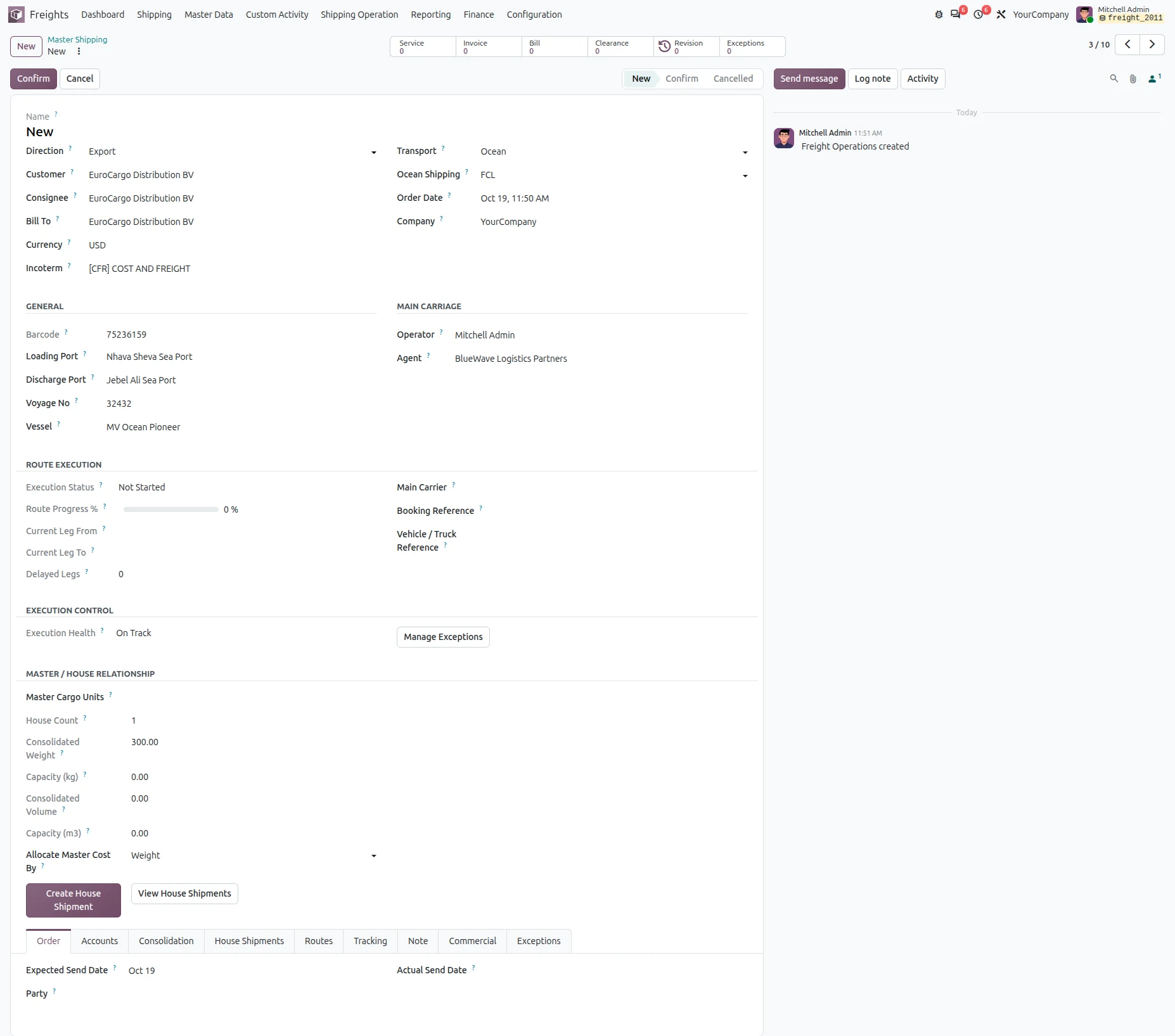
Menu path: Freights > Shipping > Master Shipping > open master
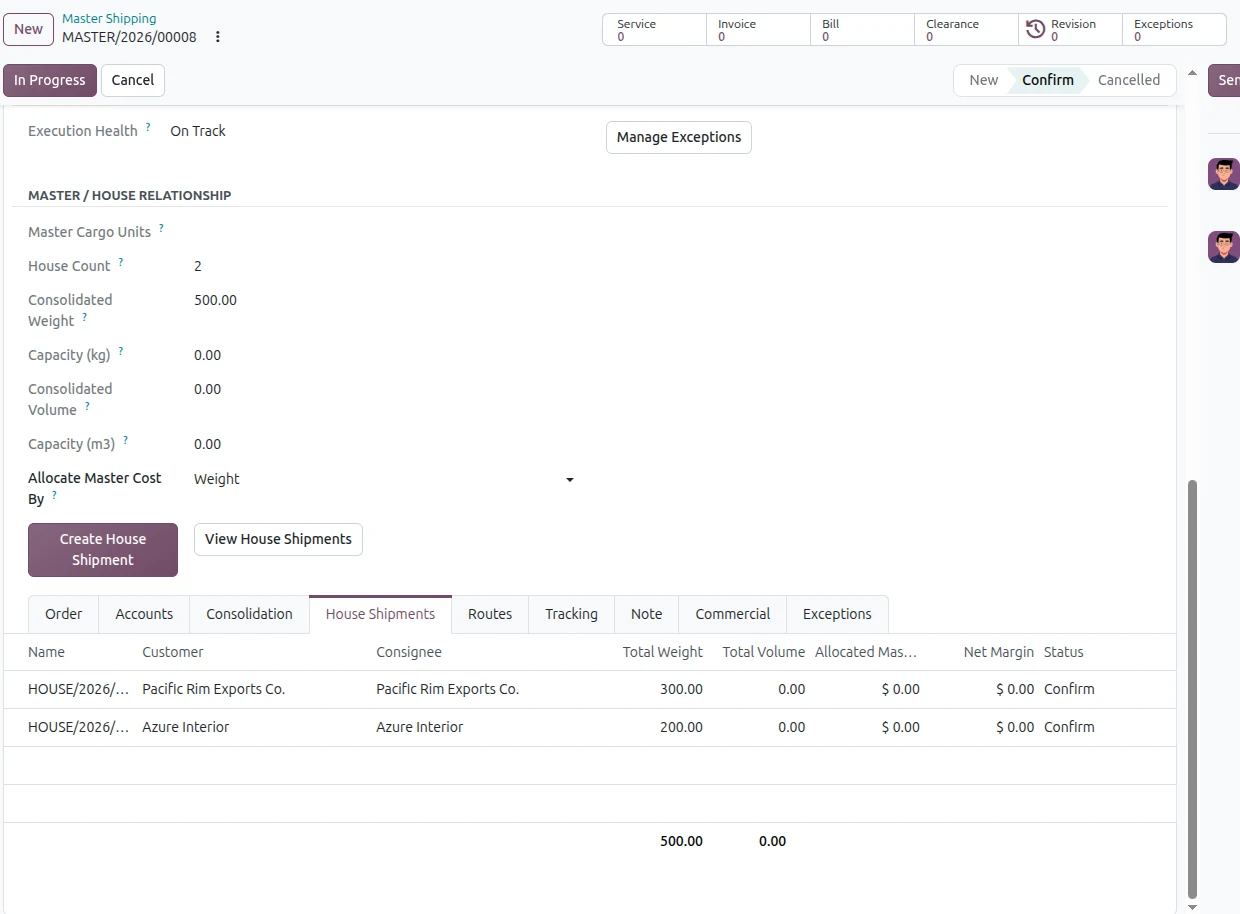
Menu path: Open master > House Shipments tab
Shipping routes and tracking are managed at master level. Appropriate houses share this information. Pending customs houses manage their own Customs Clearance.
Within the Consolidation tab, master expenditure, house revenue and the resulting margin from consolidation can be analysed. Master expenditure can then be distributed to houses by weight and/or volume.
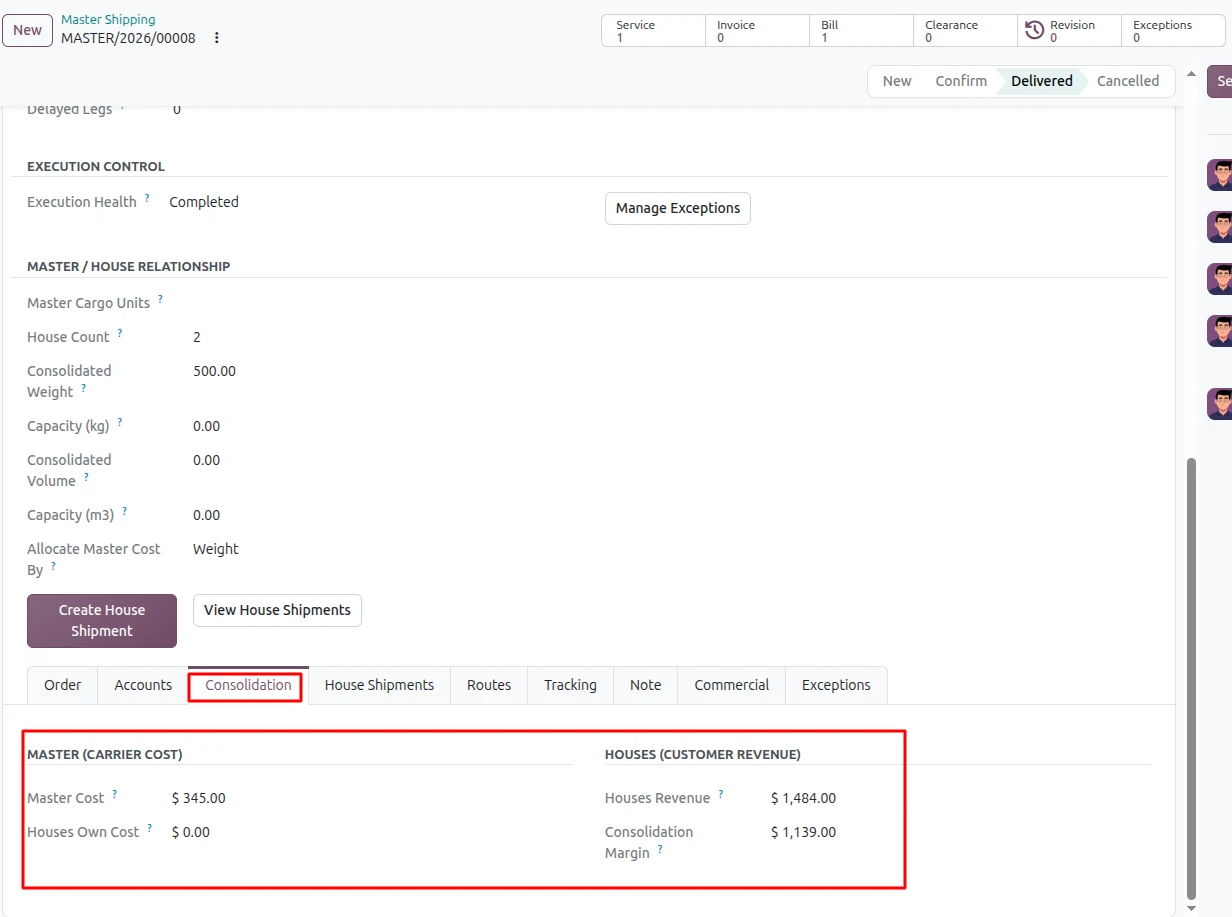
Menu path: Open master > Consolidation tab
9. Output Freight Information
Shipping Orders, House Bills (HBL / HAWB) and Master Bills can be outputted for Direct, House and Master Shipments respectively. The appropriate option can be selected depending on the shipment type. Invoice and bill payment confirmations can also be outputted.
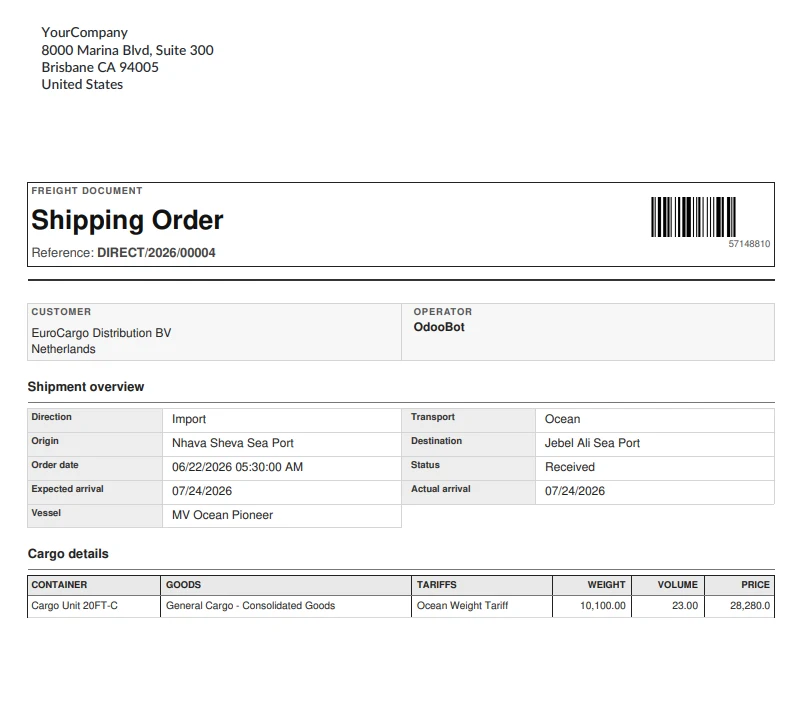
Menu path: Open direct shipment > Print > Shipping Order
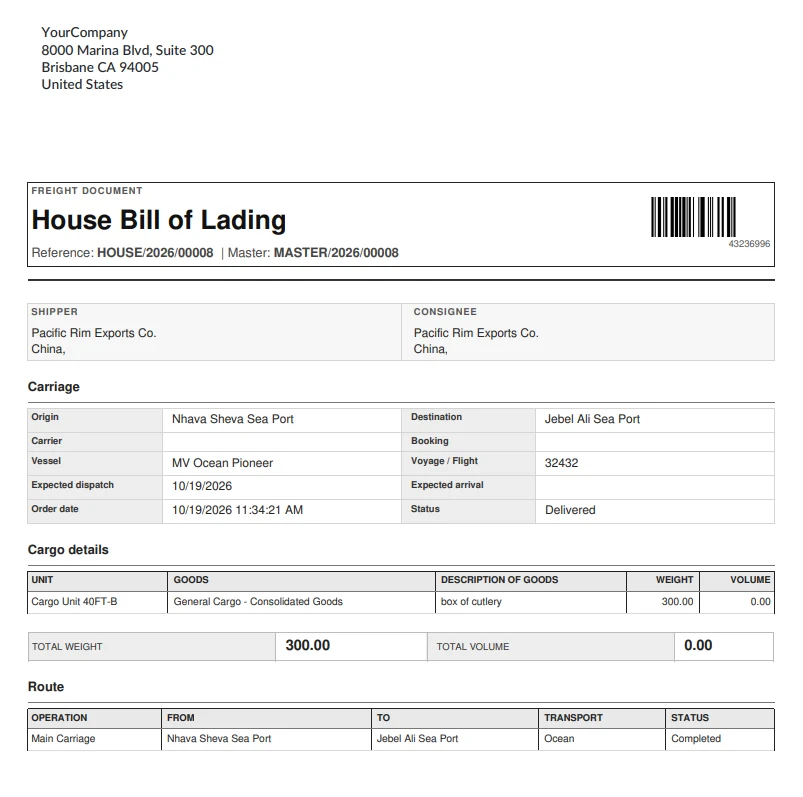
Menu path: Open house shipment > Print > House Bill (HBL / HAWB)
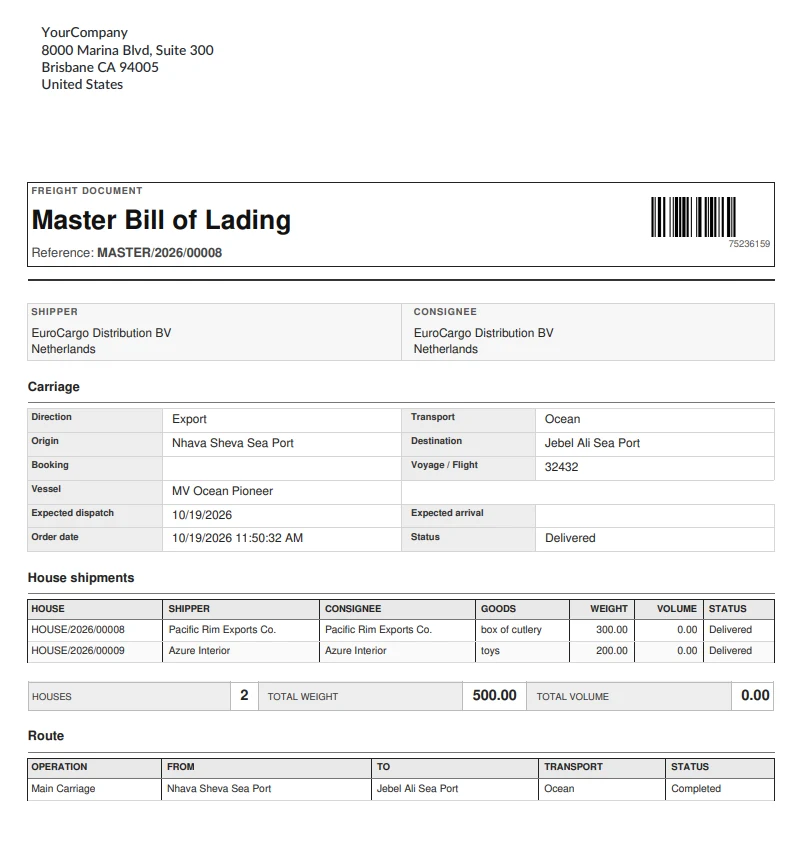
Menu path: Open master shipment > Print > Master Bill
10. Enable Web-based Shipment Tracking
Website users can analyse Track Order web pages without needing to log in. They input a shipment reference alongside a barcode or booking reference. The booking reference is especially useful as it prevents shipment references being easily guessed and so stops unauthorised individuals accessing shipment details. Unconfirmed and cancelled shipments are not displayed.
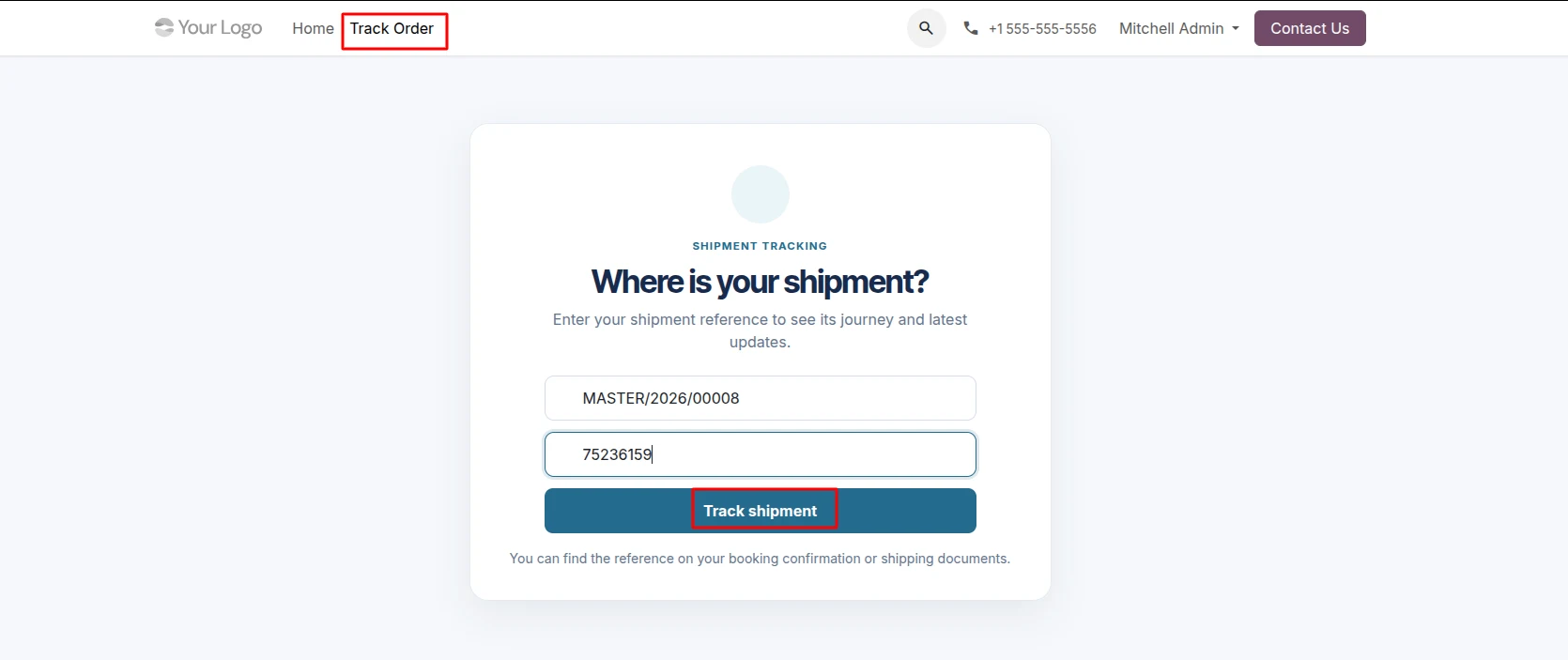
Menu path: Website > Track Order
Shipment status, shipping route progression, and route and tracking information can then be analysed.
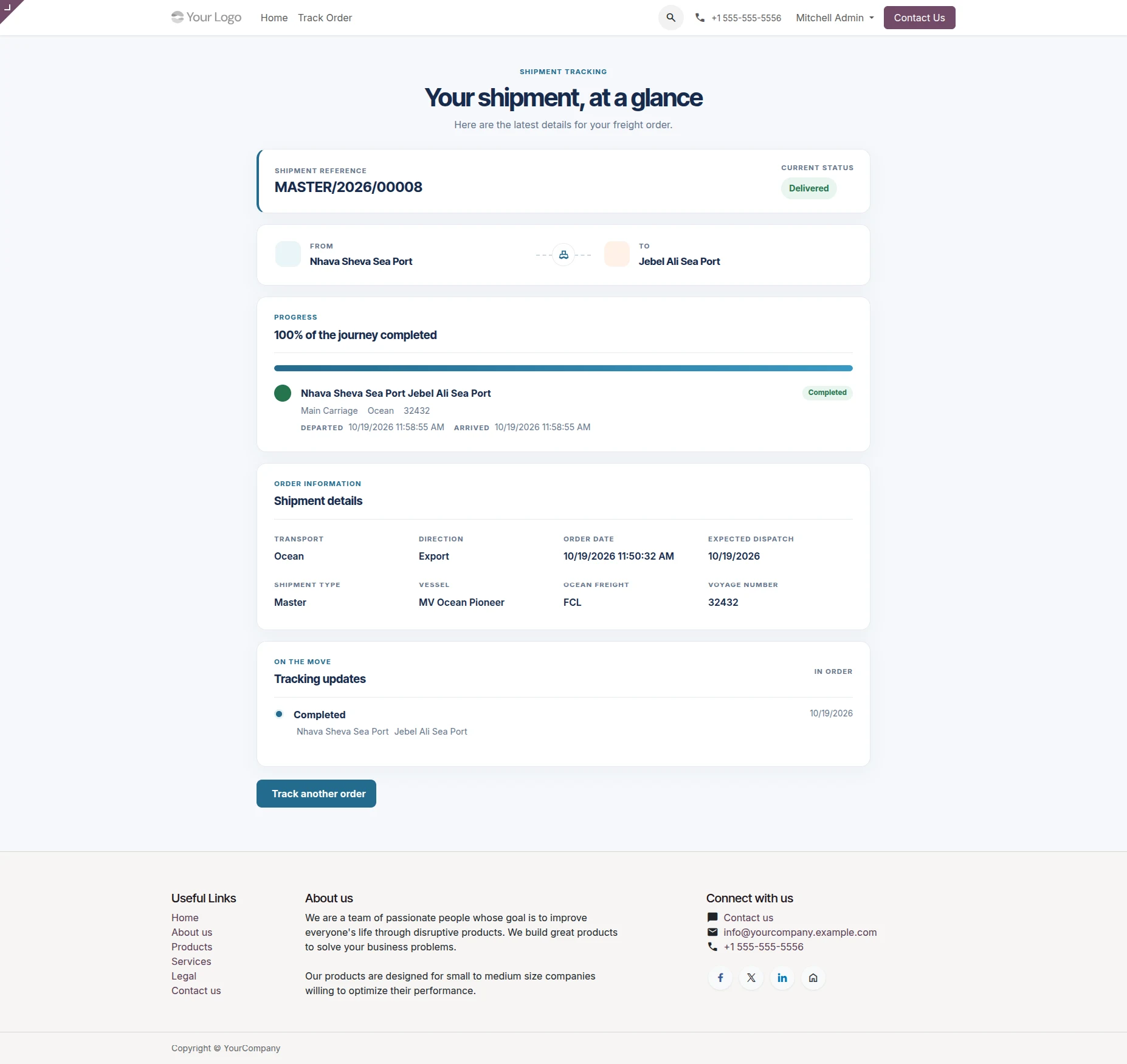
Menu path: Website > Track Order > Track shipment
11. Assess Business Performance via a Dashboard
Statistics are presented on shipment numbers, shipping, billing and expenditure together with margins. Charts illustrate transport methods, directions, statuses and key customers. Recent and delayed shipments are displayed. Analysis can be undertaken for specific dates and businesses.
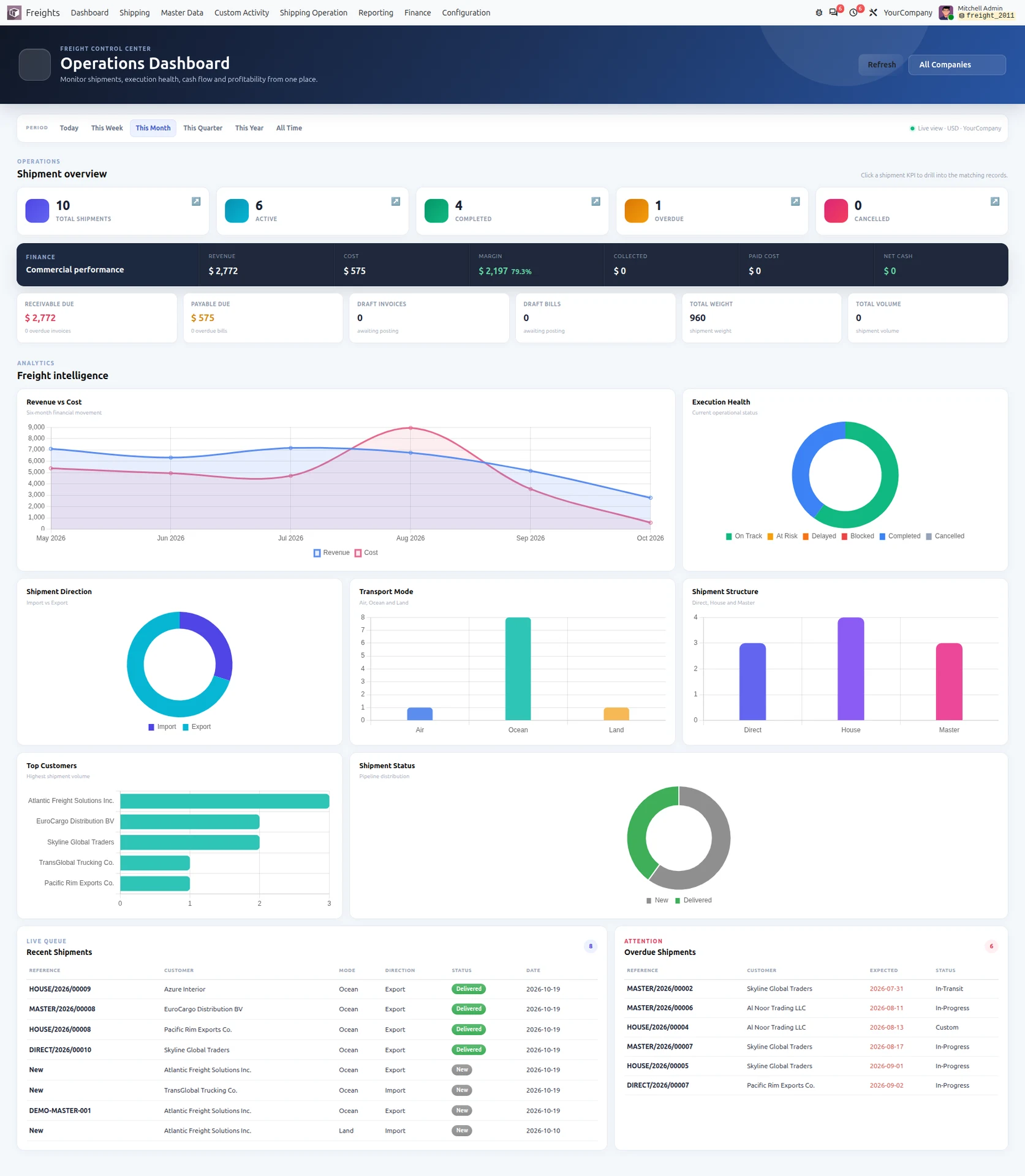
Menu path: Freights > Dashboard
Advantages of Utilising this Freight Management System
Functionality | Benefit |
Linkage to orders | Reduces the requirement to re-enter sales, purchase and freight information |
Shipping routes | Demonstrates where freight has been shipped |
Issue detection and management | Enables rapid identification and delegation of issues |
House/master linkage | Ensures that freight, supplier shipping charges and customer billing are appropriately related |
Linkage to invoicing and billing | Aids assessment of shipment margins |
Web-based tracking | Enables customers to independently track shipments |
FAQs
Air, sea and land transport can all be used. Sea freight can be transported as either Full Container Load (FCL) or Loose Container Load (LCL). Land freight can be transported as Full Truck Load (FTL) or Loose Truck Load (LTL).
Yes. Confirmed sales and/or purchase orders which have been recognised as freight orders generate shipments. Shipments can also be manually generated.
House shipments contain customer freight and billing information. Masters are made up of houses and look after shipping routes and charges.
No. Customers simply require a shipment reference and either a barcode or booking reference.
No. Third party apps cannot be installed on Odoo Online. Odoo.sh or on-premise installation should be used.
30 day bug solving support is available from the day of purchase. There is also an initial 3 hour free set-up support option. Support is available Monday to Saturday.
Conclusions
Precise and up-to-date information is essential for freight. Combining order, freight, shipping, customs and financial information enables staff to better comprehend the flow from booking through to billing for freight.
If you would like to understand how this could be utilised within your business
Please contact us for free consultancy advice.
What you will get
Freight Management setup
3 hours free set-up support
30 day bug solving support
Odoo logistics consulting
Contact us View on Odoo Apps Store